BuddyPress Menu Visibility Control by user roles, for example, in menu bar, support user role can find staff menu item, and customer can find download menu item… and so on, you can control menu visibility by user roles, each user roles can have their own menu items, so buddypress admin will not need make a long menu bar at the top of the buddypress site.
BuddyPress Menu Visibility Control by User Roles Demo
You can apply visibility controls to each menu items by user roles, for example, you can only allow customer user role to see download menu, subscriber & customer user role can see product menu… and so on, we make a few screenshots on our buddypress membership plugin site like screenshots below:
When users logged in as subscriber user role or customer user role, he will see the “My Account” menu item at the top bar, like this:
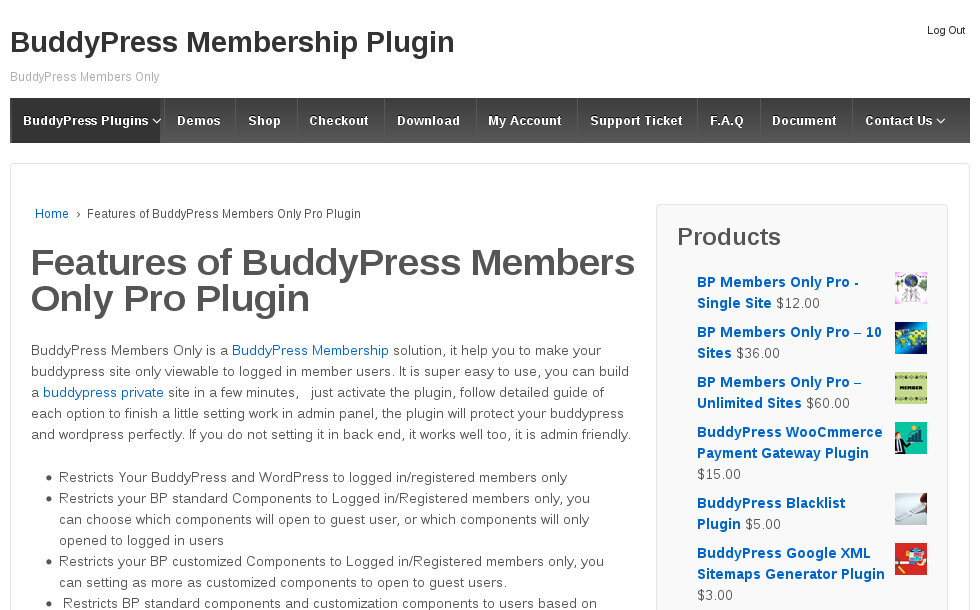
Subscriber or Customer User Role Menu Items
When guest non-member users role view our buddypress membership plugin site, in the top bar, he will not see the “My Account” menu item:

Guest User Role Menu Items
In front end, different user roles will have different menu item, based on your settings in back end, back end looks like this:
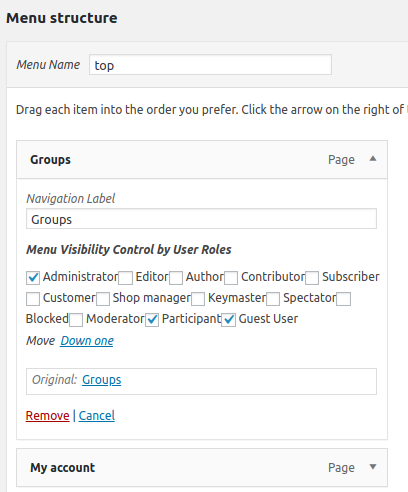
menu visibility in appearance menus panel
More “Buddypress Menu Visibility Control by User Roles” Features
You will find the “Menu Visibility Control by User Roles” Addon in buddypress members only addon menu item.
If you enabled “Menu Visibility Control by User Roles” Addon, you will a new buddypress members only menu “Menu Visibility Control”
In “Menu Visibility Control” panel, please checked “Yes, I will enable menu Visibility control by user roles” option and click submit and read our detailed description
If you checked this option, We will add a menu Visibility list option for each menu items at wordpress standard menus setting panel.
Then in “Menu structure” panel, if you click any menu item, you will find “Menu Visibility Control by User Roles” option, and we have listed all user roles in here
Please note, once you activated Menu Visibility Control addon, by default, all menu item in frontend will be hidden, you need setting “Menu Visibility Control by User Roles” option for each menu item