Hi dear BuddyPress membership users. I hope this message finds you well and that you’re enjoying wonderful days with your family. 😊
In recent times, we have received feedback from many new users. They have mentioned that after installing the BuddyPress Members Only Pro Plus plugin, they were able to maintain the privacy and security of their BuddyPress community by assigning different levels of access permissions to user roles. Additionally, by simultaneously installing the BuddyPress WooCommerce Payment Gateway plugin, paying members could access premium features, while free members had limited access. This provided an incentive for users to upgrade their membership.
However, these new users have mentioned that because the BuddyPress Members Only Pro Plus plugin offers numerous configuration options, it took some time for them to learn and set up all the options when they first started using it. They expressed the desire for a quick method—a one-click solution—to open all BuddyPress standard components to all user roles within BuddyPress while simultaneously preventing non-registered users from accessing BuddyPress content.
This is a great feature request, and our BuddyPress Members Only plugin developer has worked tirelessly to implement this function for BuddyPress webmasters as soon as possible. Now, you can use a single click to open BuddyPress standard components to all user roles in your BuddyPress / WordPress system. However, there is an exception for non-registered users, as they won’t be able to access these components. 😊
How to enable one-click access to BuddyPress standard components for all user roles in your BuddyPress:
- Login to your account on the BuddyPress Members Only site.
- Download the latest version of the BuddyPress Membership plugin (version >= 5.5.6).
- Login to your BuddyPress site as an admin, go to the WordPress dashboard, and click on the BP Members Only menu to open the “BuddyPress Members Only Settings” panel. It looks like this:
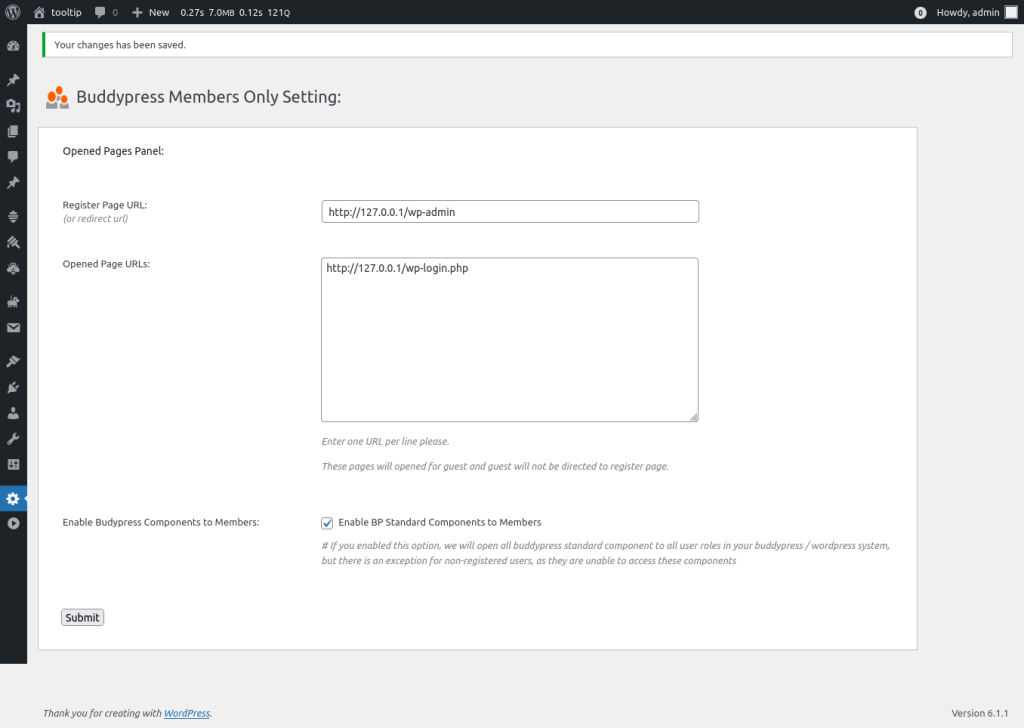
As you can see, in the “BuddyPress Members Only Settings” panel, we’ve added a new option: “Enable BuddyPress Components to Members.” If you check the checkbox for “Enable BuddyPress Components to Members” and click the submit button, you can now use a single click to open BuddyPress standard components to all user roles in your BuddyPress / WordPress system. However, please note that there is an exception for non-registered users, as they won’t be able to access these components. 🙂
Conclusion:
Also here are a few possibilities why you need one click to open buddypress standard components to all buddypress users.
User Onboarding: It can be used as a quick way to onboard new users or when transitioning from a private to a more public phase. By opening all components temporarily, it allows all users to explore the platform’s features without having to set individual permissions.
Promotion or Special Event: If there’s a special event, promotion, or time-limited campaign where you want to engage all users, you might open all components temporarily. This way, everyone can participate, and afterward, you can revert to more restricted settings.
Community Building: To encourage community building, some administrators might want to open up the platform temporarily to foster interaction among users.