Tag: Buddypress Plugin

Demos of Restricts BP Standard Components to Logged in/Registered Members Only

You can choose which components will open to guest user, or which components will only opened to logged in users.

I have setting our BP members only plugin to allow buddypress groups component / page open to non members users, you can check our group at here.

Also as a non member users, you will find the activity component is not opened, but once you logged in, you will find you can open / post on the page.

It is very easy to use this functionality, In admin area,  in “BP Components” option panel, you will find we have listed all buddypress standard buddypress components in a checkbox list, you can choose which components will open to guest user, or which components will only opened to logged in users, just a little mouse clicks, you can checked any buddypress standard components to open to non member users, and disallow non member users to touch other buddypress standard component,  when non member users try to open any pages related with protected buddypress standard components, they will be redirected to redirect page which you setting in admin area, for example,  you can setting non member users be redirect to your register page or your members payment page.
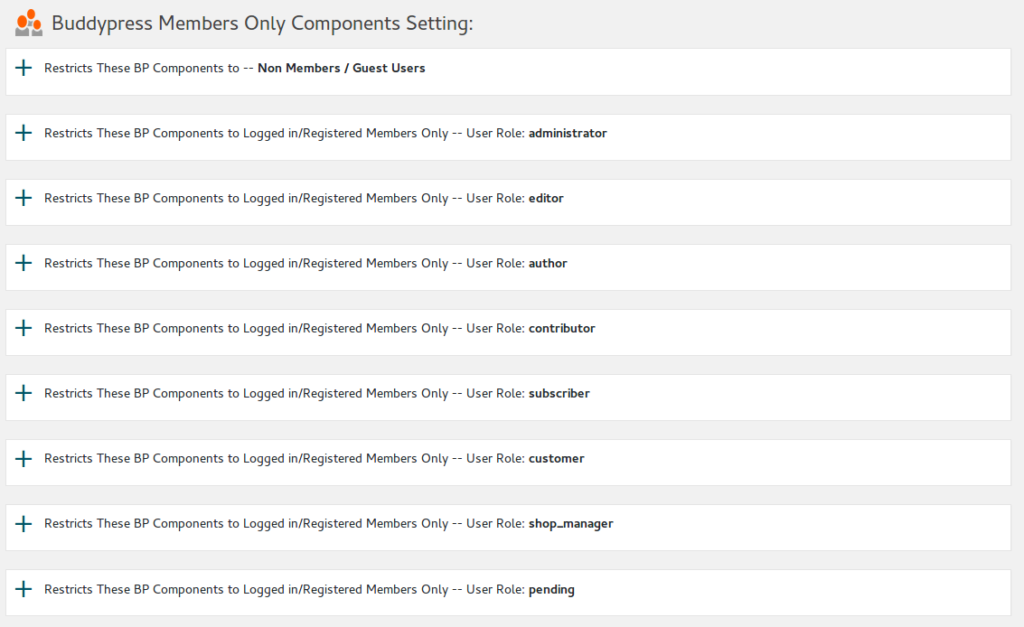
For example, you can open Buddypress Members Component / pages to non member users, but if they want to click members profile pages, they will be redirect your register page or payment page, or you can hidden your Buddypress Activity pages, so all of your buddypress activities can only be opened after they register and logged in your site.

Or you can open Buddypress Forums Component / Pages to non member users, but when non member users try to open pages related with Buddypress Groups Component, they will be redirected to the redirect page which you setting in admin area.. and so on, infinite possibilities.
Tagged with: , ,

Demo of restricts BuddyPress and WordPress to logged in members only

Only registered/logged in users can view your site, by default, non members can only open home page/login/register/lost password pages.
Logged in users have full access.

If a user who did not logged in your site, he can open home page, but when he try to view any other buddypress content, he will be redirected to optionally URL which can be setting in admin panel.

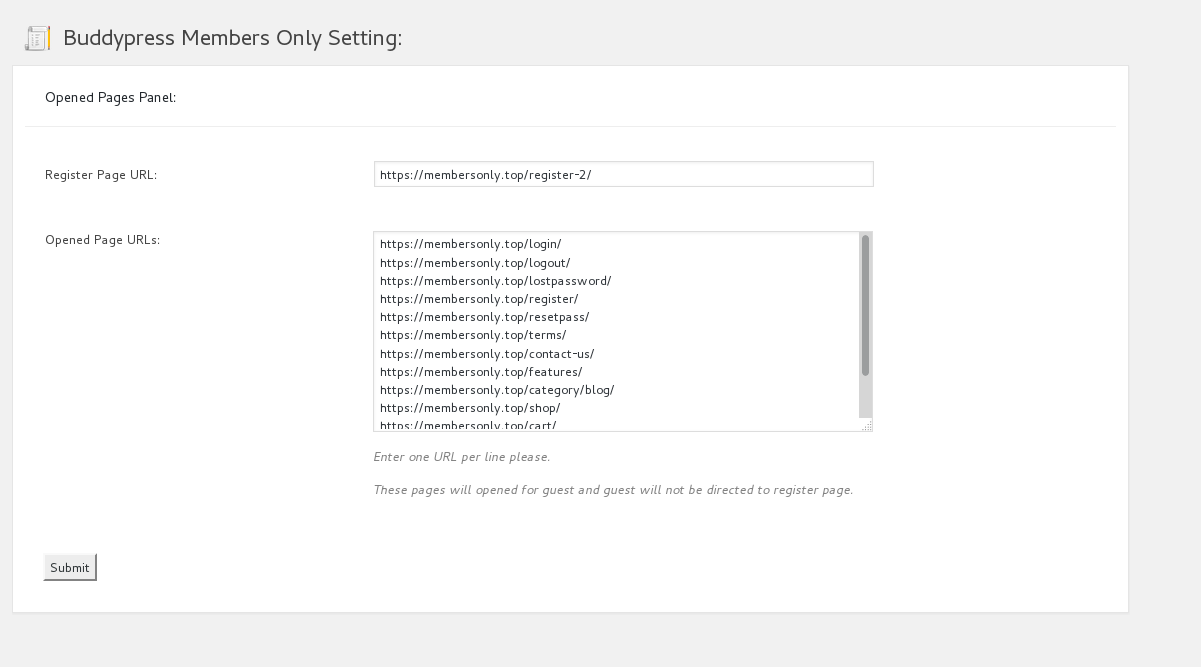
If you want more pages opened to non members users, you can enter page URLs in “Opened Page URLs” option, you can add any urls (enter one URL per line please) which opened to public, guest can view content of these opened post / pages / stores… and so on, when they view these opened pages, they will not be redirected to register page, else they will be redirect to your pages which you setting in admin area, for example, register page or store page or membership payment page… and so on.

In back end, you can do this very easy in opened pages panel, it looks like this:

membersonlyhomepage

For test the functionality, you can:

1: Click our “Members” page which has been setting as a members only page,  you will find you will be redirected to the register page.

2: Click our “Shop” page which has been setting as a opened page to any non member users, you will find you can open it directly and finish all payment process progress.

Have fun. 🙂


Update at 2019-04-20 by support: Demo of restricts BuddyPress and WordPress to logged in members only

Tagged with: , ,

Buddypress Members Only Pro Plugin 1.8.6 Released

Hi Dears,

We just released new version 1.8.6 of Buddypress Members Only Pro plugin,in this version, we support:

  • Restricts Your BuddyPress and WordPress to logged in/registered members only
  • Restricts your BP standard Components to Logged in/Registered members only, you can choose which components will open to guest user, or which components will only opened to logged in users
  • Restricts your BP customized Components to Logged in/Registered members only, you can setting as more as customized components to open to guest users.
  • Options to only protect your buddypress pages, so other section on your wordpress site will be open to the guest users.
  • Enable page level protect, when you edit a post, you can choose setting it as a members only page or not.
  • Supported https and websocket
  • If you disable buddypress, our plugins will detect it automatically and continue to protect your wordpress pages.
  • ……

In the current time, I am add more amazing functionality to help you build a more powerful and more easy-to-use bp social networking, for example in my To-Do list, a feature is multi membership levels, if you have more requirement, you are very welcome to request feature via contact us,  I hope I will publish the new version soon, thanks, enjoy. 🙂

Best Regards,
Tomas

Tagged with: , , , ,

Demo for page level protect

Our Buddypress members only pro plugin support page level protect.

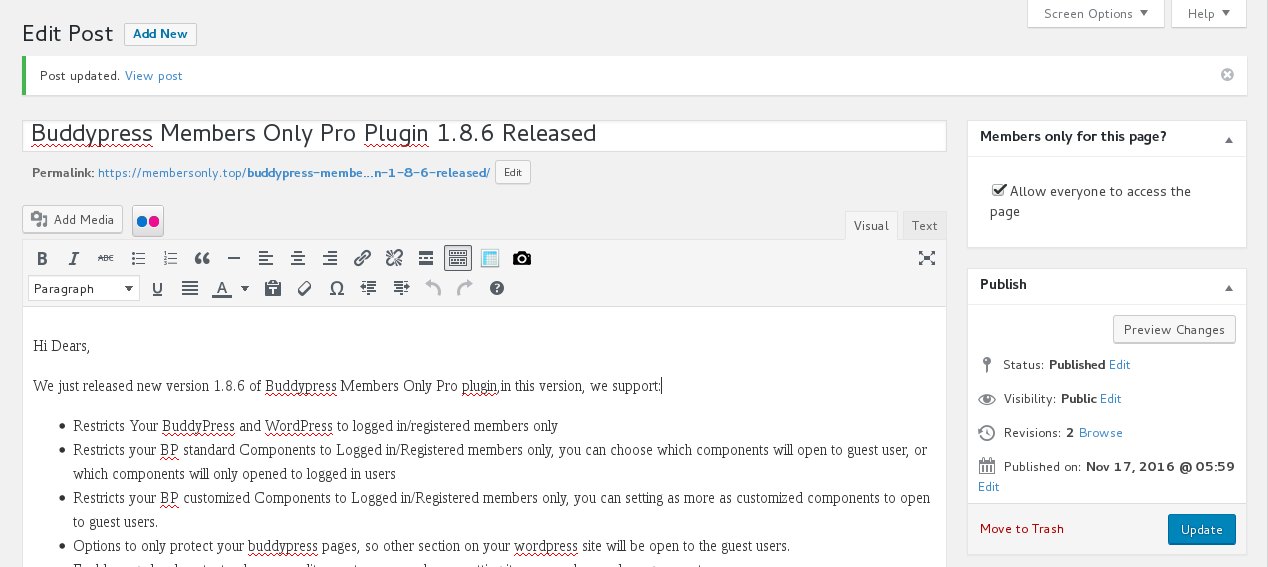
If you enabled page level protect option, when you edit page / post / product / video… and so on, you will find “Members only for this page?” meta box at the right top of the wordpress standard editor. If you checked “Allow everyone to access the page” checkbox in this meta box, the post will be opened to all guest users, by this way, you do not need enter page URLs to Opened Pages Panel always, it looks like this:

screenshot-of-members-only-page-protect


For have a direct impression, I published a opened for non member post at here, also a post which can only opened by logged in members at here, please click them to compare the efficiency of page level protect. 🙂

Tagged with: , ,
Top