Tag: Buddypress Plugin

New Option Restrict Email Domains to Reduce Spam Registrations, Create Targeted Community, Enhanced Security, Buddypress Members Only Pro Plus 5.7.6 Released

Introducing Domain Restrictions: Combat Spam, Foster Community, and Enhance Security in BuddyPress Members Only Pro Plus 5.7.6

Hi Dear BuddyPress Membership plugin users, I hope this message finds you are doing well and having happy days with your family ๐Ÿ™‚ Aย  BuddyPress user submitted a ticket, he mentioned:

We built a BuddyPress social networking platform aimed at creating a closed professional community focused on a specific industry, field, or occupation (such as healthcare industry experts). Our platform ensures that only professionals from that field are part of the community. We hope to restrict the email domains to those of certain companies or industry-specific addresses, allowing registration only with email domains from specific companies or industry-recognized email services.

Our buddypress members only plugin developer reviewed the ticket, we believe many buddypress users have similar requirements, so we would like to develop a new version to fulfill the feature request for BuddyPress membership users. ๐Ÿ™‚

Step-by-Step Guide to Restrict Email Domains for Enhanced BuddyPress Community Security

1 Access your account on the BuddyPress Members Only platform.

2 Obtain the most recent release of the BuddyPress Membership plugin (version 5.7.6 or higher).

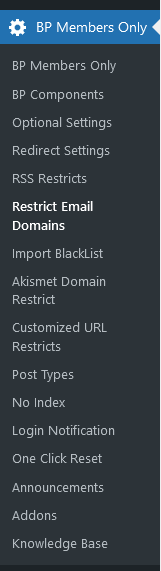
3 Access your BuddyPress site with your admin credentials, navigate to the WordPress dashboard, and select the BP Members Only menu to access the ‘BuddyPress Members Only Settings’ section.The menu looks like this:
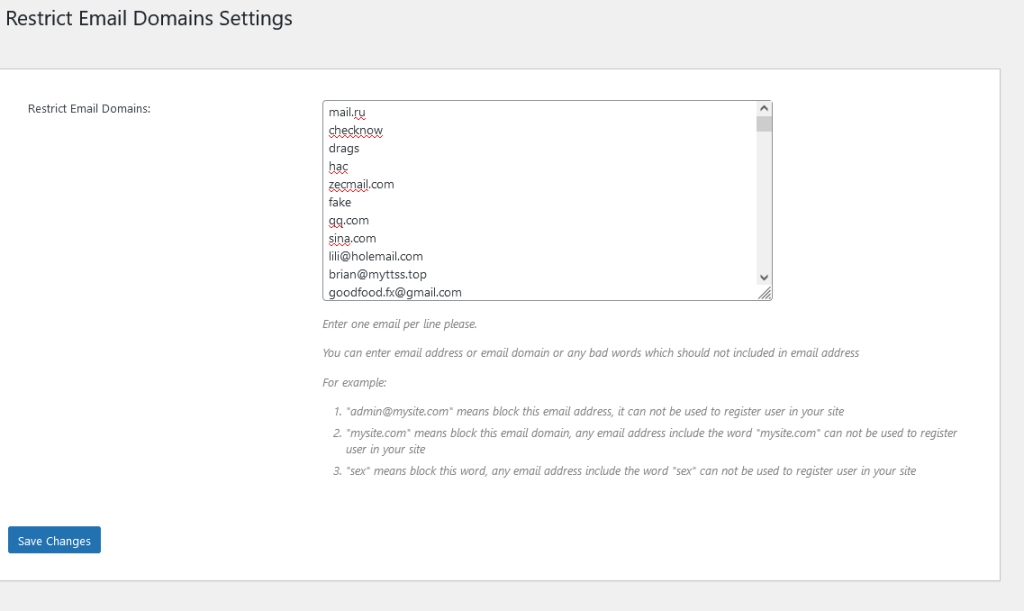
4 Next, click on the ‘Restrict Email’ sub-menu item to display the ‘Restrict Email Domains Settings’ panel, which appears as follows:
Restrict Email Domains Settings for buddypress 2024

Restrict Email Domains Settings for buddypress 2024

5 In the ‘Restrict Email Domains Settings’ panel, you have the ability to create an email blacklist using the ‘Restrict Email Domains’ option as follows:

#1 Input one email per line.

#2 You can specify either an email address, an email domain, or any inappropriate words that should be excluded from email addresses. For instance:

  • admin@mysite.com‘ will block this specific email address, preventing it from being used for user registration on your site.
  • ‘mysite.com’ will block this email domain, meaning any email address containing ‘mysite.com’ cannot be used for registration.
  • ‘sex’ will block this term, so any email address that includes the word ‘sex’ will be disallowed for user registration.

Consequently, when users attempt to register as members of your site, if their email address contains any blacklisted words, email addresses, or domains, they will receive an error message stating, ‘Sorry: Your email address is not allowed on this site,’ and will be unable to complete their registration:

Conclusion:

We believe many social network owners who use the BuddyPress plugin will need this function. Below are some types of social websites and scenarios where the ‘restrict email domains’ feature might be needed:

Internal Company Social Platforms

Purpose: These platforms are typically used for communication, collaboration, and information sharing among employees. If a company wants to ensure that only internal employees can register and use the platform, restricting email domains ensures that only company email addresses (e.g., @company.com) can be used for registration.
Example: A large companyโ€™s internal social network or knowledge-sharing platform (such as Slack, Microsoft Teams, etc.) that only allows login with company email addresses.
School or University Social Platforms

Purpose: A school or university may wish to create a social platform for students and faculty. By restricting registrations to email domains associated with the school (e.g., @university.edu), the platform ensures that only legitimate students and staff can join, avoiding external interference.
Example: A schoolโ€™s campus forum, social network, or learning platform that only allows registration with an email address from the schoolโ€™s domain.
Professional or Industry Platforms

Purpose: If a social platform operates on a membership basis with specific identity requirements (e.g., high-net-worth individuals, members of a particular organization), restricting email domains ensures that only people who meet the specific criteria can join.
Example: A social platform for high-end investors that only allows email addresses from financial institutions or investment companies to register.
Temporary/Event-based Social Websites

Purpose: For short-term events, conferences, or social gatherings organized by a company or organization, a dedicated platform may be created for participants to interact. Restricting email domains ensures that only attendees can join.
Example: A community for conference attendees or a temporary product launch-related social network that might be closed or deleted after the event.
Community Platforms (Restricted or Moderated)

Purpose: Some social platforms aim to create a more controlled community environment to prevent spam, fake accounts, or irrelevant users from joining. By restricting email domains, the platform can improve its quality and avoid misuse.
Example: A community dedicated to high-quality content and discussions that might only accept email addresses from well-known email providers (e.g., Gmail, Outlook) or specific groups.
Summary: This feature is generally used by social websites that need to “filter” users, control platform quality, or ensure specific identity verification. By restricting email domains, the platform can ensure that only people who meet certain criteria can register or log in, thereby improving security, social quality, and the professionalism of the user base.


Tagged with: , , , , , ,

BuddyPress Membership Plugin 4.8.6, New Option to Restrict BuddyPress Activity RSS

Hi, dear users of BuddyPress Membership Plugin, hope this message find you are doing well and have happy days with your family ๐Ÿ™‚ย  We got aย  ticket from an amazing user of buddypress members only plugin, in which she said she love our buddypress members only plugin, she is a psychotherapist who has helped many people recover their mental health, and our plug-in helps her protect the privacy of her clients and allows them to still feel free to share their recovery experiences, that’s great, she have a suggestion, she hope restricts rss feed of buddypress activity, in buddypress activity there are a lot of users private messages, she know our buddypress members only plugin have options to restrict buddypress activity component to non-member users, or just use buddypress members only plugin to set up which user roles can view buddypress activityย  pages or be restricted to buddypress activity pages, but she found the rss feed of buddypress activity is not protected yet, that means some users can get private messages from buddypress activity rss feed yet ๐Ÿ™‚

That’s a great suggestion, We didn’t notice that rss feed could leak information about the user’s buddypress activity, we carefully examined the buddypress code, fortunately, in the buddypress activity rss code module, we found an API, we developed a new option to allow or disallow the user to read the buddypress activity rss content ๐Ÿ™‚

It is very easy to allow or disallow the user to read the buddypress activity rss content:

1: Login wordpress dashboard as wordpress admin

2: Click “BP members only” memu item

3: Click “Rss restricts” sub menu item

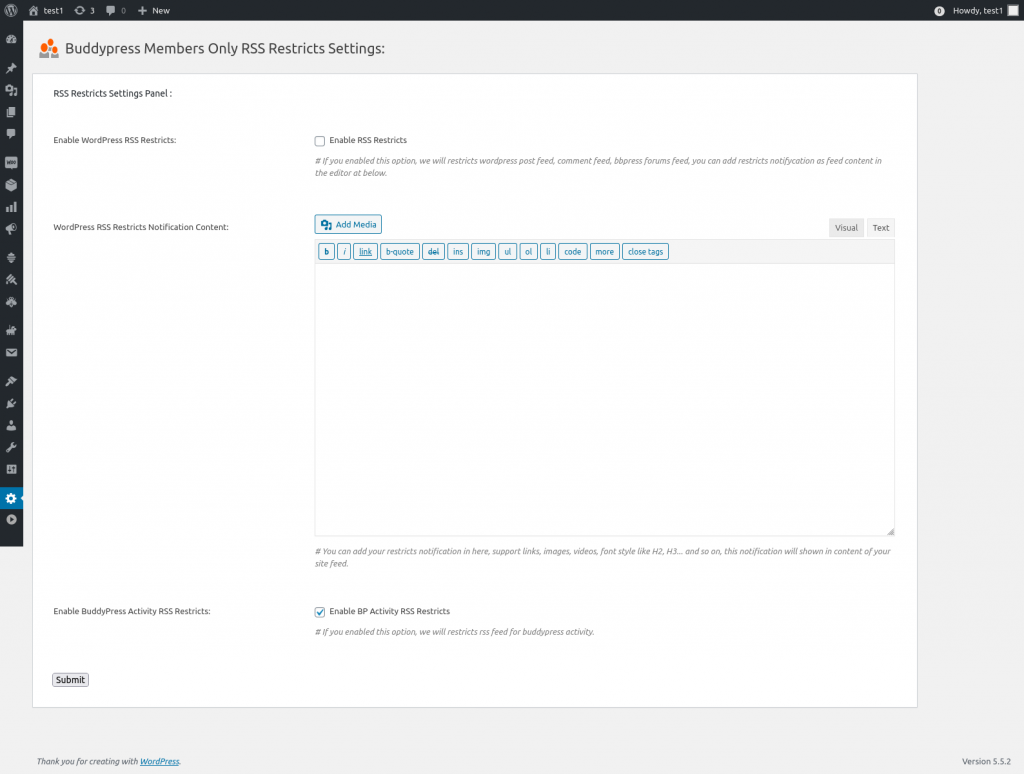
4: You will open “Buddypress Members Only RSS Restricts Settings” panel, it looks like this:

buddypress rss restriction

buddypress rss restriction

5: As you can see, in rss restricts panel, we added a new option: “Enable BuddyPress Activity RSS Restricts”, if you enable the option “Enable BuddyPress Activity RSS Restricts”, we will restricts rss feed of buddypress activity to users, when users open the rss feed of buddypress activity pages, there are nothing, by this way, we solved the problem of leak information from the user’s buddypress activity

If you want to enable rss feed of buddypress activityย  for users, just disable the option “Enable BuddyPress Activity RSS Restricts”, then users can read content of buddypress activity again ๐Ÿ™‚

Easy? ๐Ÿ™‚

Thanks for the great feedback of buddypress membership plugin, as developer of buddypress membership plugin, we are not always know all user’s requirement, it is you — users of buddypress membership plugin, give us many rate suggestions to let us know what is the real needs of buddypress private sites, if you have any feedback or suggestion of buddypress members only plugin, please don’t hesitate to tell us, we are very happy to improve functions of our buddypress membership plugin always ๐Ÿ™‚

Thanks, have a blessed weekend with your family ๐Ÿ™‚

Best Regards,

Buddypress membership plugin support


Tagged with: , , , , ,

Update:Search Form for BuddyPress Plugin Document

Hi Dear BuddyPress Membership Plugin Users,

Hope this message find you are doing well and enjoy weekend with your family! ๐Ÿ™‚

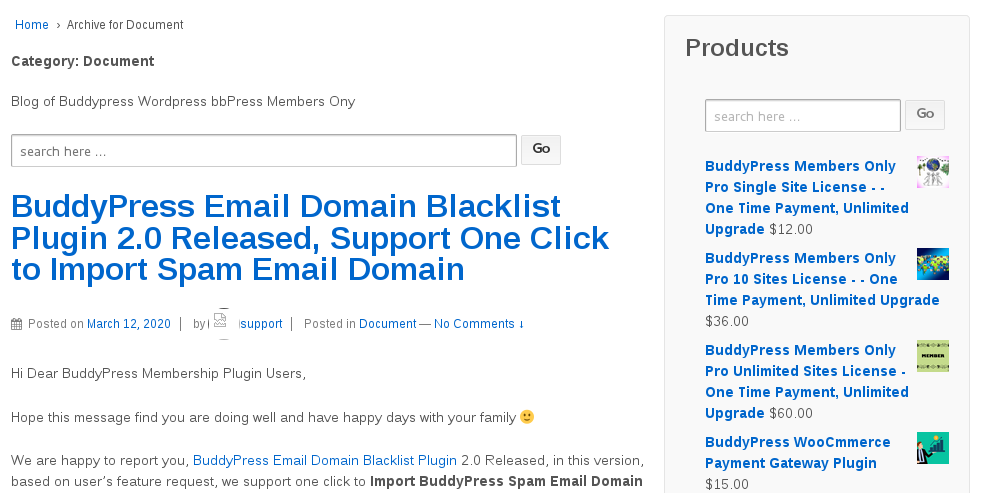
We get a buddypress membership plugin user’s ticket, in which the user told us, he had to view many pages in our buddypress membership plugin document category to learn how to setup buddypress membership plugin, he requested add a search form for buddypress membership plugin document, today we realized his requests, if you check our buddypress membership plugin document, you will find at the top of buddypress membership plugin document, we added a document search form, also in the sidebar, we added buddypress membership plugin document search form widget too, for help users search and get buddypress membership plugin document easier and faster, it looks like this:

buddypress membership document search form

buddypress membership document search form

You can enter any keyword in this buddypress membership document search form, and you will get all related knowledge base article in the search result page, hope this have a little help ๐Ÿ™‚

If you have any feature request of buddypress membership plugin or site, please contact us, we are happy to realize these functions for you always ๐Ÿ™‚

Thanks, have a blessed weekend with your family ๐Ÿ™‚

BuddyPress Membership Plugin Support Team

Tagged with: , ,

Update: BuddyPress Membership Plugin 4.4.6 Released and Uploaded

Hi Dear BuddyPress Membership User,

Hope this message find you are doing well and have happy days with your family ๐Ÿ™‚

We are happy to report you that we have released buddypress membership plugin 4.4.6, in this version, we fixed a php in_array warning problem, please upgrade to the latest version of buddypress memebrship plugin asap ๐Ÿ™‚

We are developing a new version of buddypress membership plugin, if you have any feature request of buddyrpess plugins, please don’t hesitate to tell us, we are happy to realize it for you ๐Ÿ™‚

Thanks, have a blessed day with your family ๐Ÿ™‚

BuddyPress Membership Plugin Support Team

Tagged with: , , ,

BuddyPress Membership Plugin 4.4.4, Added How to Use BuddyPress Membership Plugin Knowledge Base

Hi Dear BuddyPress Membership Plugin Users,

We just released buddypress membership plugin 4.4.4, in this version, based on users’ suggestion of buddypress membership plugin, we added How to Use BuddyPress Membership Plugin Knowledge Base menu item in back end.

Please:

1: Download buddyrpess membership plugin from your “my account” page in buddypress membership plugin site.

2: Login wordpress admin area

3: Deactivate old buddypress membership plugin in your wordpress PLUGIN panel

4: Delete old buddypress membership plugin

5: Upload the plugin zip file

6: Activate the new buddypress membership plugin

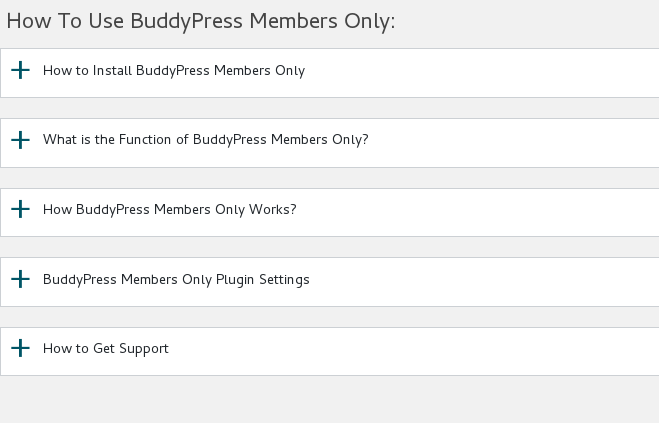
7: In “How To Use BuddyPress Members Only” panel, you will find how to use buddypress memebrship plugin knowledge base:

How to Install BuddyPress Members Only

What is the Function of BuddyPress Members Only

How BuddyPress Members Only Works?

BuddyPress Members Only Plugin Settings

How to Get Support From Our Official Site: membersonly.top

It looks like this:

buddypress membership plugin knowledge base

buddypress membership plugin knowledge base

Thanks for the give us the rare suggestions of buddypress membership plugin, if you have any more feature request about our buddypress plugin, please don’t hesitate to tell us, we are happy to realize it for you ๐Ÿ™‚

Thanks, have a blessed day with your family ๐Ÿ™‚

Best Regards,

BuddyPress Membership Plugin Support Team

Tagged with: , ,

BuddyPress Membership Plugin 4.3.2, Support Restricts Custom Post Types based on User Roles

Hi Dear BuddyPress Membership Plugin Users,

Based on buddypress memebrship plugin user suggestions, we have developed buddypress members only 4.3.2, changes in this version:

BuddyPress Membership Plugin Support Restricts Custom Post Types based on User Roles

A buddypress membership plugin user told us, he want to have ability yo restricts custom post types, and he hope he can one click to bulk open custom post types for some user roles, in buddypress membership 4.3.2, we realized this feature ๐Ÿ™‚

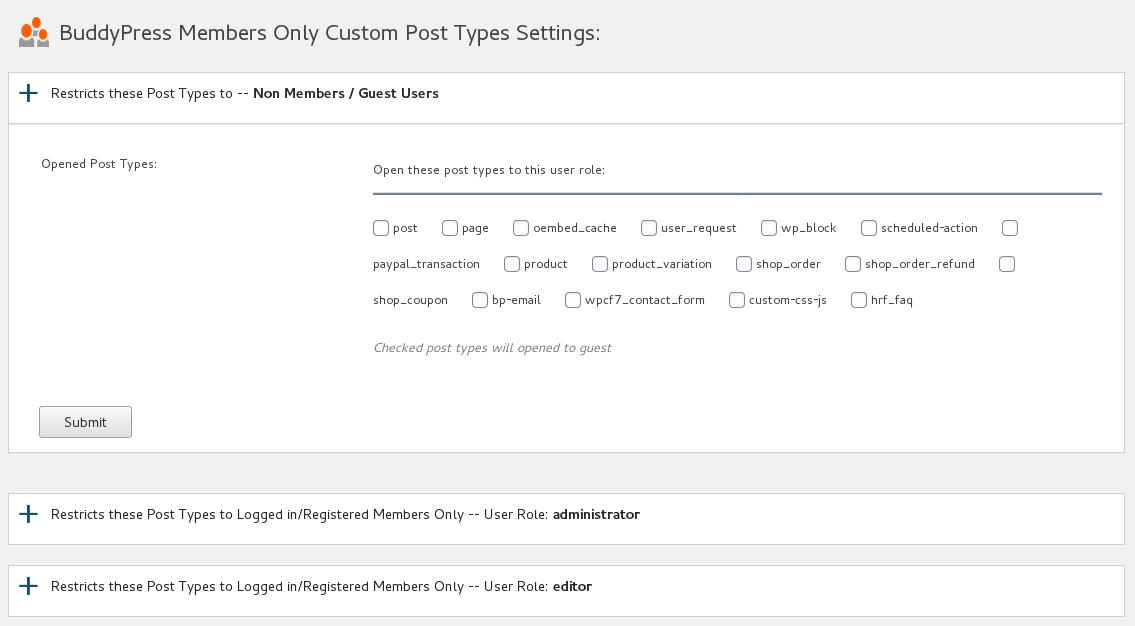
If you upgraded to buddypress membership plugin 4.3.2, in wordpress back end, you will find a new menu item “Post Types”, if you click the “Post Types” menu,ย  you will open “BuddyPress Members Only Custom Post Types Settings” panel,it looks like this:

BuddyPress Members Only Custom Post Types Settings

BuddyPress Members Only Custom Post Types Settings

You can see in the “BuddyPress Members Only Custom Post Types Settings” panel, we have have listed all user roles for you, if you click any user roles tab, you will open restricts Post Types option box for that user role, in which we have listed all custom post type in your wordpress site for you, you can just select custom post types and click submit button, in front end, selected specific custom post types will open / hideย  for specific user role.

Thanks for this amazing suggestions, it is a great help for help users restricts custom post types for specific user roles quickly, if you have any more amazing feature request of buddypress membership plugin, please don’t hesitate to tell us, we are happy to realize it for you ๐Ÿ™‚

Thanks, have a blessed day with your family ๐Ÿ™‚

Best Regards,

BuddyPress Membership Plugin Support

Tagged with: , ,

BuddyPress Search Plugin Features(Free!)

buddypress search plugin

Buddypress Search is a fast and light AngularJS members search plugin, when typing members name, show user list instantly in drop-down list, no need refresh member page

== Description ==

BP Search is a fast and light buddypress member search plugin to help users search buddypress members more faster, users do not need click submit button to refresh the BP members page.
When users type buddypress members name, we will show related members instantly in a drop-down member list, the plugin drived by AngularJS.

Why I develop this BuddyPress Search plugin?

I designed a few large buddypress sites, some of them have complex functionality in buddypress member page, for example distance, online status, user videos, matching and sorting… and so on.

This means when users search buddypress members in “Search Members” search box in members page — yourdomain.com/members, after click the “Search” button in “Search Members” search box,
We need refresh the members page and users need waiting a few seconds and all functionliaty in members page will it wastes server resources.

So I re-developed the buddypress member search box to offer a fast search result.

When users search members, once he typed one character, we start to show related members with user links instantly in a drop-down box, this running fast and users do not need to refresh the member page.

Of course, users still can click search submit button to the get member lists in a search result page, if they want. All of your buddypress search functionality did not be changed, I just inject new functionality into buddypress default members search box via AngularJS.

More amazing features are being developed and any feature request is welcome.

== Installation ==

1:Upload the BuddyPress Search plugin to your blog
2:Activate it
3: Check members search function in your members search box, for example http://yourdomain.com/members
1, 2, 3: You’re done!

== Changelog ==
= Version 1.1 =
Support newest version of buddypress plugin

= Version 1.0 =
* Spell out that the license is GPLv3
* Finished the first version
* General code clean up

Tagged with: , ,

BuddyPress Google XML Sitemaps Generator Plugin 1.1.0 Released

Hi There,

Dear BuddyPress google XML sitemaps generator plugin users, we are happy to report you that we auditing source codes of BuddyPress google XML sitemaps generator plugin, and we are following wordpress security to enhance security of buddypress google xml sitemap generator plugin ๐Ÿ™‚

BuddyPress google XML sitemaps generator plugin is written for search engines like google, bing… and so on, it will help search engines index your buddypress activity, comments… and so on more faster and more easier, so it is helpful to help search engines improve your buddypress siteโ€™s SEO rank ๐Ÿ™‚

BuddyPress google XML sitemaps generator plugin will hold all works on backend automatically, once user publish an buddypress activity or comments on your site, BuddyPress google XML sitemaps generator plugin will add it into buddypress XML sitemap automatically, you do not need to do anything. ๐Ÿ™‚

It is is very easy to use BuddyPress google XML sitemaps generator plugin, actually what you need to do is just uploade and activate BuddyPress google XML sitemaps generator plugin, then all works done automatically ๐Ÿ™‚

Good news? Yes, a better user is, first 100 users will get a bounce quote — $3.00, timed ๐Ÿ™‚

If you have any feature request or question about BuddyPress google XML sitemaps generator plugin, please don’t hesitate to tell us! ๐Ÿ™‚

Thanks, have a blessed day with your family ๐Ÿ™‚

BuddyPress google XML sitemaps generator plugin Support Team

Tagged with: , ,

Buddypress Membership Plugin 3.9.0, Added new “BuddyPress Menu Visibility Control by User Roles” Addon

Hi Dears,

Based on feature requests from dear buddypress membership users, we have developed a new buddypress members only 3.9.0 version, in this version:

Added “BuddyPress Menu Visibility Control by User Roles” Addon

A few users submitted a few feature requests, in which they hope hide their buddypress menus to guest users, and another users said he hope different user roles will find different menus in the same menu bar, because their have a few kinds of user type, for example, they hope support can find staff menu item and customer can find download menu item… and so on, based on their user roles, they will see related menu items, so buddypress admin will not need make a long menu bar at the top of the buddypress site ๐Ÿ™‚

Based on these amazing feature requests, we are happy to report you that we have realize it in buddypress members only 3.9.0, if you upgrade to buddypress membership plugin 3.9.0:

You will find the “Menu Visibility Control by User Roles” Addon in buddypress members only addon menu item.

If you enabled “Menu Visibility Control by User Roles” Addon, you will a new buddypress members only menu “Menu Visibility Control”

In “Menu Visibility Control” panel, please checked “Yes, I will enable menu Visibility control by user roles” option and click submit and read our detailed description

If you checked this option, We will add a menu Visibility list option for each menu items at wordpress standard menus setting panel.

Then in “Menu structure” panel, if you click any menu item, you will find “Menu Visibility Control by User Roles” option, and we have listed all user roles in here

You can apply visibility controls to each menu items by user roles, for example, you can only allow customer user role to see download menu, subscriber & customer user role can see product menu… and so on, we make a few screenshots on our test sites:

You can find in screenshot #1, guest non-member users role can only see a few menus

guest non-member users role can only see a few menus

guest non-member users role can only see a few menus

And in screenshot #2, subscriber user role can see more menus

subscriber user role can see more menus

subscriber user role can see more menus

In front end, different user roles will have different menu item, based on your settings in back end, back end looks like this:

menu visibility in appearance menus panel

menu visibility in appearance menus panel


Please note, once you activated Menu Visibility Control addon, by default, all menu item in frontend will be hidden, you need setting “Menu Visibility Control by User Roles” option for each menu item

If you have any more amazing buddypress feature requests, please don’t hesitate to tell us ๐Ÿ™‚

Thanks, have a blessed day with your family ๐Ÿ™‚

Best Regards,

BuddyPress Memebership Support Team


Tagged with: , , , , ,

BuddyPress Google XML Sitemaps Generator Plugin Features

What is BuddyPress Google XML Sitemaps Generator Plugin and how Increase Buddypress SEO?

A buddypress user told us he can not find aย BuddyPress Sitemap plugin, he have a large buddypress social networking site, a lot of users registered in his buddypress site everyday and post many activity in his site, he want a buddypress sitemap file which can be updated once a buddypress activityย  be published or once a comment be posted in any buddypress activity,ย  to improve buddypress SEO and help google find his members and user-generated content more easier,ย  now the answer is here, BuddyPress Google XML Sitemaps Generator plugin will generate google xml sitemap for your buddypress community site,ย  include all buddypress members URL and all buddypress activities, and all comments URL on buddypress activities.

How BuddyPress Google XML Sitemaps Generator Plugin Works?

Our buddypress sitemap plugin will generate google xml sitemap for you automatically, once buddypress users create new buddypress activity, or once buddypress users commented any buddypress activity, or once buddypress users update / delete their buddypress activity or buddypress comment in your buddypress site, we will generate a google xml site map for you automatically.

Where can I find BuddyPress Google XML Sitemap File?

BuddyPress Google XML Sitemaps Generator will generate โ€œsitemap.xmlโ€ in your site root folder, google can find these sitemap quickly.

How to Manage BuddyPress Google XML Sitemaps Generator Plugin?

BuddyPress Google XML Sitemaps Generator will help you to improve your buddypress SEO automatically, what you need to do is just install and activate it, no anything more need you do to manually.

How to Install BuddyPress Google XML Sitemaps Generator Plugin?

1. Download the plugin from https://membersonly.top/

2. Unzip the plugin BuddyPress Google XML Sitemaps Generator and upload the plugin folder โ€œbuddypress-sitemapโ€ to your site wp-content/plugins folder

3. Activate the plugin โ€œBuddyPress Sitemapโ€

4. Try to update any one of your wordpress post or update any buddypress activity or comment in your buddypress activities, you will find โ€œsitemap.xmlโ€ in your site root folder

Thatโ€™s all

License and Terms of BuddyPress Google XML Sitemaps Generator Plugin?

Site License:

For Single Site

# Terms:

Before purchase our product, please read terms first.

GPLv3 or later
License URI: http://www.gnu.org/licenses/gpl-3.0.txt

Just $3, you will own BuddyPress Google XML Sitemaps Generator plugin for single site license

Purchase Now


Changelog of BuddyPress Google XML Sitemaps Generator Plugin:

= 1.0.2 =
first version of BuddyPress Google XML Sitemaps Generator plugin

Tagged with: , , , , , ,
Top