Tag: buddypress membership

BuddyPress Membership Plugin 4.5.2 Released

Dear Users of BuddyPress Membership Plugin,

Hope this message find you are doing well πŸ™‚

We are happy to report you, we have released buddypress members only pro plugin 4.5.2, in buddypress membership pro plugin 4.5.2, we finished new code audit, and we have improved code quality on “Buddypress Page Restricts” module , Buddypress Page Restricts module will help users decide which pages should open to guest, and which pages should protected and just show content for logged in users,Β  we have moved all functions of “Buddypress Page Restricts” to a dedicated php file for build more functions of page restrirts. And we use wordpress sanitize functions and defined(‘ABSPATH’) to improve security of new “Buddypress Members Only Setting” module,we are developing a new buddypress membership plugin version to add more amazing features for buddypress membership plugin, you will see it soon πŸ™‚

Thanks, have a blessed day with your family πŸ™‚

Best Regards,

BuddyPress Membership Plugin Support Team

Tagged with: ,

BuddyPress Membership Plugin 4.5.0 Released

Dear Users of BuddyPress Membership Plugin,

Hope you are doing well and have happy days πŸ™‚

We have released buddypress membershup plugin 4.5.0 πŸ™‚

Changes In buddypress membership plugin 4.4.8

Code audit and improve code quality on “Buddypress Members Only Setting” module , we moveed all codes of “Buddypress Members Only Setting” into a dedicated php file, for add new functions more easier, also we have used wordpress sanitize functions and defined(‘ABSPATH’) to improve security of new “Buddypress Members Only Setting” module

We are stillΒ  improve codes of our buddypress membership plugin version, you will see it soon πŸ™‚

Thanks, have a blessed day with your family πŸ™‚

Best Regards,

BuddyPress Membership Plugin Support

Tagged with: ,

BuddyPress Membership Plugin 4.4.8 Released

Hi Dear BuddyPress Membership Plugin Users,

Hope this message find you are doing well and having happy weekend with your family πŸ™‚

We are happy to report you, we just released buddypress members only pro plugin 4.4.8, in this version, our developer of buddypress memebrship plugin finished code audit, and improved code quality. πŸ™‚

Change In buddypress membership plugin 4.4.8

1: Move all codes of options settings into a dedicated module, for add more functions

2: Use wordpress sanitize functions to improve security of option settings modul

We are still developing the new buddypress membership plugin version, you will see it soon πŸ™‚

Thanks, have a blessed weekend with your family πŸ™‚

Best Regards,

BuddyPress Membership Plugin Support

Tagged with: ,

How to Hide BuddyPress Members Page to Everybody?

Hi BuddyPress Membership Users,

A buddypress user asked us a question, he said he have a medical buddypress site, he want to know how to stop any buddypress logged in users and guest view buddypress members page? I think maybe many more users have the same question, I am happy to reply in here publicly:

How to Hide BuddyPress Members Page to Everybody?

1: Login your account at buddypress membership plugin site

2: Download buddypress membership plugin via “My account” page

3: Login your wordpress admin area

4: Click “Plugins” menu item

5: Deactivated old buddypress membership verion

6: Delete the old buddypress membership plugin

7: In “Plugins” menu item, click add new at the top of the plugins panel

8: Upload the new buddypress membership plugin zip file which you downloaded from buddypress memebrs only plugin site

9: Activate latest version of buddypress membership plugin

10: Click “BP Members Only” menu item

11: Click “BP Components” sub menu item, you will open “Buddypress Members Only Components Setting:” panel

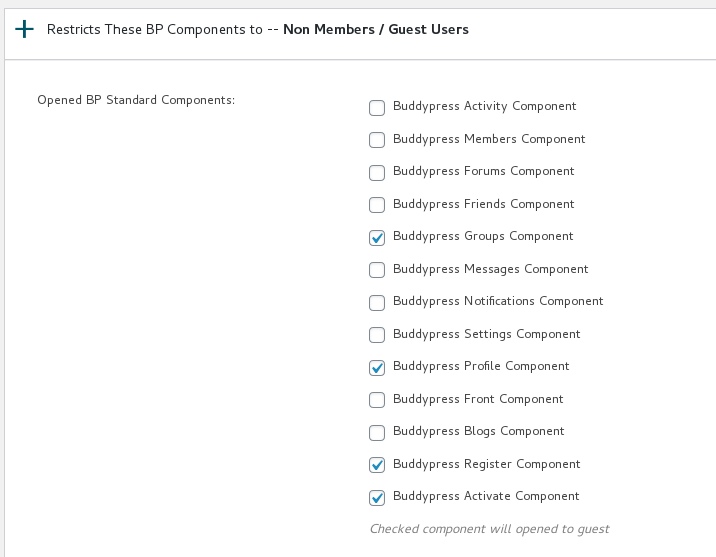
12: You will find we have listed all users roles include guest user roles for you, please click any user roles in this panel, it looks like this:

13: You will find we haveΒ  listed all buddypress components for each user role, please just checked to open or close “Buddypress MembersΒ  Component”Β  checkbox, it looks like this:

open or close buddypress component panel in buddypress membership plugin

open or close buddypress component panel in buddypress membership plugin

13 Click “Submit” button

14 In front end, when guest user or logged in members view your buddypress members page, they will be redirected to the custom URL which you set up in buddypress membership plugin settings panel. By this way, you can make the buddypress members page private, no any one can open buddypress members page πŸ™‚

Hope this will help you know how to completely hide buddypress membership page for everybody, if you have any more question, please contact us, we are happy to answer your question and help you works well with buddypress site πŸ™‚

Thanks, have a blessed day with your family πŸ™‚

BuddyPress Membership Plugin Support Team

Tagged with: , , ,

Update: BuddyPress Membership Plugin 4.4.6 Released and Uploaded

Hi Dear BuddyPress Membership User,

Hope this message find you are doing well and have happy days with your family πŸ™‚

We are happy to report you that we have released buddypress membership plugin 4.4.6, in this version, we fixed a php in_array warning problem, please upgrade to the latest version of buddypress memebrship plugin asap πŸ™‚

We are developing a new version of buddypress membership plugin, if you have any feature request of buddyrpess plugins, please don’t hesitate to tell us, we are happy to realize it for you πŸ™‚

Thanks, have a blessed day with your family πŸ™‚

BuddyPress Membership Plugin Support Team

Tagged with: , , ,

BuddyPress Membership Plugin 4.4.4, Added How to Use BuddyPress Membership Plugin Knowledge Base

Hi Dear BuddyPress Membership Plugin Users,

We just released buddypress membership plugin 4.4.4, in this version, based on users’ suggestion of buddypress membership plugin, we added How to Use BuddyPress Membership Plugin Knowledge Base menu item in back end.

Please:

1: Download buddyrpess membership plugin from your “my account” page in buddypress membership plugin site.

2: Login wordpress admin area

3: Deactivate old buddypress membership plugin in your wordpress PLUGIN panel

4: Delete old buddypress membership plugin

5: Upload the plugin zip file

6: Activate the new buddypress membership plugin

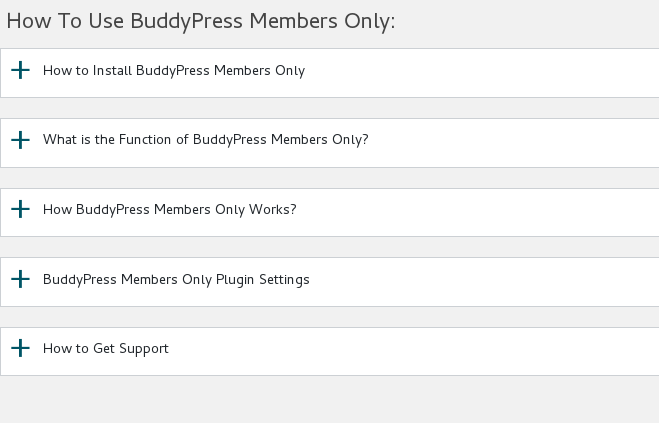
7: In “How To Use BuddyPress Members Only” panel, you will find how to use buddypress memebrship plugin knowledge base:

How to Install BuddyPress Members Only

What is the Function of BuddyPress Members Only

How BuddyPress Members Only Works?

BuddyPress Members Only Plugin Settings

How to Get Support From Our Official Site: membersonly.top

It looks like this:

buddypress membership plugin knowledge base

buddypress membership plugin knowledge base

Thanks for the give us the rare suggestions of buddypress membership plugin, if you have any more feature request about our buddypress plugin, please don’t hesitate to tell us, we are happy to realize it for you πŸ™‚

Thanks, have a blessed day with your family πŸ™‚

Best Regards,

BuddyPress Membership Plugin Support Team

Tagged with: , ,

BuddyPress Membership Plugin 4.3.4 Released

Hi BuddyPress Membership Users,

Hope this message find you are doing well and have happy days with your family πŸ™‚

We have released BuddyPress Membership plugin 4.3.4, in this version, we re-developed our buddypress members only pro plugin to avoid naming conflicts of functions.php, please remember to upgrade your buddypress membership plugin to latest version πŸ™‚

Thanks, have a blessed day with your family πŸ™‚

Best Regards,

BuddyPress Membership Support

Tagged with: , ,

BuddyPress Membership Plugin 3.9.2 Released

Hi Dear BuddyPress Membership Plugin Users,

We just released BuddyPress Membership Plugin 3.9.2, in this version, we fixed function name conflict with bbpress membership plugin, so when users can activate buddypress membership plugin and bbpress membership plugin at the same time πŸ™‚

Also we have updated detailed description of buddypress members only plugin to add new changes in recent versions, you can find them at:

Features of BuddyPress Members Only Pro Plugin

BP Members Only Pro – Single Site

BP Members Only Pro – 10 Sites

BP Members Only Pro – Unlimited Sites

Thanks, have a blessed weekend with your family πŸ™‚

Best Regards,

BuddyPress Membership Plugin Support Team

Tagged with: , ,

Updated BuddyPress Membership Plugin Features Page and Description of 3 Products

Hi Dear BuddyPress Membership Plugin User,

We have reported since Buddypress Membership Plugin 3.9.0,Β  we developed a new β€œBuddyPress Menu Visibility Control by User Roles” Addon .

A few users submitted a few feature requests, in which they hope hide their buddypress menus to guest users, and another users said he hope different user roles will find different menus in the same menu bar, because their have a few kinds of user type, for example, they hope support can find staff menu item and customer can find download menu item… and so on, based on their user roles, they will see related menu items, so buddypress admin will not need make a long menu bar at the top of the buddypress site

Today we have added detailed description to BuddyPress Membership Plugin feature page, and we have added details to 3 BuddyPress Membership Plugin product page.

We are developing a new buddypress members only version based on users feature requests, you will see it soon πŸ™‚

Thanks, have a blessed day with your family πŸ™‚

Best Regards,

BuddyPress Membership Plugin Support Team

Tagged with: , , , ,

Buddypress Membership Plugin 3.9.0, Added new “BuddyPress Menu Visibility Control by User Roles” Addon

Hi Dears,

Based on feature requests from dear buddypress membership users, we have developed a new buddypress members only 3.9.0 version, in this version:

Added “BuddyPress Menu Visibility Control by User Roles” Addon

A few users submitted a few feature requests, in which they hope hide their buddypress menus to guest users, and another users said he hope different user roles will find different menus in the same menu bar, because their have a few kinds of user type, for example, they hope support can find staff menu item and customer can find download menu item… and so on, based on their user roles, they will see related menu items, so buddypress admin will not need make a long menu bar at the top of the buddypress site πŸ™‚

Based on these amazing feature requests, we are happy to report you that we have realize it in buddypress members only 3.9.0, if you upgrade to buddypress membership plugin 3.9.0:

You will find the “Menu Visibility Control by User Roles” Addon in buddypress members only addon menu item.

If you enabled “Menu Visibility Control by User Roles” Addon, you will a new buddypress members only menu “Menu Visibility Control”

In “Menu Visibility Control” panel, please checked “Yes, I will enable menu Visibility control by user roles” option and click submit and read our detailed description

If you checked this option, We will add a menu Visibility list option for each menu items at wordpress standard menus setting panel.

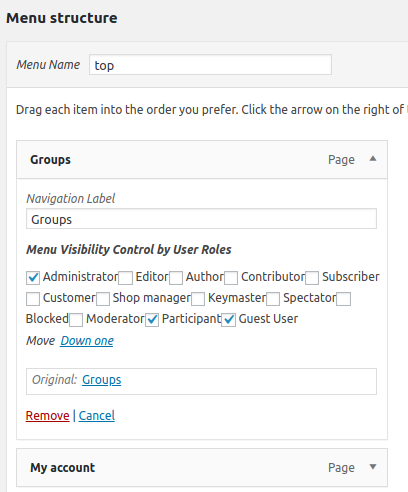
Then in “Menu structure” panel, if you click any menu item, you will find “Menu Visibility Control by User Roles” option, and we have listed all user roles in here

You can apply visibility controls to each menu items by user roles, for example, you can only allow customer user role to see download menu, subscriber & customer user role can see product menu… and so on, we make a few screenshots on our test sites:

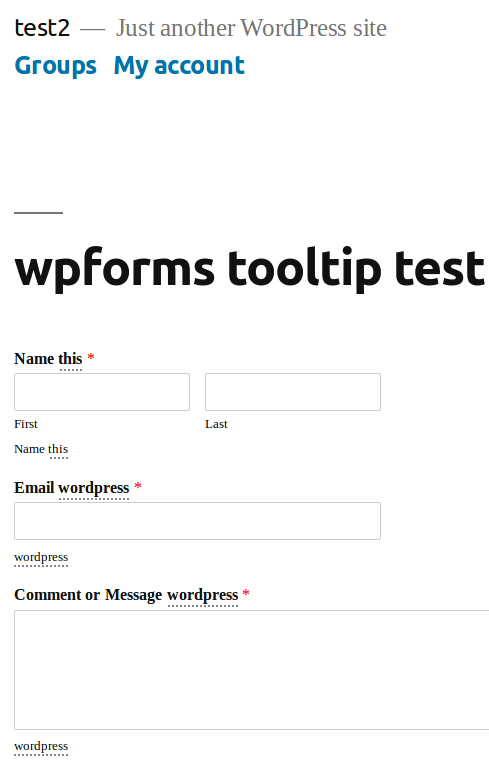
You can find in screenshot #1, guest non-member users role can only see a few menus

guest non-member users role can only see a few menus

guest non-member users role can only see a few menus

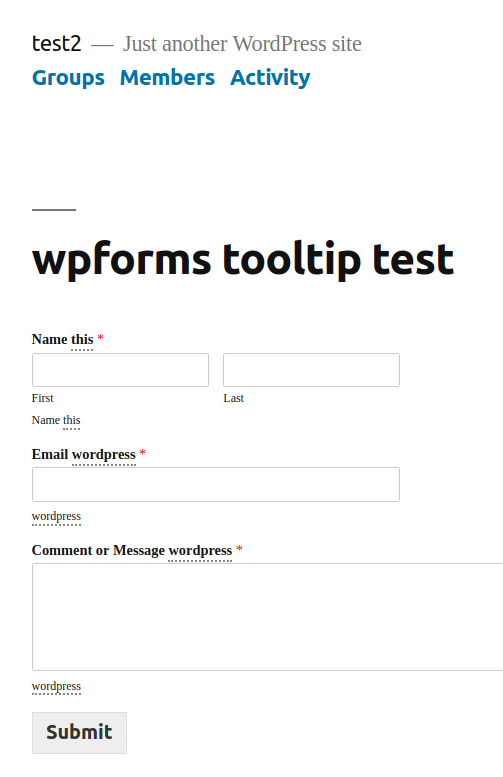
And in screenshot #2, subscriber user role can see more menus

subscriber user role can see more menus

subscriber user role can see more menus

In front end, different user roles will have different menu item, based on your settings in back end, back end looks like this:

menu visibility in appearance menus panel

menu visibility in appearance menus panel


Please note, once you activated Menu Visibility Control addon, by default, all menu item in frontend will be hidden, you need setting “Menu Visibility Control by User Roles” option for each menu item

If you have any more amazing buddypress feature requests, please don’t hesitate to tell us πŸ™‚

Thanks, have a blessed day with your family πŸ™‚

Best Regards,

BuddyPress Memebership Support Team


Tagged with: , , , , ,
Top