Tag: buddypress membership

New Option Restrict Email Domains to Reduce Spam Registrations, Create Targeted Community, Enhanced Security, Buddypress Members Only Pro Plus 5.7.6 Released

Introducing Domain Restrictions: Combat Spam, Foster Community, and Enhance Security in BuddyPress Members Only Pro Plus 5.7.6

Hi Dear BuddyPress Membership plugin users, I hope this message finds you are doing well and having happy days with your family ๐Ÿ™‚ Aย  BuddyPress user submitted a ticket, he mentioned:

We built a BuddyPress social networking platform aimed at creating a closed professional community focused on a specific industry, field, or occupation (such as healthcare industry experts). Our platform ensures that only professionals from that field are part of the community. We hope to restrict the email domains to those of certain companies or industry-specific addresses, allowing registration only with email domains from specific companies or industry-recognized email services.

Our buddypress members only plugin developer reviewed the ticket, we believe many buddypress users have similar requirements, so we would like to develop a new version to fulfill the feature request for BuddyPress membership users. ๐Ÿ™‚

Step-by-Step Guide to Restrict Email Domains for Enhanced BuddyPress Community Security

1 Access your account on the BuddyPress Members Only platform.

2 Obtain the most recent release of the BuddyPress Membership plugin (version 5.7.6 or higher).

3 Access your BuddyPress site with your admin credentials, navigate to the WordPress dashboard, and select the BP Members Only menu to access the ‘BuddyPress Members Only Settings’ section.The menu looks like this:
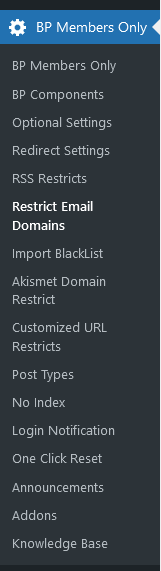
4 Next, click on the ‘Restrict Email’ sub-menu item to display the ‘Restrict Email Domains Settings’ panel, which appears as follows:
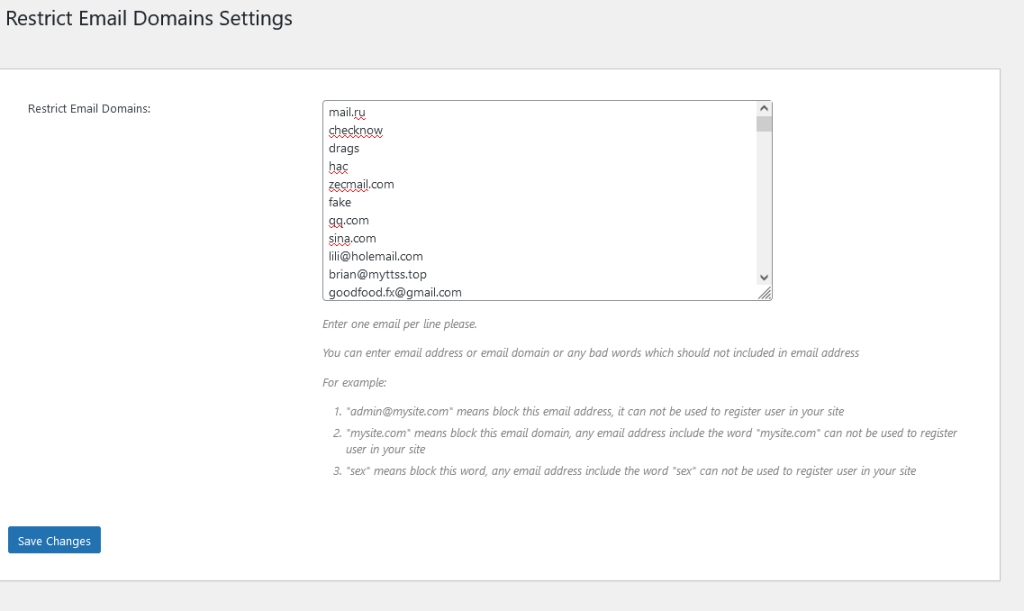
Restrict Email Domains Settings for buddypress 2024

Restrict Email Domains Settings for buddypress 2024

5 In the ‘Restrict Email Domains Settings’ panel, you have the ability to create an email blacklist using the ‘Restrict Email Domains’ option as follows:

#1 Input one email per line.

#2 You can specify either an email address, an email domain, or any inappropriate words that should be excluded from email addresses. For instance:

  • admin@mysite.com‘ will block this specific email address, preventing it from being used for user registration on your site.
  • ‘mysite.com’ will block this email domain, meaning any email address containing ‘mysite.com’ cannot be used for registration.
  • ‘sex’ will block this term, so any email address that includes the word ‘sex’ will be disallowed for user registration.

Consequently, when users attempt to register as members of your site, if their email address contains any blacklisted words, email addresses, or domains, they will receive an error message stating, ‘Sorry: Your email address is not allowed on this site,’ and will be unable to complete their registration:

Conclusion:

We believe many social network owners who use the BuddyPress plugin will need this function. Below are some types of social websites and scenarios where the ‘restrict email domains’ feature might be needed:

Internal Company Social Platforms

Purpose: These platforms are typically used for communication, collaboration, and information sharing among employees. If a company wants to ensure that only internal employees can register and use the platform, restricting email domains ensures that only company email addresses (e.g., @company.com) can be used for registration.
Example: A large companyโ€™s internal social network or knowledge-sharing platform (such as Slack, Microsoft Teams, etc.) that only allows login with company email addresses.
School or University Social Platforms

Purpose: A school or university may wish to create a social platform for students and faculty. By restricting registrations to email domains associated with the school (e.g., @university.edu), the platform ensures that only legitimate students and staff can join, avoiding external interference.
Example: A schoolโ€™s campus forum, social network, or learning platform that only allows registration with an email address from the schoolโ€™s domain.
Professional or Industry Platforms

Purpose: If a social platform operates on a membership basis with specific identity requirements (e.g., high-net-worth individuals, members of a particular organization), restricting email domains ensures that only people who meet the specific criteria can join.
Example: A social platform for high-end investors that only allows email addresses from financial institutions or investment companies to register.
Temporary/Event-based Social Websites

Purpose: For short-term events, conferences, or social gatherings organized by a company or organization, a dedicated platform may be created for participants to interact. Restricting email domains ensures that only attendees can join.
Example: A community for conference attendees or a temporary product launch-related social network that might be closed or deleted after the event.
Community Platforms (Restricted or Moderated)

Purpose: Some social platforms aim to create a more controlled community environment to prevent spam, fake accounts, or irrelevant users from joining. By restricting email domains, the platform can improve its quality and avoid misuse.
Example: A community dedicated to high-quality content and discussions that might only accept email addresses from well-known email providers (e.g., Gmail, Outlook) or specific groups.
Summary: This feature is generally used by social websites that need to “filter” users, control platform quality, or ensure specific identity verification. By restricting email domains, the platform can ensure that only people who meet certain criteria can register or log in, thereby improving security, social quality, and the professionalism of the user base.


Tagged with: , , , , , ,

Solved bug in “Restricts Custom Post Types based on User Roles” module, buddypress members only pro plus 5.6.6 and buddypress members only pro 5.0.8 has been released

Hi Dear BuddyPress Membership plugin users, I hope this message find you are doing well and have wonderful days with your family ๐Ÿ™‚ A user utilizing BuddyPress reached out to us seeking guidance on launching an eLearning education membership platform. On their eLearning platform, diverse user roles such as students, teachers, and administrators require access to distinct custom publishing types like course materials, quizzes, and administration tools. They have integrated multiple educational plugins from the LMS to create a variety of custom publishing types, including premium content and exclusive resources available only to members. Furthermore, access to these resources is limited to users with specific membership levels or subscriptions.

Our buddypress members only plugin developer checked this ticket, and we believe this is a great suggestion, we understand buddypress user wants to restrict custom post types based on user roles in order to create a more personalized and controlled user experience on their website. By limiting access to specific custom post types for certain user roles, they can tailor the content available to different user groups, ensuring that each user sees only the information that is relevant to them. This can help improve user engagement, streamline navigation, and enhance overall user satisfaction with the website. Additionally, restricting access to certain custom post types based on user roles can also be a security measure to protect sensitive information or content meant for specific audiences.

To cater to this requirement, we developed the “custom post type” module within the BuddyPress Members Only Pro plugin to meet the user’s specifications. This module enables setting access restrictions for specific categories of custom post types based on the user roles assigned to the users.

Here are some examples of situations where restricting access to certain custom post types based on buddypress user roles can be important:

Membership Sites: On a membership site, certain custom post types, such as premium content or member-only resources, may need to be restricted to only those users who have a specific membership level or subscription.

E-Learning Platforms: In an e-learning platform, different user roles like students, instructors, and administrators may need access to different types of custom post types, such as course material, quizzes, or administrative tools.

Corporate Intranets: Within a corporate intranet, sensitive company information like HR policies, financial reports, or executive communications may need to be restricted to specific user roles, such as HR managers or executives.

News Websites: A news website might have custom post types for different types of news articles, such as breaking news, editorials, or subscriber-only content, which should only be accessible based on the user’s role or subscription status.

Collaborative Platforms: In a collaborative platform, different user roles may have access to specific project-related custom post types, such as design files, development updates, or client communication, based on their involvement in the project.
By implementing access restrictions based on user roles for custom post types in these scenarios, website owners can ensure that sensitive information is protected, content is tailored to specific user groups, and overall user experience is enhanced.

In buddypress members only pro plus 5.6.6 and buddypress members only pro 5.0.8 , we have solved bug in “Restricts Custom Post Types based on User Roles” module, please upgrade to the latest version asap you can ๐Ÿ™‚

Thanks, have a blessed day with your loved ones ๐Ÿ™‚

Best Regards,

Buddypress memebrship plugin support

Tagged with: , , ,

How to one click to open buddypress standard components to all user roles in your buddypress, supported by buddypress members only pro plus 5.5.6

Hi dear BuddyPress membership users. I hope this message finds you well and that you’re enjoying wonderful days with your family. ๐Ÿ˜Š

In recent times, we have received feedback from many new users. They have mentioned that after installing the BuddyPress Members Only Pro Plus plugin, they were able to maintain the privacy and security of their BuddyPress community by assigning different levels of access permissions to user roles. Additionally, by simultaneously installing the BuddyPress WooCommerce Payment Gateway plugin, paying members could access premium features, while free members had limited access. This provided an incentive for users to upgrade their membership.

However, these new users have mentioned that because the BuddyPress Members Only Pro Plus plugin offers numerous configuration options, it took some time for them to learn and set up all the options when they first started using it. They expressed the desire for a quick methodโ€”a one-click solutionโ€”to open all BuddyPress standard components to all user roles within BuddyPress while simultaneously preventing non-registered users from accessing BuddyPress content.

This is a great feature request, and our BuddyPress Members Only plugin developer has worked tirelessly to implement this function for BuddyPress webmasters as soon as possible. Now, you can use a single click to open BuddyPress standard components to all user roles in your BuddyPress / WordPress system. However, there is an exception for non-registered users, as they won’t be able to access these components. ๐Ÿ˜Š

How to enable one-click access to BuddyPress standard components for all user roles in your BuddyPress:

  1. Login to your account on the BuddyPress Members Only site.
  2. Download the latest version of the BuddyPress Membership plugin (version >= 5.5.6).
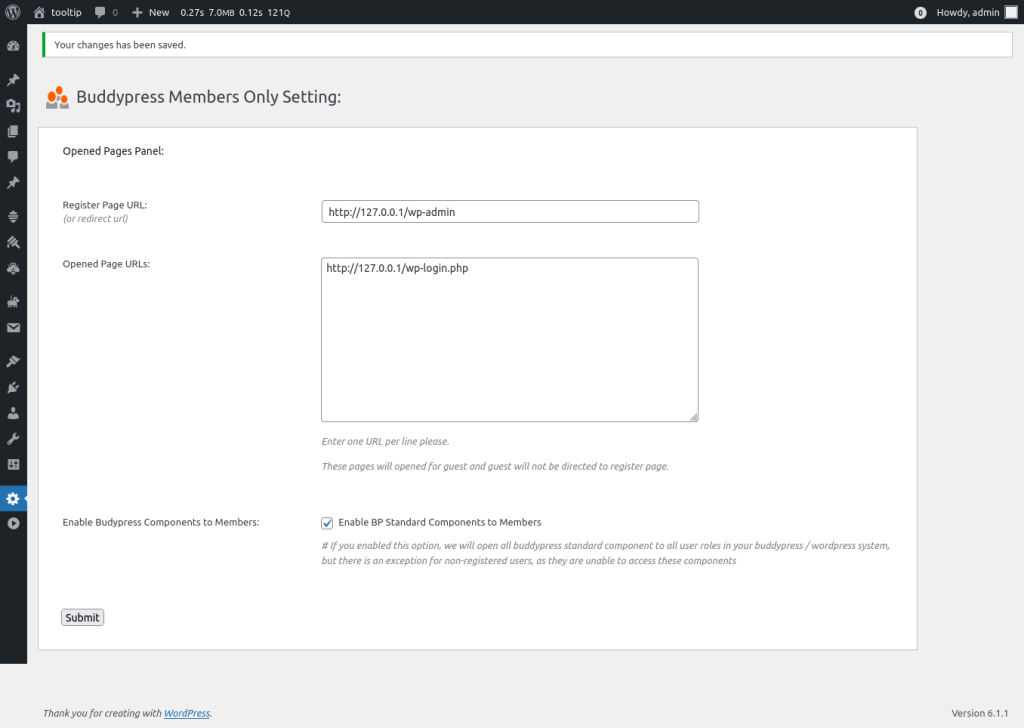
  3. Login to your BuddyPress site as an admin, go to the WordPress dashboard, and click on the BP Members Only menu to open the “BuddyPress Members Only Settings” panel. It looks like this:

Enable BuddyPress Components to Members

As you can see, in the “BuddyPress Members Only Settings” panel, we’ve added a new option: “Enable BuddyPress Components to Members.” If you check the checkbox for “Enable BuddyPress Components to Members” and click the submit button, you can now use a single click to open BuddyPress standard components to all user roles in your BuddyPress / WordPress system. However, please note that there is an exception for non-registered users, as they won’t be able to access these components. ๐Ÿ™‚


Conclusion:

Also here are a few possibilities why you need one click to open buddypress standard components to all buddypress users.

User Onboarding: It can be used as a quick way to onboard new users or when transitioning from a private to a more public phase. By opening all components temporarily, it allows all users to explore the platform’s features without having to set individual permissions.

Promotion or Special Event: If there’s a special event, promotion, or time-limited campaign where you want to engage all users, you might open all components temporarily. This way, everyone can participate, and afterward, you can revert to more restricted settings.

Community Building: To encourage community building, some administrators might want to open up the platform temporarily to foster interaction among users.


Tagged with: , , ,

How to hide my homepage and all Buddypress pages from guest users only but open all buddypress pages from login users?

Hi dear BuddyPress membership users. hope this message find you are doing well and have happy days with your family ๐Ÿ™‚ We got an amazing buddypress members only plugin user’s ticket in which he said:

Hi, I’m using version 4.9.0 and I just want to hide my homepage and all Buddypress pages from guest users only but for some strange reason your plugin is hiding all buddypress pages fromm login users.

Whenever I click on a user’s profile photo or try to view a Buddypress page I get redirected to the page I set as my Redirect Page.

We checked the front end of his site and we believe this is a settings problem, we’d like write a detailed document for the amazing buddypress members pro user. ๐Ÿ™‚

How to hide my homepage and all Buddypress pages from guest users only but open all buddypress pages from login users?

1: login your account in buddypress members only site

2: download the latest version of buddypress memebrship plugin

3: login your buddypress site as admin

4: in wordpress dashboard, please click BP Members Only menu, then you will open “Buddypress Members Only Setting” panel, it looks like this:

Buddypress Members Only Setting panel in buddypress 4.8.8

Buddypress Members Only Setting panel in buddypress 4.8.8

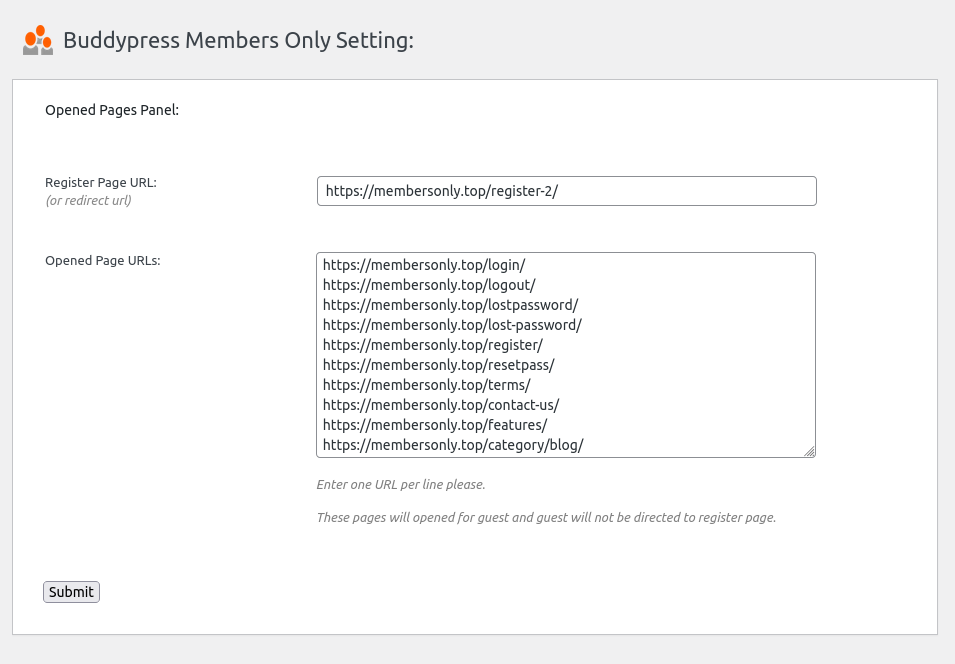
As you can see,ย  you can enter the landing page /ย  redirect page / register page for guest user in register page URL input box, When a user attempts to access a page for which they do not have permission, they will be automatically redirected to this landing page.

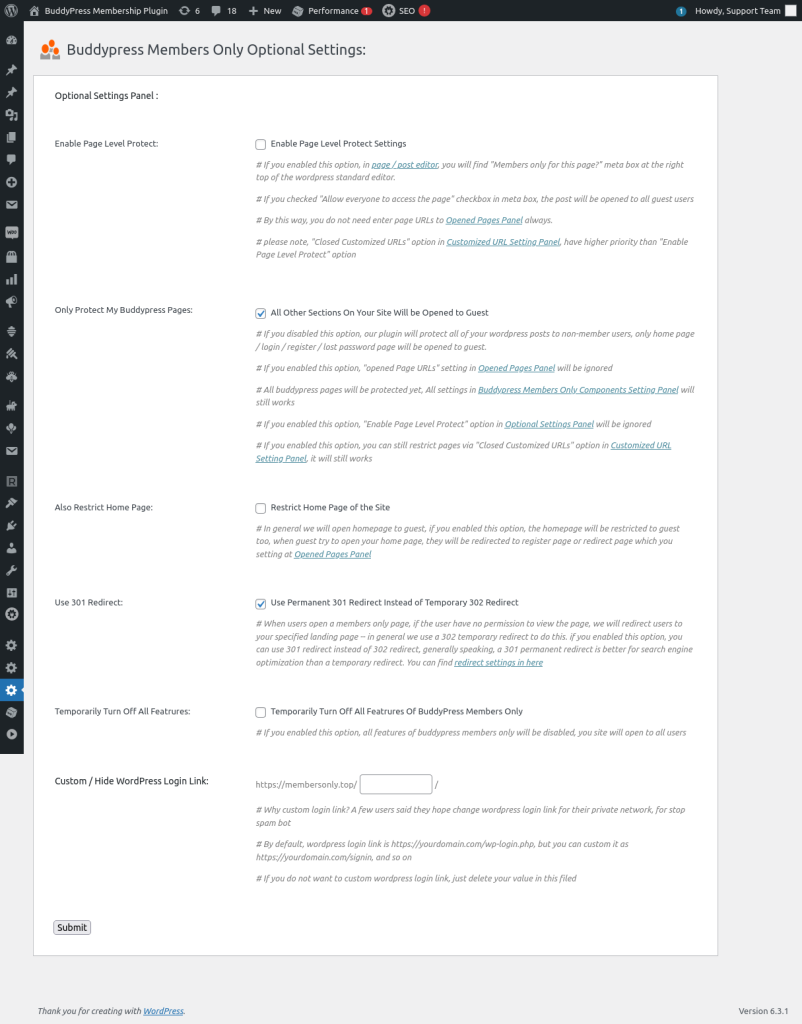
5: On wordpress dashboard, please click bp members only menu, then click optional settings sub menu item, you will open “Buddypress Members Only Optional Settings” panel, it looks like this:

Buddypress Members Only Optional Settings panel in 4.8.8

Buddypress Members Only Optional Settings panel in 4.8.8

Please go to “Only Protect My Buddypress Pages”, and checked the option “All Other Sections On Your Site Will be Opened to Guest”, please note:

a If you enabled this option, all buddypress pages will be protected yet, all settings in Buddypress Members Only Components Setting Panel will still works.

b If you enabled this option,wordpress posts / pages will be opened toย  guest users.

c If you enabled this option, “opened Page URLs” setting in Opened Pages Panel will be ignored.

d If you enabled this option, “Enable Page Level Protect” option in Optional Settings Panel will be ignored

e If you enabled this option, you can still restrict pages via “Closed Customized URLs” option in Customized URL Setting Panel, it will still works

f If you disabled this option, our plugin will protect all of your wordpress posts to non-member users, only home page / login / register / lost password page will be opened to guest.

In your case, please enable this option to open all wordpress posts to your guest users

6: In “Buddypress Members Only Optional Settings” panel, please go to “Restrict Home Page” and checked “Restrict Home Page of the Site ” option,

By default, we will open the wordpress home page to guest users, but if you enabled this option, the homepage will be restricted to guest users too, when guest try to open your home page, they will be redirected to register page or redirect page which you setting at Opened Pages Panel

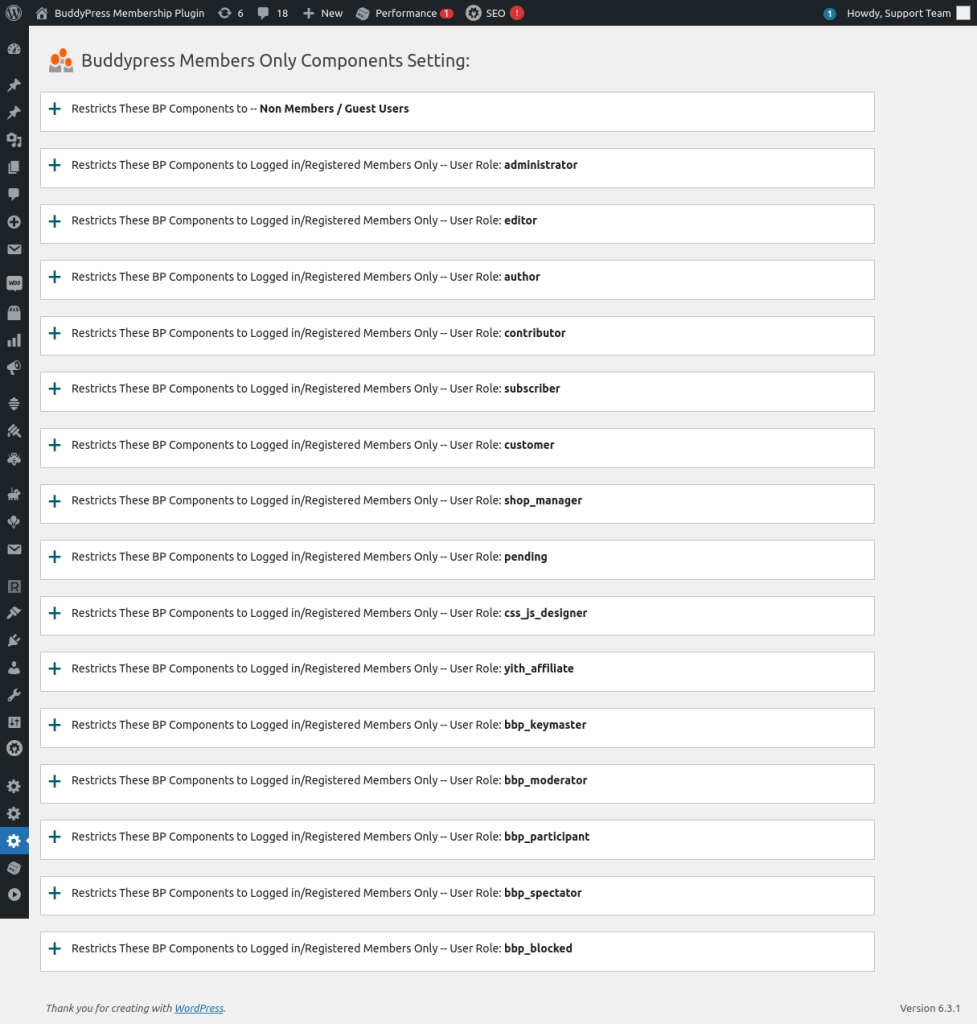
7: On wordpress dashboard, please click bp members only menu, then click “BP Components” sub menu item, you will open ”

Buddypress Members Only Components Setting” panel, it looks like this:
Buddypress Members Only Components Setting panel in bp members only 4.8.8

Buddypress Members Only Components Setting panel in bp members only 4.8.8

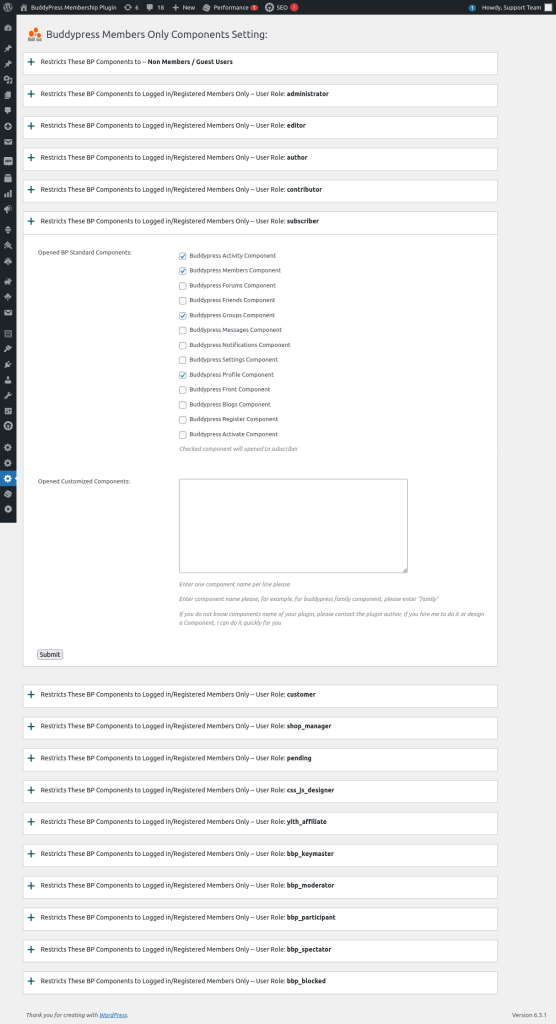
As you can see, we listed all user roles of your buddypress site in here, what you need is just click tabs of user roles to open buddypress standard components for specific user roles, for example, please click “subscriber” tab, it will looks like this:

open buddypress compents for specific user roles.png

open buddypress compents for specific user roles.png

as you can see, we have listed all buddypress standard components in here, checked component will opened to subscriber , what you need is just click to open specific buddypress standard components for the user role “subscriber”, please remember to click “submit” button to save the changes.

Also if you installed 3rd buddypress plugins which offer customized components, you can enter name of these 3rd customized components, they will opened to the user role “subscriber” too.

By this way, you can open other buddypress components to other user roles.

For newbie of buddypress members only user, you can try to open all buddypress components to all user roles, but restricts it to guest user.

Sometimes, these settings cannot works well, it is because in buddypress site, buddypress plugin looks HTTP link and HTTPS links as two different sites, in this case, you need install a plugin like REALLY SIMPLE SSL plugin to force HTTP links to HTTPS links ๐Ÿ™‚

We are still creating the video for the document, once finish it we will insert the video in here so you can learn it easier ๐Ÿ™‚

Thanks,have a blessed day with your family ๐Ÿ™‚

Best Regards,

Buddypress memebrship plugin support

Tagged with:

Buddypress Members Only pro plus 5.2.6 Released

Hi, dear buddypress membership plugin users, hope this message find you are doing well and have happy days with your family ๐Ÿ™‚

Our buddypress membership plugin author just released buddypress members only pro + plugin to offer a better words for wordpress rss feed restriction module ๐Ÿ™‚

Why Buddypress members only pro admin need an option t disable the rss feed of wordpress?

In general, offer a RSS feed for wordpress users is a good idea, but for a members only site, disabling the RSS feed can help to increase the site’s security and private. By restricting access to a site’s content through the RSS feed, it can be more difficult for unauthorized users to access and distribute that content.

Additionally, if the site is subscription-based and requires users to pay for access, disabling the RSS feed can help to ensure that only paying members are able to access the site’s content. This can prevent non-memebrs from accessing the site’s content without permission, which can help to protect the site’s revenue stream.

Finally, disabling the RSS feed can help to control the distribution of copyrighted content. If the site’s content is protected by copyright, disabling the RSS feed can help to prevent unauthorized copying and distribution of that content, which can help to protect the site’s intellectual property rights.

Overall, disabling the RSS feed on a members-only site can help to improve the site’s security and privacy, protect the site’s revenue stream, and control the distribution of copyrighted content. ๐Ÿ™‚

Please upgrade to buddypress membership pro plus ๐Ÿ™‚


Tagged with: , , ,

How to Restricts Buddypress Groups to Guest Users? BuddyPress Members Only Plugin Free 3.1.9 Released

Hi Dear Users of BuddyPress Members Only Plugin,

Hope this message find you are doing well and having happy weekend with your family ๐Ÿ™‚ We get a ticket from a buddypress members only plugin user, in which he said in his buddypress site, his users build a lot of buddypress groups,his site is built for hospital which offer long-term care hone beds and community support services, his user do not want their private messages in buddypress groups be viewed by public users, he searched a solution for a long time, finally in google, he searched in our buddypress membership features page, we said in buddypress members only pro plugin, support

“14: Setting users redirect to BuddyPress Groups Page”

and

“2: Restricts BP components to Non-member / guest, include:
Buddypress Activity Component
Buddypress Members Component
Buddypress Forums Component
Buddypress Friends Component
Buddypress Groups Component
Buddypress Messages Component
Buddypress Notifications Component
Buddypress Settings Component
Buddypress Profile Component
Buddypress Blogs Component
and other opened customized components you entered”

and

“# In login redirect based on user role menu, admin can setting users redirect to BuddyPress Groups Page”

and

“# In logout redirect based on user role menu, admin can setting users redirect to BuddyPress Groups Page”

and

“Or you can open Buddypress Forums Component / Pages to non member users, but when non member users try to open pages related with Buddypress Groups Component, they will be redirected to the redirect page which you setting in admin area.. and so on, infinite possibilities.”

He said that’s what he wanted, as a not-for-profit senior care organization, he downloaded and installed our buddypress members only free plugin, but he found these features just included in buddypress membership pro plugin versions, he asked us can we add function of “restricts buddypress group for non-members users” to buddypress members only free plugin?

Okay, our buddypress membership plugin author said he is very happy to add the function of protect messages in buddypress groups to guest users into to buddypress members only free plugin too, that’s why we released buddyrpess members only free 3.1.9 ๐Ÿ™‚

How to Restricts Buddypress Groups to Guest Users?

1: Please login your wordpress site as wordpress admin

2: In wordpress plugins panel, please update your buddypress members only plugin to 3.1.9

3: After upgraded buddypress members only, please click “BP Members Only” menu item in wordpress dashboard

4: Then please click the sub menu โ€œBP Componentsโ€ , in here you can set up to restricts buddypress component to guest users, you will open โ€œBuddypress Members Only Components Setting:โ€ panel

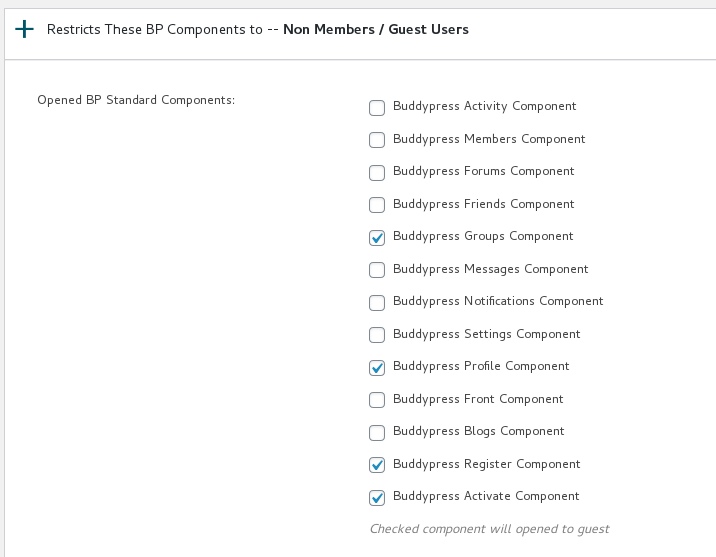
5: In โ€œBuddypress Members Only Components Settingโ€ panel, You will find we have listed buddypress components in here, for example, activity, group, members… and so on, there are a screenshot for the buddypress memebrs only pro version — in which support more buddypress components and support restricts buddypress component based on user roles, but basically what you need to do is the same — just a few clicks to restricts selected buddypress components to non-member users:

open or close buddypress component panel in buddypress membership plugin

6: If you want to restricts guest users to read messages in any buddypress component, just checked the checkbox, then click submit, it is very easy.

7: In front end, when guest users try to view your private-protected messages in selected buddypress component, they will be redirected to your landing page or register page which you set up in “bp members only” menu item

Conclusion:

With BuddyPress Members Only Plugin, you can restrict your private buddypress components-pages to non-member users, just view a few clicks in the new โ€œBuddypress Members Only Components Setting:โ€ panel, by this way, some not-for-profit organization can hide their user’s private message to public users, it is great to help you build a safe-private-helpful buddypress site for your users ๐Ÿ™‚


Tagged with: , , ,

BuddyPress Members Only Pro Plus Plus 4.9.2 Released, Support Custom Notes in Restriction Shortcode

Hey sear BuddyPress Members Only Plugin users, we are happy to report you, we just released BuddyPress Members Only Pro Plus Plus 4.9.2, to support custom notes in wordpress / buddypress restriction shortcode ๐Ÿ™‚

A buddypress memebrship plugin user told us, he love buddypress memebrship plugin because it not only allow buddyrpess admin restrict buddypress component (buddypress activity, buddypress members page, buddypress user profile page, buddypress groups… and so on) of buddypress site based on user roles, restricts wordpress post content based on user role, and can restricts nearly all wordpress element based on user roles, for example menus,ย  and he found he can use our buddypress restriction shortcode to restrict a few privacy sections to users based on wordpress user roles, that’s fully solution to build a pretty buddypress / wordpress membership site. ๐Ÿ™‚

The problem is, he’s client come from France, but in buddypress restriction shortcode, he found there are only English notes to tell non-permission users to register to a paid membership user to give his privacy content, he suggestion we add a new Var in buddypress restriction shortcode to allow buddypress admins custom the message based on their language and needs ๐Ÿ™‚

Yes, this is a great suggestion, our developer re-developed our buddypress membership plugin to allow buddypress admin customize messages in buddypress restriction shortcode, now you can use it like this:

[restriction note='lovely privacy paid content']]privacy paid content with text and video[[/restriction]

Just replace the sample note “lovely privacy paid content” in note Var with your language or your promote messages ๐Ÿ™‚

Thanks for the great suggestion, if you have any question or feature request, please don’t hesitate to tell us, we are happy to develop a better and better buddypress membership plugin for you ๐Ÿ™‚

Thanks, have a blessed day with your family ๐Ÿ™‚

Best Regards,

BuddyPress Membership Plugin Support


Tagged with: , , ,

Buddypress members only free 3.0.5 released, support restricts buddypress components for buddypress guest users

Hi Dear Users of BuddyPress Members Only Plugin,

Hope this message find you are doing well and have happy weekend with your family ๐Ÿ™‚ย  We are very happy to report you, buddypress members only free 3.0.5 released, support restricts buddypress components for buddypress guest users ๐Ÿ™‚

We get an amazing user’s ticket, in which he said when he read the document of buddypress members only pro version, he found in backend buddypress site admin can open / close a few specific buddypress components to users based on user roles, he hope have the ability yo open activity yo guest user and disable user profile pages to non-member users. ๐Ÿ™‚

Yes, we have developed this function many years before, this is our original thoughts, before our buddypress restriction product, the whole internet have no this solution because no users find this requirement, our developer make the idea to help buddypress admin protect buddypress components(members / groups / activity / messages… etc) to non-member users, based on user roles of buddypress, we are happy to add a few theses functions to free versions too, you will see more and more function be added in to the free version of buddypress members only plugin ๐Ÿ™‚

After upgraded to the buddypress members only free 3.0.5, you will find a new menu item “Buddypress Components”, once click the menu “Buddypress Components”, you will open the Buddypress Components Restriction Panel,ย  we have a screenshot for the pro version, basically free version works like this method too:

open or close buddypress component panel in buddypress membership plugin

open or close buddypress component panel in buddypress membership plugin

Just click the buddypress components which you hope open to guest users, and click submit button, then in front end, guest can open these buddypress component pages, for example, buddypress activity , buddypress members page… etc, we are adding more and more pages in free version, you will see the new version soon ๐Ÿ™‚


Thanks for the suggestion, if you have more questions, please don’t hesitate to tell us, we are very happy to realize these buddypress plugins for you ๐Ÿ™‚

Best Regards,

Buddypress Memebrship Plugin Support

Tagged with: , , , ,

BuddyPress Members Only Pro 4.8.8 Released, Support Elementor

Hi Dear Users of BuddyPress Members Only Plugin,

Hope this message find you are doing well and have happy days with your family ๐Ÿ™‚ We are happy to report that we just released BuddyPress membership Pro plugin 4.8.8, to solve the problem which submitted by a user, he said he using elementor editor, and he found some issues:

Hi,

When we edit a page with Elementor and save the page the โ€œAllow everyone to access the pageโ€ setting is set to false. Is it possible to keep the setting true after i edit a page with Elementor?

We replied:

Thanks for the reply ๐Ÿ™‚

We installed elementor editor, and we learned how to use elementor, it is a great editor ๐Ÿ™‚ Our developer jump into the sea of the elementor codes, and finally we found a method to detect is the current editor is elementor or not, if users using elementor, we will not update the metabox, because elementor hook the wordpress editor API but did not do the all work of editor(metabox), we tested it and it works well on our site, we will release it tomorrow, both of pro version and free version will support the great elementor, we will reply you again once we finished the document and released the new version ๐Ÿ™‚

Thanks, have a blessed day with your family ๐Ÿ™‚

Best Regards,
Support

With new version of buddypress members only pro 4.8.8 and buddypress members only free 2.9.5, all these problems in elementor has been solved, we will release another buddypress members only free plugin soon, in which we will allow admin decide open some specific buddypress component to non-members users too, for example, buddypress activity, buddypress user profile…and so on, you will see it soon ๐Ÿ™‚

Thanks, have a blessed day with your family ๐Ÿ™‚

Best Regards,

BuddyPress Membership Plugin Support

Tagged with: , ,
Top