Tag: Buddypress Members Only

Buddypress members only free 3.0.5 released, support restricts buddypress components for buddypress guest users

Hi Dear Users of BuddyPress Members Only Plugin,

Hope this message find you are doing well and have happy weekend with your family 🙂  We are very happy to report you, buddypress members only free 3.0.5 released, support restricts buddypress components for buddypress guest users 🙂

We get an amazing user’s ticket, in which he said when he read the document of buddypress members only pro version, he found in backend buddypress site admin can open / close a few specific buddypress components to users based on user roles, he hope have the ability yo open activity yo guest user and disable user profile pages to non-member users. 🙂

Yes, we have developed this function many years before, this is our original thoughts, before our buddypress restriction product, the whole internet have no this solution because no users find this requirement, our developer make the idea to help buddypress admin protect buddypress components(members / groups / activity / messages… etc) to non-member users, based on user roles of buddypress, we are happy to add a few theses functions to free versions too, you will see more and more function be added in to the free version of buddypress members only plugin 🙂

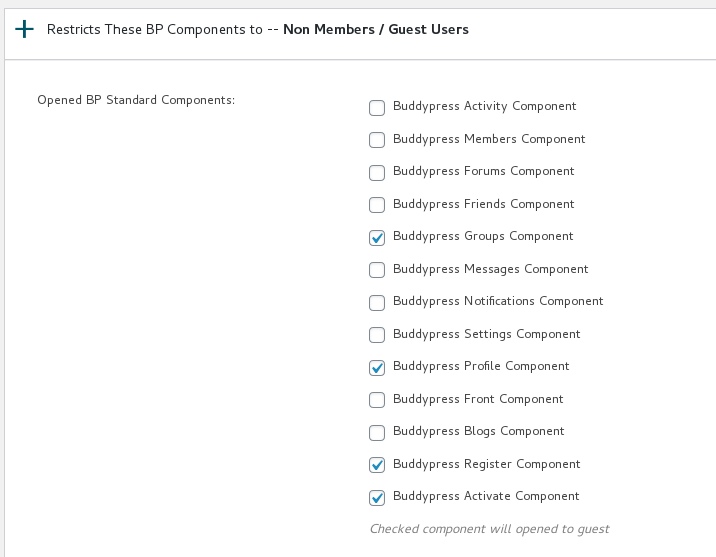
After upgraded to the buddypress members only free 3.0.5, you will find a new menu item “Buddypress Components”, once click the menu “Buddypress Components”, you will open the Buddypress Components Restriction Panel,  we have a screenshot for the pro version, basically free version works like this method too:

open or close buddypress component panel in buddypress membership plugin

open or close buddypress component panel in buddypress membership plugin

Just click the buddypress components which you hope open to guest users, and click submit button, then in front end, guest can open these buddypress component pages, for example, buddypress activity , buddypress members page… etc, we are adding more and more pages in free version, you will see the new version soon 🙂


Thanks for the suggestion, if you have more questions, please don’t hesitate to tell us, we are very happy to realize these buddypress plugins for you 🙂

Best Regards,

Buddypress Memebrship Plugin Support

Tagged with: , , , ,

BuddyPress Members Only Pro 4.8.8 Released, Support Elementor

Hi Dear Users of BuddyPress Members Only Plugin,

Hope this message find you are doing well and have happy days with your family 🙂 We are happy to report that we just released BuddyPress membership Pro plugin 4.8.8, to solve the problem which submitted by a user, he said he using elementor editor, and he found some issues:

Hi,

When we edit a page with Elementor and save the page the “Allow everyone to access the page” setting is set to false. Is it possible to keep the setting true after i edit a page with Elementor?

We replied:

Thanks for the reply 🙂

We installed elementor editor, and we learned how to use elementor, it is a great editor 🙂 Our developer jump into the sea of the elementor codes, and finally we found a method to detect is the current editor is elementor or not, if users using elementor, we will not update the metabox, because elementor hook the wordpress editor API but did not do the all work of editor(metabox), we tested it and it works well on our site, we will release it tomorrow, both of pro version and free version will support the great elementor, we will reply you again once we finished the document and released the new version 🙂

Thanks, have a blessed day with your family 🙂

Best Regards,
Support

With new version of buddypress members only pro 4.8.8 and buddypress members only free 2.9.5, all these problems in elementor has been solved, we will release another buddypress members only free plugin soon, in which we will allow admin decide open some specific buddypress component to non-members users too, for example, buddypress activity, buddypress user profile…and so on, you will see it soon 🙂

Thanks, have a blessed day with your family 🙂

Best Regards,

BuddyPress Membership Plugin Support

Tagged with: , ,

Change Log of BuddyPress Members Only Free Plugin

BuddyPress Membership Plugin 3.3.3

Please check our detailed document at: Buddypress Members Only Free Plugin 3.3.3 Released

BuddyPress Membership Plugin 3.3.1

Please check our detailed document at: BuddyPress Members Only Support 3.3.1 Released, New Support Forum

BuddyPress Membership Plugin 3.2.9

Please check our detailed document at: BuddyPress Memebrs Only Free Plugin 3.2.9 Released, Improved UI of BuddyPress Memebrs Only Plugin

BuddyPress Membership Plugin 3.2.3

A very importand version, please check our detailed document at: BuddyPress Memebrs Only Free Plugin 3.2.3 Released, Followed WordPress Security Standard to Filter All Input and Output Which Generated by Admin

BuddyPress Membership Plugin 3.1.9

Support restrict buddypress groups to guest, please check our detailed step by step document with screenshot at: How to Restricts Buddypress Groups to Guest Users? BuddyPress Members Only Plugin Free 3.1.9 Released

BuddyPress Membership Plugin 3.0.7

An amazing user told us, the function name of buddypress members only free version is conflicts with pro version, we found it is because in last version we added many new functions in free version, we fixed the problem in this version

BuddyPress Membership Plugin 3.0.5

Buddypress members only free 3.0.5 released, support restricts buddypress components for buddypress guest users

BuddyPress Membership Plugin 2.9.5

Please check details at here, for members only free 2.9.5 and members only pro 4.8.8

BuddyPress Membership Plugin 2.9.3

We get a ticket, in which a buddypress members only user said he cannot understand how buddypress members only works, he request us update the document, in the version 2.9.1, we rewrite the knowledge base to help admin understand how bp members only works easier. 🙂

We get another amazing user’s feature request, he hope have the ability to open specific parts of buddypress to guest too, we are develop the new version and you will see this function with a new menu item in next version, we will release it soon 🙂

BuddyPress Membership Plugin 2.9.1, New Option to Restrict BuddyPress Activity RSS

Please check our detailed document at: BuddyPress Membership Plugin 4.8.6, New Option to Restrict BuddyPress Activity RSS, although the document is write for BP members only pro, but the change in this pro version is the same of the free version 2.9.1 🙂


BuddyPress Membership Plugin 2.8.9:

Please check our detailed document at:

How to custom the redirect link of buddypress restrict shortcode of wordpress private content? Supported by Buddypress memebrship plugin 2.8.9 and pro version  4.8.0


BuddyPress Membership Plugin 2.8.7:

How to Restrict Private Post Content Based on Users Roles in Your BuddyPress Site? BuddyPress Membership Plugin 2.8.7

Please check our detailed document:

How to Restrict Private Post Content Based on Users Roles in Your BuddyPress Site? BuddyPress Membership Plugin 4.7.4

This document is for the buddypress members pro version, but with the same usage and changes with the free version 🙂


BuddyPress Membership Plugin 2.8.5, New ShortCode to Restrict Content of WordPress Post:

1: Please check our detailed document: BuddyPress Membership Plugin 2.8.5, New ShortCode to Restrict Content of WordPress Post

2: Support wordpress latest version wordpress 5.7


BuddyPress Members Only PluginVersion 2.8.3:

1: A user told us he is still using wordpress 4.x, and new version did not work for wordpress 4.x,  we did a check, we  used a few wordpress security functions to enhance security of memebers only plugin ,but some very old version of wordpress, for example, wordpress 4.5, have no function of sanitize_textarea_field, we re-developed our plugin to support these old wordpress versions too

2: When new user install and activate memebers only,  at first time, we will display a guide bar at admin notice bar, to help users click knowledge base link to learn how to use the plugin, and how to get support. This guide bar will only show one time, then it will not display again


BuddyPress Members Only PluginVersion 2.8.1:

Follow the wordpress security standard to use sanitize_text_field function to sanitize $_POST in BuddyPress Members Only Restrict Custom Post Types Settings panel


BuddyPress Members Only PluginVersion 2.7.7:

Fixed a deprecated notice for latest php version, which generated when users deleted all urls from “Opened Page URLs”


BuddyPress Members Only PluginVersion 2.7.5:

When deactivate the plugin, we will remove rewrite rules automatically


BuddyPress Members Only PluginVersion 2.7.3:

Fixed a bug in Custom / Hide WordPress Login Link, in some special cases, it will caused home page redirect to login page

BuddyPress Members Only PluginVersion 2.7.1:

When users first time to install the buddypress members only plugin, we will do a init settings for the plugin to help users understand how buddypress members only plugin works better

BuddyPress Members Only PluginVersion 2.6.5:

Support restricts custom post types
In wordpress back end, you will find new menu item “Restrict Post Types”, it you click the “Restrict Post Types” menu,
you will open ” BuddyPress Members Only Restrict Custom Post Types Settings” panel, in which we have listed all wordpress custom post types in your wordpress site for you.
Just select custom post types and click submit button, you can enable / disable speific custom post types for guest users.
Re-write readme for help users understand how to use the plugin more easier

BuddyPress Members Only PluginVersion 2.4.3:

Added new option “Custom / Hide WordPress Login Link” in “Buddypress Members Only Setting” panel
# Why custom login link? A few users said they hope change wordpress login link for their private network, for stop spam bot
# By default, wordpress login link is https://yourdomain.com/wp-login.php, but you can custom it as https://yourdomain.com/signin, and so on
# If you do not want to custom wordpress login link, just delete your value in this filed
Fixed typo
Make the donate link gray for better user-friendly UI
Remove buy me a coffee png image
Update readme

BuddyPress Members Only PluginVersion 2.3.1:

Based on user’s feedback, added more description(links) of how to use “Register Page URL”
Tweak the “Buddypress Members Only Setting” UI to make it more pretty and user-friendly

BuddyPress Members Only PluginVersion 2.2.1:

Support Page Level Protect
Added “Enable Page Level Protect Settings” option in “Buddypress Members Only Setting” option
If you enabled this option, in page / post editor, you will find “Members only for this page?” meta box at the right top of the wordpress standard editor.
If you checked “Allow everyone to access the page” checkbox in meta box, the post will be opened to all guest users
By this way, you do not need enter page URLs to Opened Pages Panel always.

BuddyPress Members Only PluginVersion 2.1.5:

Added new option “Temporarily Turn Off All Featrures Of BuddyPress Members Only”, If you enabled this option, all features of buddypress members only will be disabled, you site will open to all users
Updated description of buddypress members only settings panel

BuddyPress Members Only Plugin Version 2.1.1:

In setting panel, options to only protect your buddypress pages, so other section on your wordpress site will be open to the guest users.

BuddyPress Members Only PluginVersion 2.0.1:

We added Knowledge Base sub menu item in admin area, based on users requested, Knowledge Base include:
How to Install BuddyPress Members Only
What is the Function of BuddyPress Members Only?
How BuddyPress Members Only Works?
BuddyPress Members Only Plugin Settings
What We are Developing Now
How to Get Support

BuddyPress Members Only PluginVersion 1.9.5:

Based on user requested, added a new option to redirect Logged in Users to buddypress activity page — https://mysite.com/members/username/,
you can find the new option in “Buddypress Members Only Setting” Panel -> “Redirect Logged in Users to” select box, you can choose redirect user to:
“BuddyPress Personal Profile Page”
“BuddyPress Members Page”
“BuddyPress Personal Activity Page”

BuddyPress Members Only PluginVersion 1.9.3:

Better support to RTL(right-to-left) languages in admin area.

BuddyPress Members Only PluginVersion 1.9.1:

After users logged in, users can be redirected to buddypress user personal profile page, or buddypress members page.
Webmasters can setting it at buddypress members only setting page — http://yourdomain.com/wp-admin/admin.php?page=bpmemberonly
If buddypress be deactivated,Our plugin will detect it automacitally and avoid redirect users to buddypress pages.

BuddyPress Members Only PluginVersion 1.8.5:

Use wordpress sanitize_textarea_field to improve site security
Opened Page URLs list can be deleted fully

BuddyPress Members Only PluginVersion 1.8.3:

Use function esc_url to replace deprecated function escape
Use wordpress nonce security to improve site security

BuddyPress Members Only PluginVersion 1.7.3:

Fixed the bug of homepage section

BuddyPress Members Only PluginVersion 1.7.1:

Repalced deprecated menu functions with newest version

Fixed text domains referenced

A better description about how the plugin works

BuddyPress Members Only PluginVersion 1.6.1:

supported https, http, websocket, reserved url for example home page, fixed bugs…
New Pro Version 1.8.2 Feature:
Restricts Your Buddypress and WordPress to logged in/registered members ,
Restricts your BP standard Components to Logged in/Registered members only, you can choose which components will open to guest user, or which components will only opened to logged in users
Restricts your BP customized Components to Logged in/Registered members only, you can setting as more as customized components to open to guest users.
Options to only protect your buddypress pages, so other section on your wordpress site will be open to the guest users.
Enable page level protect, when you edit a post, you can choose setting it as a members only page or not.

more pro plugin features can be find at https://membersonly.top

BuddyPress Members Only PluginVersion 1.3.0:

Support translate buddypress members only plugin in content and launch localized versions, .po files can be found in languages folder

BuddyPress Members Only PluginVersion 1.2.0:

Enhanced wordpress security and plugin security

BuddyPress Members Only PluginVersion 1.1.0:

Since version 1.1.0, We added a new option: Opened Page URLs, you can add any urls (enter one URL per line please) which opened to public, guest can view content of these opened post / pages / stores… and so on, and they will not be redirected to register page.

BuddyPress Members Only PluginVersion 1.0.5:

Solve the problems in some themes about “headers already sent” error

BuddyPress Members Only PluginVersion 1.0.4:

Based on some users suggestion, since version 1.0.4, our buddypress members only plugin support wordpress too, if you disable buddypress on your site, our plugin will detect it and support wordpress members only automatically.

BuddyPress Members Only PluginVersion 1.0.2:

setting menu capability so the menu item will only displayed to the admin.

BuddyPress Members Only PluginVersion 1.0.1:

Added Notification in back end and fixed some bugs.

BuddyPress Members Only PluginVersion 1.0.0:

BuddyPress Members Only Published

Tagged with: , ,

BuddyPress Membership Plugin 4.8.6, New Option to Restrict BuddyPress Activity RSS

Hi, dear users of BuddyPress Membership Plugin, hope this message find you are doing well and have happy days with your family 🙂  We got a  ticket from an amazing user of buddypress members only plugin, in which she said she love our buddypress members only plugin, she is a psychotherapist who has helped many people recover their mental health, and our plug-in helps her protect the privacy of her clients and allows them to still feel free to share their recovery experiences, that’s great, she have a suggestion, she hope restricts rss feed of buddypress activity, in buddypress activity there are a lot of users private messages, she know our buddypress members only plugin have options to restrict buddypress activity component to non-member users, or just use buddypress members only plugin to set up which user roles can view buddypress activity  pages or be restricted to buddypress activity pages, but she found the rss feed of buddypress activity is not protected yet, that means some users can get private messages from buddypress activity rss feed yet 🙂

That’s a great suggestion, We didn’t notice that rss feed could leak information about the user’s buddypress activity, we carefully examined the buddypress code, fortunately, in the buddypress activity rss code module, we found an API, we developed a new option to allow or disallow the user to read the buddypress activity rss content 🙂

It is very easy to allow or disallow the user to read the buddypress activity rss content:

1: Login wordpress dashboard as wordpress admin

2: Click “BP members only” memu item

3: Click “Rss restricts” sub menu item

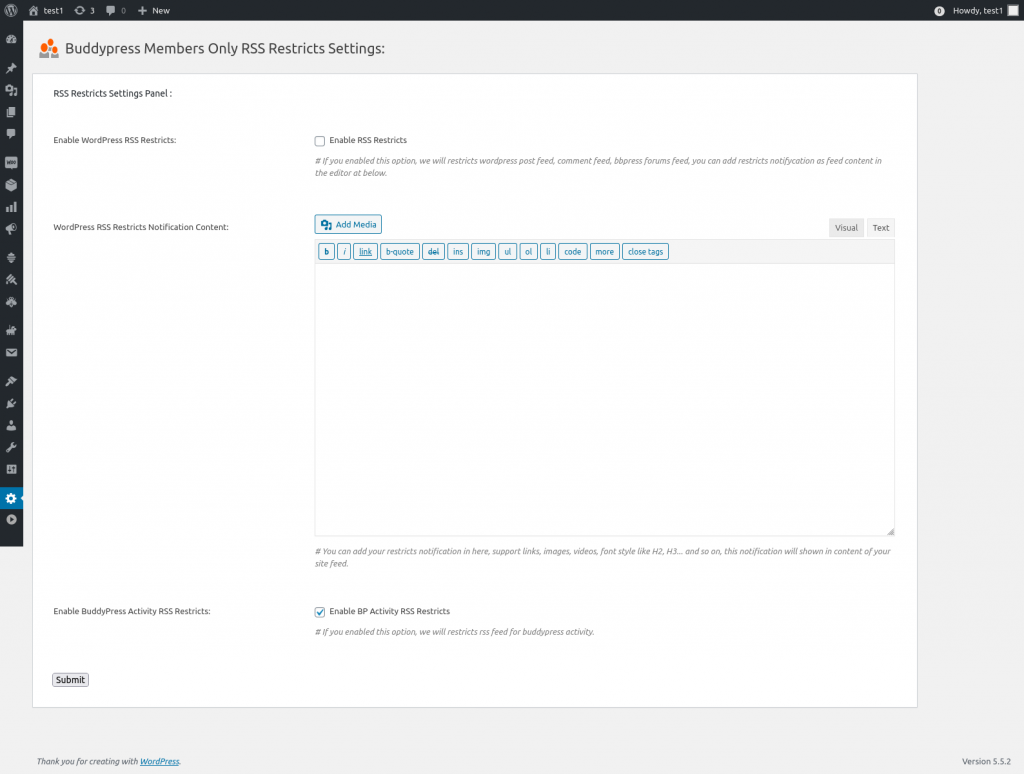
4: You will open “Buddypress Members Only RSS Restricts Settings” panel, it looks like this:

buddypress rss restriction

buddypress rss restriction

5: As you can see, in rss restricts panel, we added a new option: “Enable BuddyPress Activity RSS Restricts”, if you enable the option “Enable BuddyPress Activity RSS Restricts”, we will restricts rss feed of buddypress activity to users, when users open the rss feed of buddypress activity pages, there are nothing, by this way, we solved the problem of leak information from the user’s buddypress activity

If you want to enable rss feed of buddypress activity  for users, just disable the option “Enable BuddyPress Activity RSS Restricts”, then users can read content of buddypress activity again 🙂

Easy? 🙂

Thanks for the great feedback of buddypress membership plugin, as developer of buddypress membership plugin, we are not always know all user’s requirement, it is you — users of buddypress membership plugin, give us many rate suggestions to let us know what is the real needs of buddypress private sites, if you have any feedback or suggestion of buddypress members only plugin, please don’t hesitate to tell us, we are very happy to improve functions of our buddypress membership plugin always 🙂

Thanks, have a blessed weekend with your family 🙂

Best Regards,

Buddypress membership plugin support


Tagged with: , , , , ,

How to Purchase BuddyPress Membership Plugins?

Dear Buddypress membership plugin users, hope this message find you are doing well and having happy weekend with your family 🙂  A buddypress members only free plugin users said he love our buddypress members only plugin, he want to upgrade to the buddypress members only pro version, but he don’t know how to do it:


Subject: Membership Profiles

Message Body:
Hello. I have a website for Christian authors and bloggers. While I would like to keep that part of the website free for all, I am aiming
to create a paid membership feature using Buddypress. I am unable to  get a reply from this website on how to buy $12 Buddypress Members Only product and the $15 Buddypress Woocommerce Payment Gateway Plugin (I will be creating products through Woocommerce and would like to sell them on the website).


Our buddypress memebrship plugin support replied:

Hi,

Thanks for the message 🙂

We are very happy to help you 🙂

You can purchase plugin via:

BuddyPress WooCmmerce Payment Gateway Plugin
and
BuddyPress Members Only Pro Single Site License – – One Time Payment, Unlimited Upgrade

Any more question is welcome 🙂

Thanks, have a happy day with your family 🙂

Best Regards,
BuddyPress Memebrship Plugin Support Team

I think may be more users of BuddyPress Memebrs Only free plugin have the similar request, I’d like write a document to help users complete the purchase of BuddyPress Memebrship pro plugin:

1: Open our Buddypress membership site in your browser

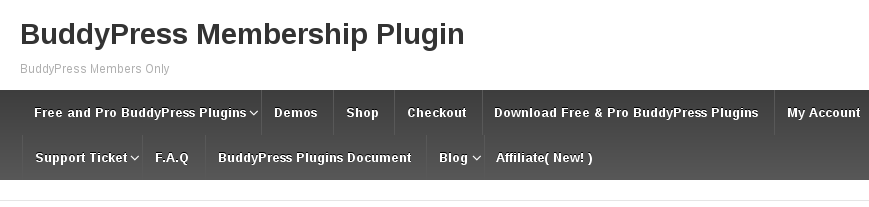
2: At the top menu bar, you will find the “Shop” menu item, it looks like this:

buddypress memebrship plugin site top menu

buddypress memebrship plugin site top menu

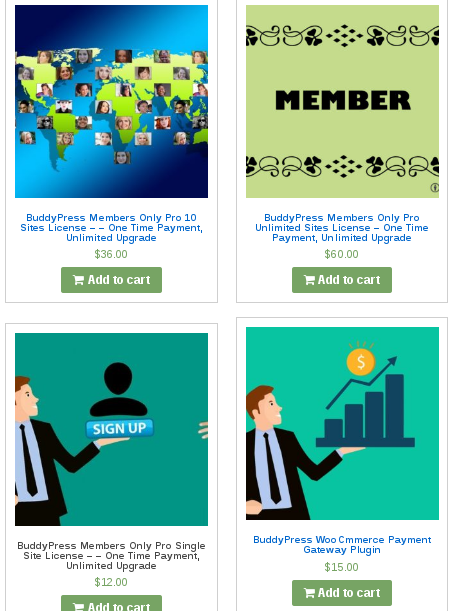
3: Please just click the Shop menu item on the top menu bar on Buddypress membership plugin site . You will open the Shop page in which we have listed all buddypress membership plugins in this products page, it looks like this:

buddypress membership plugin shop

buddypress membership plugin shop


4: At shop page, you can see we have listed all buddypres membership plugin products in this products page, and at the top of the shop page, you will find our buddypress membership plugin:

BuddyPress WooCmmerce Payment Gateway Plugin
and
BuddyPress Members Only Pro Single Site License – – One Time Payment, Unlimited Upgrade

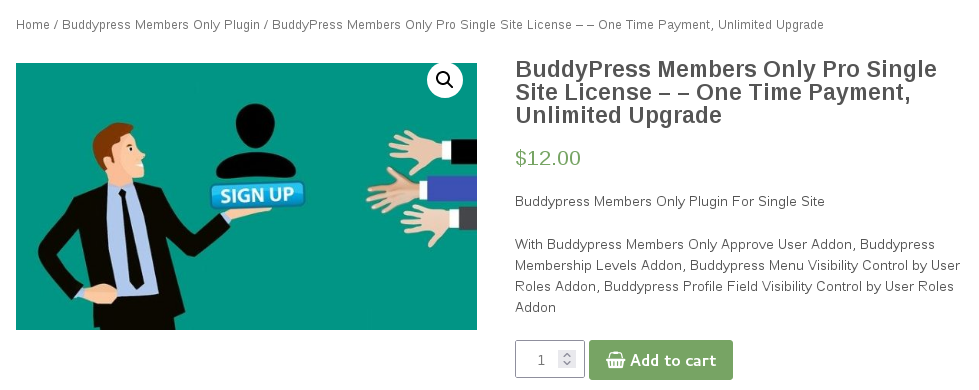
5: The price of BuddyPress Members Only Pro Single Site License – – One Time Payment, Unlimited Upgrade is $12.00, with Buddypress Members Only Approve User Addon, Buddypress Membership Levels Addon, Buddypress Menu Visibility Control by User Roles Addon, Buddypress Profile Field Visibility Control by User Roles Addon…etc,  one time payment, lifetime upgrade and support,  you can use the plugin in one of your owned buddypress site.

6: The price of BuddyPress WooCmmerce Payment Gateway Plugin is $15.00 per year,  BP WooCommerce Payment integrated buddypress with woocommerce to allow site owner assign wordpress user roles to your woocommerce product, so when your buddypress users can pay for membership product to become your paid member who can get access of your advanced buddypress component or services…etc, you can use it in one of your owned buddypress site,

7: After selected the version of BuddyPress Members Only Pro Single Site License – – One Time Payment, Unlimited Upgrade , what you need is add the product into the cart, it looks like this:

buddypress membership plugin product page

buddypress membership plugin product page

8: Please just click “Add to cart” green button in the product page of BuddyPress Members Only Pro Single Site License Plugin, then our buddypress membership ecommerce system will tell you ““BuddyPress Members Only Pro Single Site License – – One Time Payment, Unlimited Upgrade” has been added to your cart. “, it looks like this:

added buddypress membership plugin into cart

added buddypress membership plugin into cart

9: As you can see in the above screenshot, after added the buddypress members only plugin product into the cart, buddypress membership ecommerce system will give you a notice bar, in which have a green “View Cart” button, now what you need to do is just please just click “View Cart” button

10: Then you will open the “Cart” page, in which you can add / reduce product numbers… etc,  it looks like this:

wordpress tooltip cart in wordpress tooltip plugin site

cart in buddypress membership plugin site

11: At the bottom of the cart page, you will find the “Proceed to checkout” green button, please just click the “Proceed to checkout” button, to open the “Checkout” page, the “Checkout” page looks like this:

wordpress tooltip checkout page

buddypress membership checkout page

12: In the “Checkout” page, please just enter required fields, and click “Proceed to Paypal” button to complete the purchase via the paypal site, it just need about 1~2 minutes to finish the payment on paypal site

13: Some users do not have a paypal account, they just want to use credit card to paid the buddypress membership products, it is easy too:

We have enabled paypal credit card payment gateway now, on checkout page — https://tooltips.org/checkout ,after you click “proceed to paypal” button, you will find at on paypal login page, there are “pay with debit or credit card” bar, just click it you can pay buddypress membership plugins with credit card or debit card now, you do not need a paypal account, we made a screenshot,  it looks like this:

pay credit card without paypal account

pay credit card without paypal account

If you click “Pay with a debit or credit card”, then you will redirected to paypal guest checkout page, in which you can pay with your credit card or debit card, it looks like this:

paypal pay with credit card or debit card

paypal pay with credit card or debit card

In here, you can finish the payment with your credit card / debit card and you do not need a paypal account 🙂

15: After finish the payment, you will be redirected to buddypress membership plugin download page, then you can download buddypress membership pro plugin and install it on your wordpress site 🙂

About how to install buddypress membership pro plugin, you can find all of our buddypress members only plugin document with detailed video and screenshot at: buddypress membership plugin document

Thanks for the question: How to purchase buddypress membership plugins this will help more users buy the buddypress pro plugins easier, if you have any question or feature reqeust about our buddypress plugins, please don’t hesitate to tell us 🙂

Thanks, have a blessed weekend with your family 🙂

Best Regards,

BuddyPress Membership Plugin Support Team

Tagged with: , , ,

BuddyPress Membership Plugin 4.7.8 Released

Hi BuddyPress Membership Plugin users, hope this message finding you are doing well and have happy days with your family 🙂  A few days before, we reported that we released BuddyPress Membership Only Plugin 4.7.4, in which buddypress members only plugin support restrict private post content based on users roles in BuddyPress sites 🙂

In recent days, we get a few user’s ticket, to ask us how to protect their private content via different user roles and how to charge a little money from these private contents in their buddypress sites.  We think may be there are more users have the same questions, the better method is add a few new knowledge base items in the buddypress membership plugin knowledge base menu panel, to help buddypress plugin users understand it faster 🙂

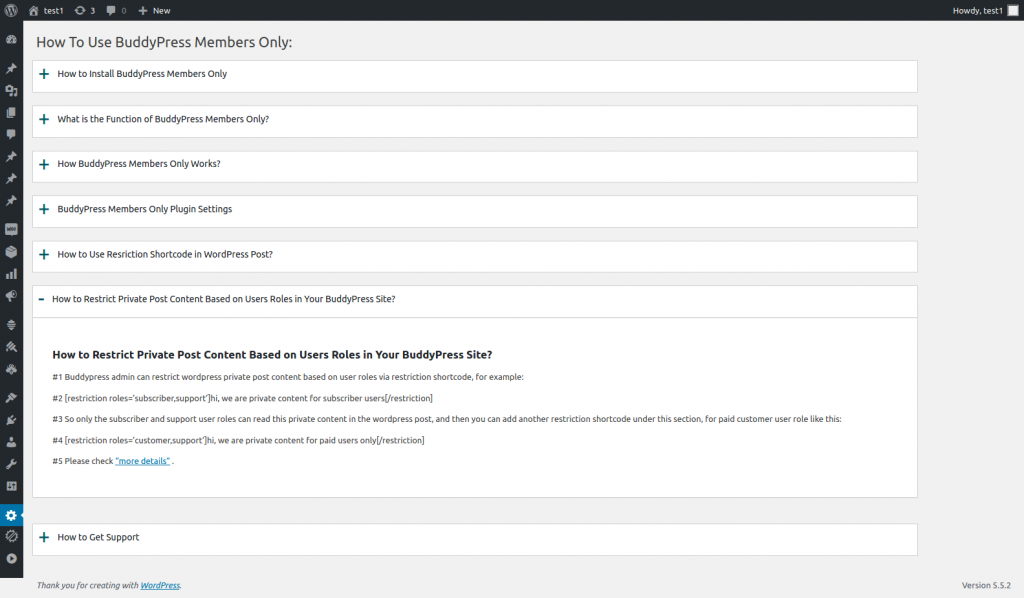
So our buddypress plugin developer developed  a new version buddypress membership plugin 4.7.8 to realize this function, if you upgrade to the buddypress membership plugin version 4.7.8, you will find there are two new new knowledge base item in the new knowledge base panel:

1: How to Restrict Private Post Content Based on Users Roles in Your BuddyPress Site?

2: How to Use Resriction Shortcode in WordPress Post?

It looks like this:

buddypress members only knowledge base

buddypress members only knowledge base

We will write more buddypress members only plugin knowledge base item for our buddypress plugin users, so buddypress users can use plugins more easier and faster 🙂

Thanks, have a blessed day with your family 🙂

BuddyPress Membership Plugin Support Team

Tagged with: , , , ,

BuddyPress Membership Plugin 2.8.5, New ShortCode to Restrict Content of WordPress Post

We Just Released BuddyPress Membership Plugin 2.8.5

Dear BuddyPress Membership Plugin users, hope this message find you are doing well and have happy weekend with your family, based on user’s feature request, we just released buddyPress membership plugin 2.8.5 — a new shortcode to  restrict content in wordPress post 🙂

Changes in 2.8.5, New Shortcode to Restrict Content of WordPress Post

We get a message from a user of buddypress membership pro plugin, he said he love our buddypress membership plugin, he used our buddypress membership plugin to build a dating site, he have restricted buddypress acitvity and buddypress members page to non-member users, and have have restricted a few important menu and functionality to guest users, just open these paid functions to paid members only, now he start to write some wordpress posts, and he hope, buddypress membership plugin can support restrict some important content in the wordpress post to guest users too, so only paid wordpress members can view a few important section in his wordpress pages, he do not want guest user or search engines open these important talk records to public users, based on his feature request, we have released buddypress membership plugin 4.7.0, then our developer think this is helpful function to help users of  buddypress members only free plugin too, so we added this function into buddypress members only 2.8.5. 🙂
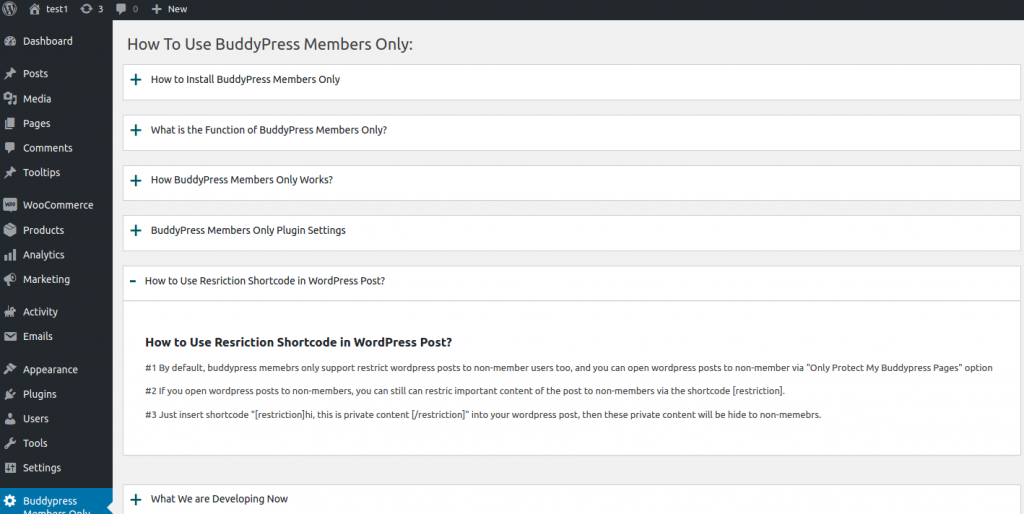
If you want a specific piece of content in a wordpress post to be available only to registered users, while hiding this short content from non-registered users, you can use the shortcode [Sorry, this is restricted content, please log in first

If the user have logged in your buddypress site, he will see the real content “hi, we are private content”,  else he will see the content “Sorry, this is restricted content, please log in first” — with the login link, you can set up the log in link in buddypress membership plugin settings panel, if you did not entered login link in buddypress membership plugin settings panel, buddypress membership plugin will use the wordpress default login link 🙂

Also we added a new buddypress members only FAQ in Knowledge menu, to help users understand how to use this shortcode [restriction], it looks like this:

how to use restriction shortcode

how to use restriction shortcode

If you have any more suggestion, please don’t hesitate to tell us, we are very happy to build a better and better buddyrpess plugin for you 🙂

Thanks, have a happy weekend with your family 🙂

BuddyPress Membership Plugin Support Team

Tagged with: , , ,

BuddyPress Membership Plugin Site Update at 2020-08-16

Hi Dear BuddyPress Membership Plugin Users,

Hope this message find you are doing well and having happy weekend with your family 🙂

We are happy to report you, we have updated our buddypress membership site, changes at 2020-08-16:

1: We upgraded buddypress membership plugin, we have released buddypress members only plugin 4.6.2, please login your buddyrpess membership site account and download the latest version of buddypress members only plugin and upgrade it asap 🙂

2: We have updated Pay With a Login or Register Members Only Plugin

3: We have updated Pay With a Link Members Only Plugin

4: We have updated Pay With a Comment Members Only Plugin

5: Based on buddypress members only plugin user’s request, we have added a “BuddyPress Plugins Recent Posts” widget at right sidebar, so users of buddypress plugin can view the latest plugin updates news quickly, not need to check each buddypress plugins categories one by one 🙂

6: We have rewrite description of buddypress membership plugin, you can find it at BuddyPress Members Only Pro Plugin Features

7: We have improved performance of buddypress site by enable lazy load plugin, so users can open buddypress plugins pages faster 🙂

We are developing new buddypress plugins for users, you will see new versions soon 🙂

Thanks, have a blessed weekend with your family 🙂

Best Regards,

BuddyPress Membership Plugin Support

Tagged with: , ,

BuddyPress Members Only Plugin Site Migrated to New Hosting and Optimized Performance for Our Site

Hi Dear BuddyPress Membership Plugin Users,

Hope this message find you are doing well and have happy weekend with your family 🙂

We are happy to report you, our BuddyPress Members Only Plugin Site Migrated to New Hosting and Optimized Performance for Our Site!

With the new hosting, we will do more works for your buddypress membership plugin site, we plan to adding CDN for buddypress membership site, and we plan to add more buddypress plugins into out buddypress membership site, the next buddypress plugin we will online for buddypress users is buddypress cache plugin, we developed buddyress cache plugin about 5 years before, we using it for our own buddypress network social sites, now we will share it with our buddypress members only users 🙂

Also we have speed up our buddepress membership plugin site, before we optimized our buddypress network social membership site, it is slow, but now if you open pages on buddypress network social membership site, you will find you can open pages in 2s~3s 🙂

In last few months, we have a little trouble and we are come back to develop more buddypress plugins for users, you will see many buddypress plugins soon 🙂

If you have any feature request about buddypress plugins, please don’t hesitate to tell us, we are happy to realize it for you 🙂

Thanks, have a happy weekend with your family 🙂

Best Regards,

BuddyPress Membership Plugin Support Team

Tagged with: , ,

BuddyPress Membership Plugin 4.6.0 Released

Dear BuddyPress Membership Plugin Users,

Hope this message find you are doing well and having happy days with your family! 🙂

We are happy to report you, we have finished a new buddypress membership plugin version, in buddypress membership plugin 4.6.0,when users deactivate the plugin, we will remove rewrite rules automatically. 🙂

We have released a few members only plugin, for example buddypress members only plugin, wordpress pay with a link plugin, wordpress pay with a comment plugin, wordpress pay with a register or login user plugin, we are developing a few new membership  plugins,  if you have any feature request of buddypress membership plugin, please don’t hesitate to tell us 🙂

Thanks, have  a blessed day with your family 🙂

BuddyPress Membership Plugin Support Team

Tagged with: , ,
Top