Introducing Domain Restrictions: Combat Spam, Foster Community, and Enhance Security in BuddyPress Members Only Pro Plus 5.7.6
Hi Dear BuddyPress Membership plugin users, I hope this message finds you are doing well and having happy days with your family 🙂 A BuddyPress user submitted a ticket, he mentioned:
We built a BuddyPress social networking platform aimed at creating a closed professional community focused on a specific industry, field, or occupation (such as healthcare industry experts). Our platform ensures that only professionals from that field are part of the community. We hope to restrict the email domains to those of certain companies or industry-specific addresses, allowing registration only with email domains from specific companies or industry-recognized email services.
Our buddypress members only plugin developer reviewed the ticket, we believe many buddypress users have similar requirements, so we would like to develop a new version to fulfill the feature request for BuddyPress membership users. 🙂
Step-by-Step Guide to Restrict Email Domains for Enhanced BuddyPress Community Security
1 Access your account on the BuddyPress Members Only platform.
2 Obtain the most recent release of the BuddyPress Membership plugin (version 5.7.6 or higher).
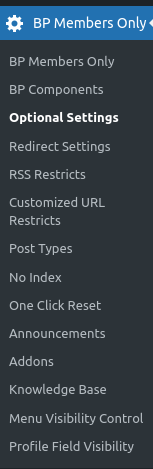
3 Access your BuddyPress site with your admin credentials, navigate to the WordPress dashboard, and select the BP Members Only menu to access the ‘BuddyPress Members Only Settings’ section.The menu looks like this:
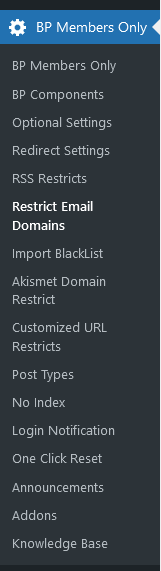
4 Next, click on the ‘Restrict Email’ sub-menu item to display the ‘Restrict Email Domains Settings’ panel, which appears as follows:
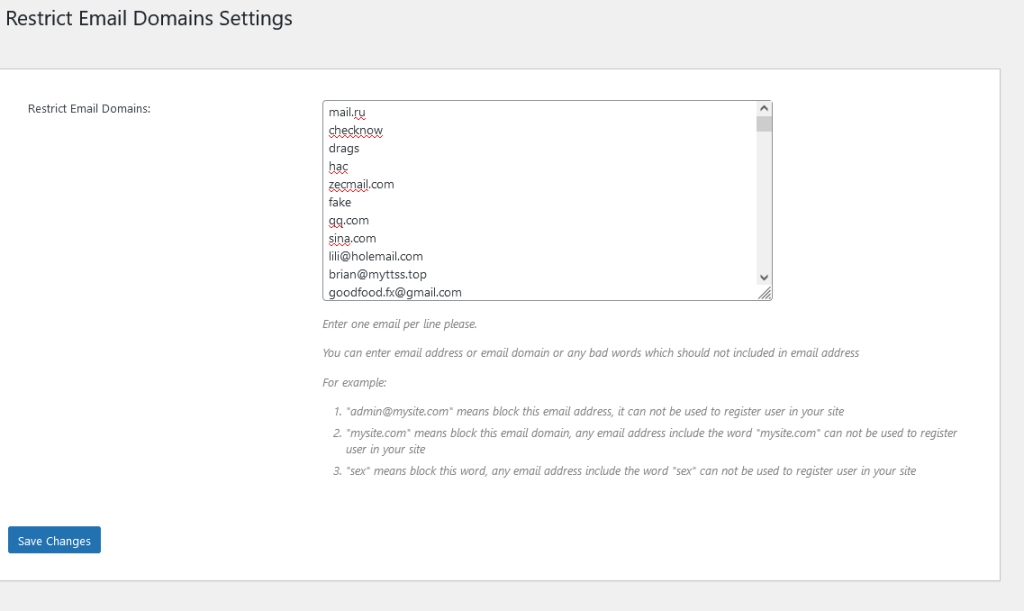
Restrict Email Domains Settings for buddypress 2024
5 In the ‘Restrict Email Domains Settings’ panel, you have the ability to create an email blacklist using the ‘Restrict Email Domains’ option as follows:
#1 Input one email per line.
#2 You can specify either an email address, an email domain, or any inappropriate words that should be excluded from email addresses. For instance:
- ‘admin@mysite.com‘ will block this specific email address, preventing it from being used for user registration on your site.
- ‘mysite.com’ will block this email domain, meaning any email address containing ‘mysite.com’ cannot be used for registration.
- ‘sex’ will block this term, so any email address that includes the word ‘sex’ will be disallowed for user registration.
Consequently, when users attempt to register as members of your site, if their email address contains any blacklisted words, email addresses, or domains, they will receive an error message stating, ‘Sorry: Your email address is not allowed on this site,’ and will be unable to complete their registration:

Conclusion:
We believe many social network owners who use the BuddyPress plugin will need this function. Below are some types of social websites and scenarios where the ‘restrict email domains’ feature might be needed:
Internal Company Social Platforms
Purpose: These platforms are typically used for communication, collaboration, and information sharing among employees. If a company wants to ensure that only internal employees can register and use the platform, restricting email domains ensures that only company email addresses (e.g., @company.com) can be used for registration.
Example: A large company’s internal social network or knowledge-sharing platform (such as Slack, Microsoft Teams, etc.) that only allows login with company email addresses.
School or University Social Platforms
Purpose: A school or university may wish to create a social platform for students and faculty. By restricting registrations to email domains associated with the school (e.g., @university.edu), the platform ensures that only legitimate students and staff can join, avoiding external interference.
Example: A school’s campus forum, social network, or learning platform that only allows registration with an email address from the school’s domain.
Professional or Industry Platforms
Purpose: If a social platform operates on a membership basis with specific identity requirements (e.g., high-net-worth individuals, members of a particular organization), restricting email domains ensures that only people who meet the specific criteria can join.
Example: A social platform for high-end investors that only allows email addresses from financial institutions or investment companies to register.
Temporary/Event-based Social Websites
Purpose: For short-term events, conferences, or social gatherings organized by a company or organization, a dedicated platform may be created for participants to interact. Restricting email domains ensures that only attendees can join.
Example: A community for conference attendees or a temporary product launch-related social network that might be closed or deleted after the event.
Community Platforms (Restricted or Moderated)
Purpose: Some social platforms aim to create a more controlled community environment to prevent spam, fake accounts, or irrelevant users from joining. By restricting email domains, the platform can improve its quality and avoid misuse.
Example: A community dedicated to high-quality content and discussions that might only accept email addresses from well-known email providers (e.g., Gmail, Outlook) or specific groups.
Summary: This feature is generally used by social websites that need to “filter” users, control platform quality, or ensure specific identity verification. By restricting email domains, the platform can ensure that only people who meet certain criteria can register or log in, thereby improving security, social quality, and the professionalism of the user base.