Hi BuddyPress Membership Users,
A buddypress user asked us a question, he said he have a medical buddypress site, he want to know how to stop any buddypress logged in users and guest view buddypress members page? I think maybe many more users have the same question, I am happy to reply in here publicly:
How to Hide BuddyPress Members Page to Everybody?
1: Login your account at buddypress membership plugin site
2: Download buddypress membership plugin via “My account” page
3: Login your wordpress admin area
4: Click “Plugins” menu item
5: Deactivated old buddypress membership verion
6: Delete the old buddypress membership plugin
7: In “Plugins” menu item, click add new at the top of the plugins panel
8: Upload the new buddypress membership plugin zip file which you downloaded from buddypress memebrs only plugin site
9: Activate latest version of buddypress membership plugin
10: Click “BP Members Only” menu item
11: Click “BP Components” sub menu item, you will open “Buddypress Members Only Components Setting:” panel
12: You will find we have listed all users roles include guest user roles for you, please click any user roles in this panel, it looks like this:

13: You will find we have listed all buddypress components for each user role, please just checked to open or close “Buddypress Members Component” checkbox, it looks like this:
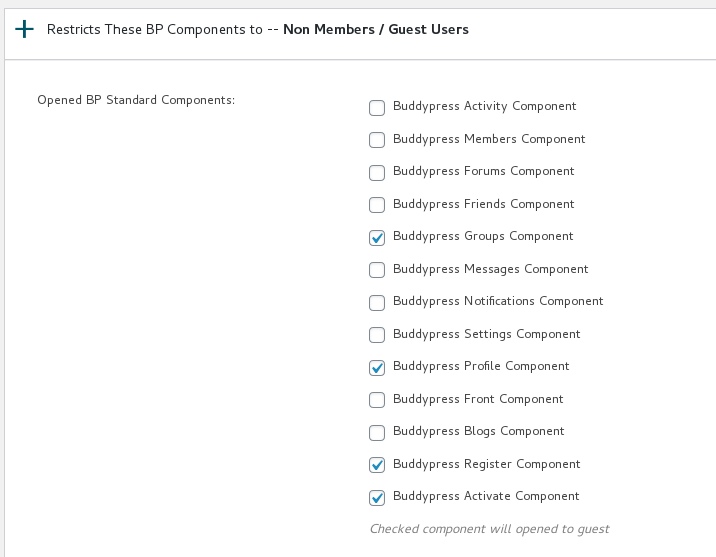
open or close buddypress component panel in buddypress membership plugin
13 Click “Submit” button
14 In front end, when guest user or logged in members view your buddypress members page, they will be redirected to the custom URL which you set up in buddypress membership plugin settings panel. By this way, you can make the buddypress members page private, no any one can open buddypress members page 🙂
Hope this will help you know how to completely hide buddypress membership page for everybody, if you have any more question, please contact us, we are happy to answer your question and help you works well with buddypress site 🙂
Thanks, have a blessed day with your family 🙂
BuddyPress Membership Plugin Support Team