BuddyPress Members Only is a BuddyPress Membership solution, it help you to make your buddypress site only viewable to allowed users based on user roles in a few minutes, just activate the plugin, follow detailed guide of each option to finish a little setting work in admin panel, the plugin will protect your buddypress and wordpress perfectly. Just $12, you will have a powerful Buddypress Membership plugin to build a comfortable & safe private buddypress community for your buddypress users, Unlimited Download, Lifetime Upgrades, Ticket Support:
- Restricts Your BuddyPress and WordPress to allowed users based on user roles
- Restricts BuddyPress standard components and customization components to users based on user roles, for example, you can choose which components will open to guest user, and open members component page to subscriber user roles, and open activity component page to paid user roles only… and so on, in back end it is very easy to setting which components will only opened to logged in users based on user roles
- BuddyPress Menu Visibility Control by user roles, for example, in menu bar, support user role can find staff menu item, and customer can find download menu item… and so on, you can control menu visibility by user roles, each user roles can have their own menu items, so buddypress admin will not need make a long menu bar at the top of the buddypress site.
- BuddyPress Profile Field Visibility Control by user roles, you can chose to hide buddypress profile fields in buddypress profile page, based on user roles, for example, buddypress non-member guest can not view buddypress profile fields like name, age, address… and so on, but customer user roles can see name, age, address… fields, by this way, you can build a comfortable & safe private buddypress community for buddypress users, users’ privacy be respected.
- Restricts Site RSS Feed, you can add restricts notification in editor, support image, link, font style, videos… and so on, restricts notification will shown in feed content
- One click to add default membership levels and custom the name of membership level as any thing you want, for example: Bronze, Silver, Gold… and so on
- Charge Membership fees with BuddyPress Membership WooCmmerce Payment Gateway Plugin
- Approved users only addon, if enabled this addon, when users register as members, they need awaiting administrator approve their account manually, at the same time when unapproved users try to login your site, they can not login your site and they will get a message that noticed they have to waiting for admin approve their access first, only approved users can login your site.
You can enable / disable approve user addon at anytime in addon manage panel - Customized URLs Restricts based on user role, For example, you can settings https://yourdomain.com/members/%username%/forums/ only opened for paid users, or open %sitename%/family/%username%/ for family user types… and so on.
- Options to only protect your buddypress pages, so other section on your wordpress site will be open to the guest users.
- Enable page level protect, when you edit a post, you can choose setting it as a members only page or not.
- Login and Logout auto redirect based on user roles, for example, you can let women user role go to messages page after they logged in, and let man user role go to members page after they logged in, or let subscriber user role go to product / upgrade members page after they logged out…and so on
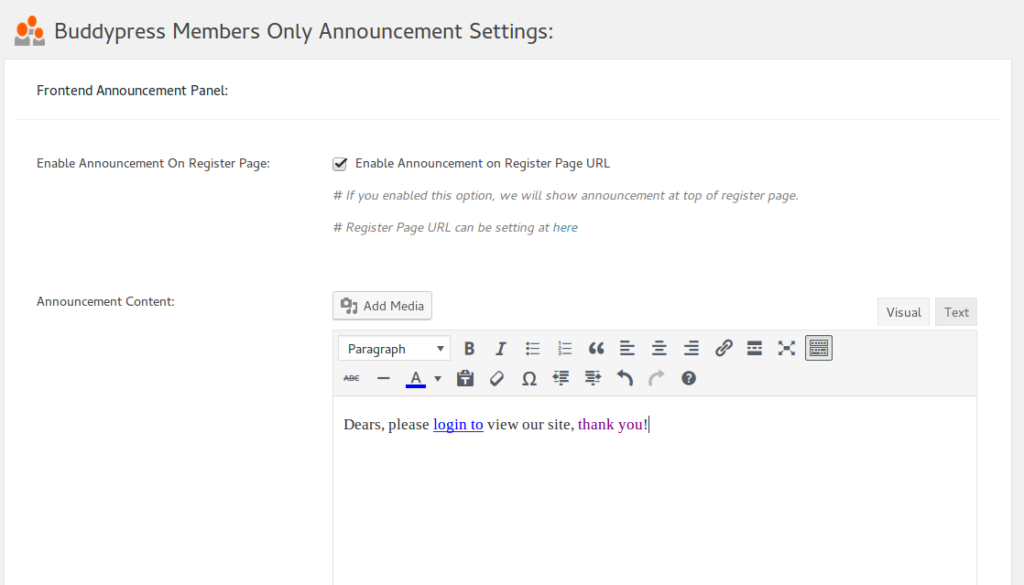
- Support Add Announcement on Buddypress Members Only register page, you can add announcement in editor with image, link, font style, videos… and so on, we will show announcement at top of register page.
- Custom / Hide WordPress Login Link, change wordpress default login link for buddypress private network, to stop spam bot
- Support One Click Reset all Settings
- Supported https and websocket
- If you disable buddypress, our plugins will detect it automatically and continue to protect your wordpress pages.
- ……
- BuddyPress Membership Plugin Demos
Restricts your Buddypress to logged in/registered members only
Only registered/logged in users can view your site, by default, non members can only open home page/login/register/lost password pages.
Logged in users have full access.
If a user who did not logged in your site, he can open home page, but when he try to view any other buddypress content, he will be redirected to optionally URL which can be setting in admin panel.
If you want more pages opened to non members users, you can enter page URLs in “Opened Page URLs” option, you can add any urls (enter one URL per line please) which opened to public, guest can view content of these opened post / pages / stores… and so on, when they view these opened pages, they will not be redirected to register page, else they will be redirect to your pages which you setting in admin area, for example, register page or store page or membership payment page… and so on.
Restricts your Buddypress standard components to Logged in/Registered members only
In admin area, In “BP Components” option panel, you will find we have listed all buddypress standard buddypress components in a checkbox list, you can choose which components will open to guest user, or which components will only opened to logged in users, just a little mouse clicks, you can checked any buddypress standard components to open to non member users, and disallow non member users to touch other buddypress standard component, when non member users try to open any pages related with protected buddypress standard components, they will be redirected to redirect page which you setting in admin area, for example, you can setting non member users be redirect to your register page or your members payment page.
For example, you can open Buddypress Members Component / pages to non member users, but if they want to click members profile pages, they will be redirect your register page or payment page, or you can hidden your Buddypress Activity pages, so all of your buddypress activities can only be opened after they register and logged in your site.
Or you can open Buddypress Forums Component / Pages to non member users, but when non member users try to open pages related with Buddypress Groups Component, they will be redirected to the redirect page which you setting in admin area.. and so on, infinite possibilities.
Restricts your BP customized Components to Logged in/Registered members only
We understand there are many amazing developer developed many customized buddypress components, for example, I designed buddypress family components which have many amazing features to help Family Communication, maybe you hope only logged in member users can access these customized buddypress, so you can very easy to disable non member users to access these pages, also you can add any customized buddypress components to a whitelist, and these buddypress components can opened by non member users.
Restricts BP standard components and customization components to users based on user roles
We support restricts BP standard components and customization components to users based on user roles, it looks like this:

You can setting which buddypress components opened for Non-Members / Guest users, and which buddypress components opened for logged in users based on user roles, for example:
1: You can setting allow Non-Members / Guest users only open buddypress members page, but they can not check buddypress members profile pages,
2: You can setting subscriber users can open buddypress members page and buddypress members profile pages, but they can not open buddypress messages pages.
3: You can setting paid members can open buddypress member pages and buddypress member profile pages, and they can not buddypress messages pages…
4: …. and so on
BuddyPress Menu Visibility Control by User Roles
You will find the “Menu Visibility Control by User Roles” Addon in buddypress members only addon menu item.
If you enabled “Menu Visibility Control by User Roles” Addon, you will a new buddypress members only menu “Menu Visibility Control”
In “Menu Visibility Control” panel, please checked “Yes, I will enable menu Visibility control by user roles” option and click submit and read our detailed description
If you checked this option, We will add a menu Visibility list option for each menu items at wordpress standard menus setting panel.
Then in “Menu structure” panel, if you click any menu item, you will find “Menu Visibility Control by User Roles” option, and we have listed all user roles in here
You can apply visibility controls to each menu items by user roles, for example, you can only allow customer user role to see download menu, subscriber & customer user role can see product menu… and so on, we make a few screenshots on our buddypress membership plugin site like screenshots below:
When users logged in as subscriber user role or customer user role, he will see the “My Account” menu item at the top bar, like this:
Subscriber or Customer User Role Menu Items
When guest non-member users role view our buddypress membership plugin site, in the top bar, he will not see the “My Account” menu item:

Guest User Role Menu Items
In front end, different user roles will have different menu item, based on your settings in back end, back end looks like this:
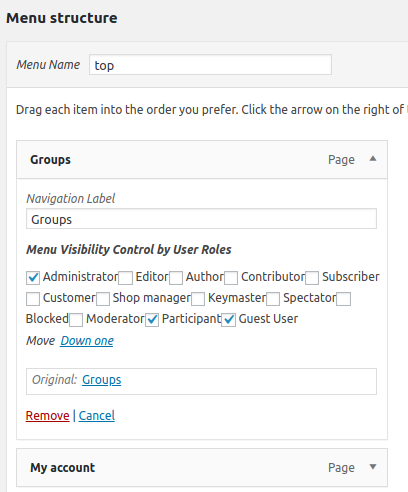
menu visibility in appearance menus panel
Please note, once you activated Menu Visibility Control addon, by default, all menu item in frontend will be hidden, you need setting “Menu Visibility Control by User Roles” option for each menu item
BuddyPress Profile Field Visibility Control By User Roles
A few users told me they do not hope buddypress members profile filed be viewed by public users, for example, members’ name, age, sex, address… and so on. But as you know, in buddyrpess profile page, everyone can view other guys profile fields, because in buddypress, all fields will be settings as “Every One” by defailt, of course, profile owner can edit their profile fields one by one, but many user will ignored these settings because they are too busy to learn each options in buddypress settings panel, that’s why we created this one-click solution for buddypress community owners, it is very easy to hide profile fields based on user roles:
In back end, You will find the “Profile Field Visibility Control by User Roles Addon” Addon in buddypress members only “Addon” menu item, it looks like this:
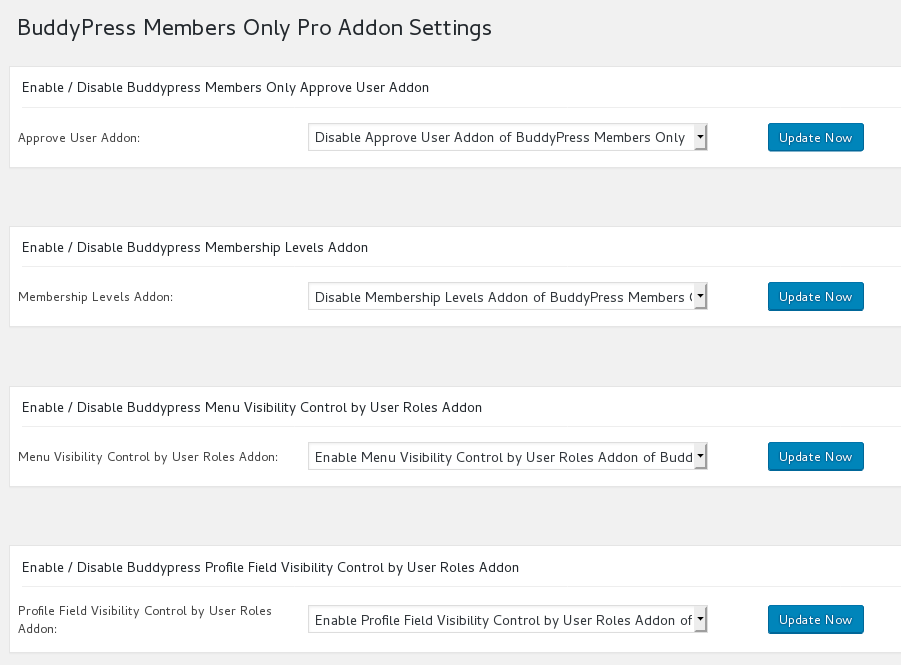
buddypress mebership plugin addons
If you enabled “buddypress Profile Field Visibility Control by User Roles” Addon, you will a new buddypress members only menu “Profile Field Visibility”
If you click the “Profile Field Visibility” menu item, you will open “BuddyPress Profile Field Visibility Setting” panel, it loks like this:
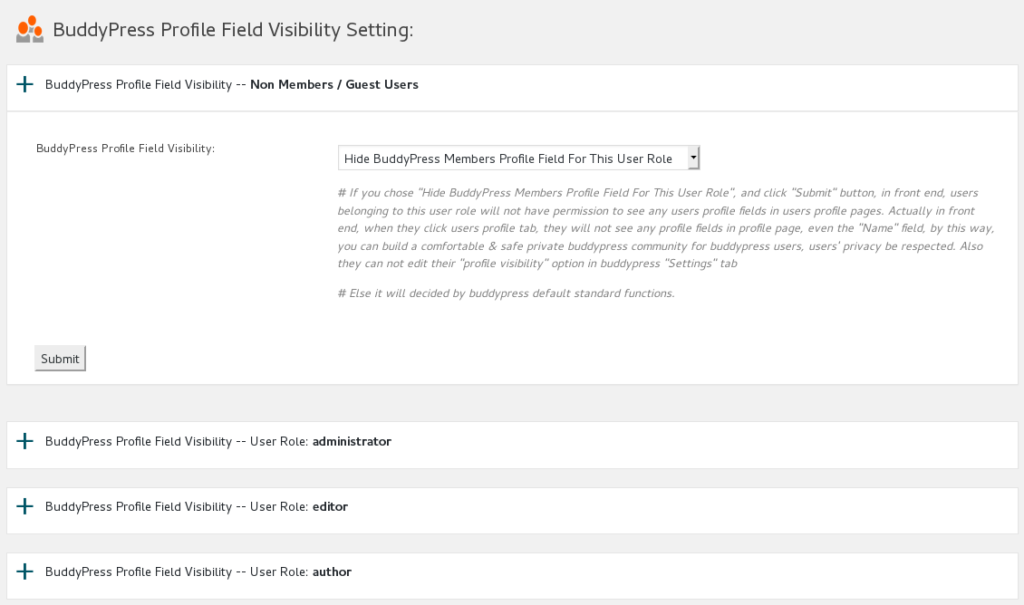
buddypress profile field visibility
In the “BuddyPress Profile Field Visibility Setting” panel, you will find we have listed all users roles for you with a accordion effect, please click any one user role item, you will find “BuddyPress Profile Field Visibility” option in expanded window, you can choose to “Hide BuddyPress Members Profile Field For This User Role” or “Enable BuddyPress Members Profile Field For This User Role”
If you chose “Hide BuddyPress Members Profile Field For This User Role”, in front end, users belonging to this user role will not have permission to open users’ profile pages.
Actually in front end, when they click users profile tab, they will not see any profile fields in profile page, even the “Name” field, by this way, you can build a comfortable & safe private buddypress community for buddypress users, users’ privacy be respected.
Also they can not edit their “profile visibility” option in buddypress “Settings” tab.
Else it will decided by buddypress default standard functions.
You can find a demo at my buddypress profile field demo page
Membership Levels Management

membership levels management
Our plugin support one click to create membership levels automatically, each membership level is a wordpress user role. By default users will see their membership level as “Membership Level 1″… “Membership Level 10” and so on, you can custom the name of membership level as any thing you want, for example: Bronze, Silver, Gold… and so on. It is very easy to use, you can one click to add default 10 membership levels, one click to remove default 10 membership levels, edit label of each default membership levels… and so on.
Charge Buddypress Membership Fees With BuddyPress WooCmmerce Payment Gateway Plugin
You can charge membership fees from user levels, our BuddyPress WooCommerce Payment plugin integrated buddypress with woocommerce to allow site owner assign wordpress user roles to your woocommerce product, so when your buddypress users can pay for membership product to become your paid member, paid member can get access of your advanced buddypress component or services.
Our BuddyPress WooCmmerce plugin is very easy to use, once you installed our BuddyPress WooCmmerce Payment Gateway plugin, you will find menu item “BuddyPress WooCommerce” in admin area.
If you click “BuddyPress WooCommerce” menu item, you can enable BP Membership WooCommerce Payment Gateway
#1 If you enabled option “Enable Membership Payment Gateway”, When you add / edit woocommerce products, you will find new tab “BP Membership” under “Product data”.
#2 If you click “BP Membership” tab, You will find we have listed all user roles in “Membership Role” dropdown box, you can assign any user role to this product.
#3 Once user completed the order for this product, we will assign selected user role to paid customers automatically, this means you can charge membership level fee via woocommerce products.
#4 If you cancelled users order in woocommerce order manager, we will remove user membership role.
#5 If you refund users order in woocommerce order manager, we will remove user membership role too
#6 In Buddypress Members Only Pro Plugin, you can enable membership levels addon to add membership levels, and custom membership name.
#7 In Buddypress Members Only Pro Plugin, you can enable / disable buddypress component access for each user roles, for example user level1 can open members page, but level2 can do more things — open user profile pages, and level3 can post to buddypress activity… and so on.
#8 In WooCommerce Product editor, you can add membership levels which generated by “buddypress members only” plugin to “Membership role” dropdown box in “BP Membership” tab, then based on #7, you can charge membership levels fee for your buddypress component access
Approved Users Only Addon
if enabled this addon, when users register as members, they need awaiting administrator approve their account manually, at the same time when unapproved users try to login your site, they can not login your site and they will get a message that noticed they have to waiting for admin approve their access first, it looks like this:
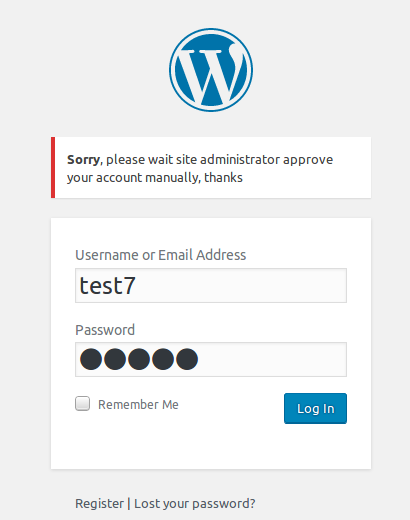
After enabled approve user addon, all registered users need approved by site administrator manually, but Super administrator (user ID = 1) and users who have admin user role will never be settings as unapproved user, they can always login your site.After enabled approve users addon, you will find a new sub menu item — “Approve User”, in the “Buddypress Members Only Approve User Addon Setting” panel, you can approve all existed users as approved users by one click.
Also admin user can approve or unapprove any users at anytime, admin can find users approved status at wordpress standard users list page, it looks like this:
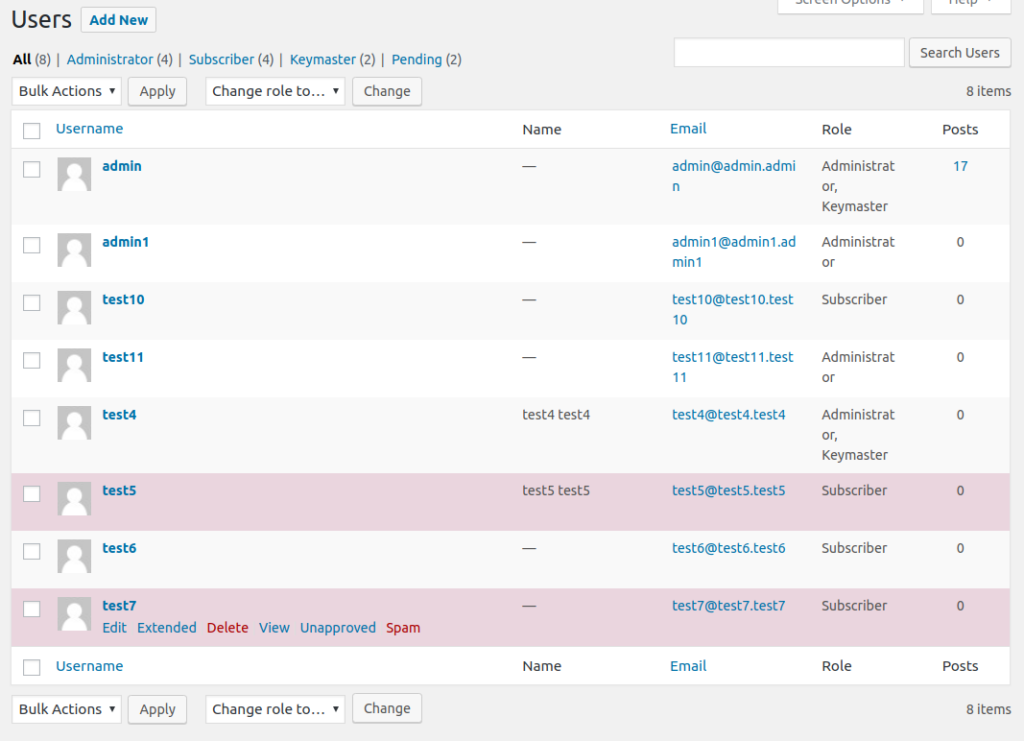
Unapproved users will be mark as red background, also If you move your mouse on users name at users list page, you will find Approve and Unapprove links, just click links, you will be redirect edit user panel, at the bottom of the edit user panel, you will find Approve User option, and you can approve or unapprove that user manually.
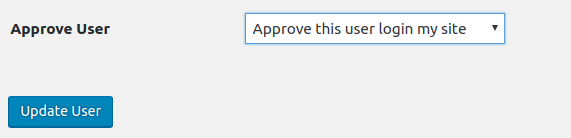
You can enable / disable buddypress approve user addon at anytime in addon manage panel
Options to only protect your buddypress pages
Some users requested to only protect buddypress pages, and open all other pages related wordpress section to non member users. We have realized this feature, just click the option “All Other Sections On Your Site Will Be Opened to Guest”, then other sections, for example page, post, store… and so on will be opened to non member users, at the same time, when they want to view your buddypress sections, they will be redirect to your redirect page which setting in admin area.
Enable page level protect
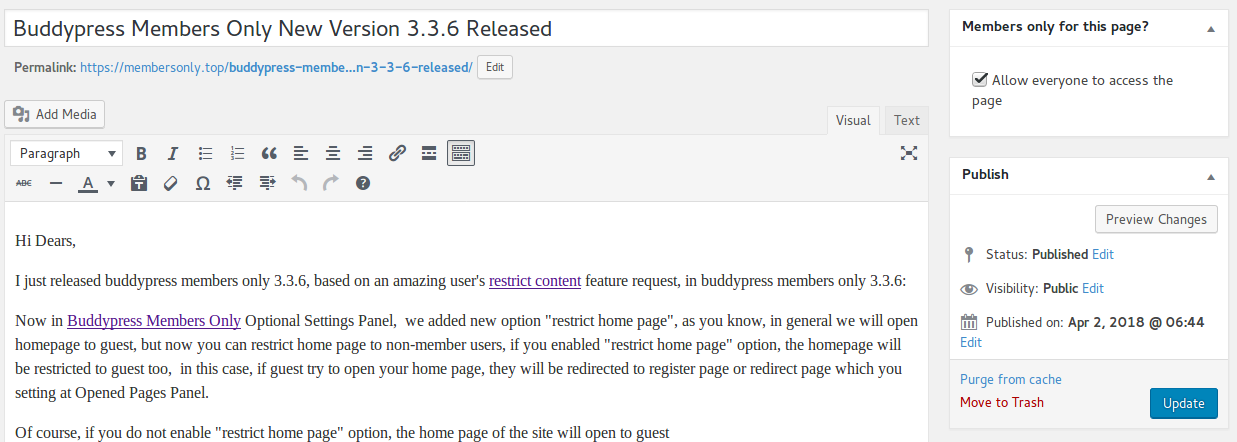
If you enabled page level protect option, when you edit page / post / product / video… and so on, you will find “Members only for this page?” meta box at the right top of the wordpress standard editor. If you checked “Allow everyone to access the page” checkbox in this meta box, the post will be opened to all guest users, by this way, you do not need enter page URLs to Opened Pages Panel always.
Login and Logout auto redirect based on user roles
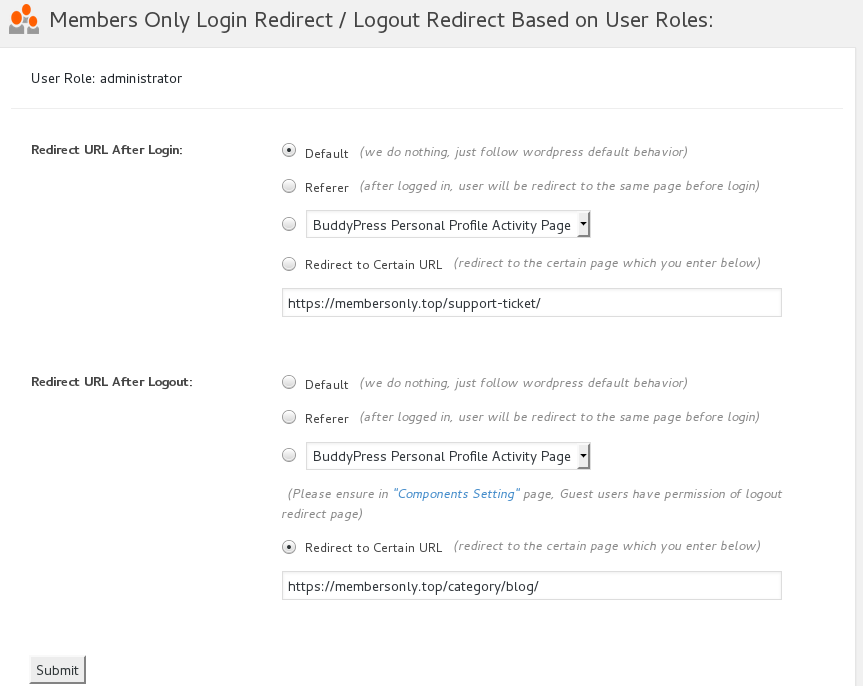
you can setting after login redirect URLs and after logout URLs based on user roles. For example, you can setting users which have subscriber role redirect to their activity page after they logged in, and let users who have woocommerce customer role redirected to their shop account page,or redirect editors to their messages page… and so on.
This feature is very easy to use, please logged in your admin area, open BP Members Only menu, click redirect setting sub menu item, you can find we have listed all roles automatically, just select roles which you want to setting via a few clicks, Buddypress Membership Plugin support 14 “after login redirect” methods and 11 “after logout redirect” methods:
1: Default, this means do nothing and just follow buddypress and wordpress default behaviour.
2: Referer, this means after logged in, user will be redirect to the same page before login
3: Redirect to Certain URL, you can enter any page URL in your domain, users which have related roles will be redirected to this URL after they logged in.
4: Setting users redirect to BuddyPress Personal Profile Activity Page
5: Setting users redirect to BuddyPress Members Page
6: Setting users redirect to BuddyPress Personal Friends Page
7: Setting users redirect to BuddyPress Personal Messages Page
8: Setting users redirect to BuddyPress Personal Notifications Page
9: Setting users redirect to BuddyPress Personal Settings Page
10: Setting users redirect to BuddyPress Personal Profile Page
11: Setting users redirect to BuddyPress Personal Favorites Page
12: Setting users redirect to BuddyPress Personal Mentions Page
13: Setting users redirect to BuddyPress Site Wide Activity Page
14: Setting users redirect to BuddyPress Groups Page
All features works well on Buddypress, but if you disable Buddypress, this module will works well on WordPress too.
Options to Use Permanent 301 Redirect Instead of Temporary 302 Redirect
When users open a members only page, if the user have no permission to view the page, we will redirect users to your specified landing page — in general wordpress will use a 302 temporary redirect to do this. if you enabled this option, we can use 301 redirect instead of 302 redirect, generally speaking, a 301 permanent redirect is better for search engine optimization than a temporary redirect. You can find redirect settings in here
This will change redirect methods when:
1: Non-member and other member levels redirect to register rage URL or redirect URL
2: Restricts BP components to Non-member / guest, include:
Buddypress Activity Component
Buddypress Members Component
Buddypress Forums Component
Buddypress Friends Component
Buddypress Groups Component
Buddypress Messages Component
Buddypress Notifications Component
Buddypress Settings Component
Buddypress Profile Component
Buddypress Blogs Component
and other opened customized components you entered
3: Home page when you enabled “Restrict Home Page of the Site”
4: Non-member and other member levels redirect settings of “redirect after login” and “redirect after logout”, include options of:
Default
Referer
Redirect to Certain URL
redirect to buddypress component pages
Customized URLs Restricts based on user role
You can use tags to build your Restricts roles to restricts Customized URLs pages — based on user roles, you can open specified pages based for some user roles, at the same time, you can close specified pages based for some other user roles.
For example, you can use placeholders / tags: %username% and %sitename% to restricts your customized URLs pages,
* For example: you can open https://yourdomain.com/members/%username%/forums/ for customer user roles
* For example: you can open %sitename%/family/%username%/ to family user roles
* For example: you can open %sitename%/%username%/questions to subscriber user roles
And at the same time, you can
* Close %sitename%/support only for user role customer
* Open %sitename%/product for guest user role
… and so on
Restricts Site RSS Feed
in admin -> BP Members Ony -> RSS Restricts Panel, you can enable / disable RSS Restricts, you can add restricts notification in editor, support image, link, font style, videos… and so on, restricts notification will shown in feed content
One Click Reset All
In one click reset panel, you can reset all settings in buddypress members only pro
New Version Update Notification
When we released a new version of buddypress members only pro plugin, you will get plugin update notify on admin top bar
Support Add Announcement on buddypress members only plugin register page / redirect page
In admin -> BP Members Ony -> Announcement Panel, you can enable / disable announcement on register page, you can add announcement in editor with image, link, font style, videos… and so on, we will show announcement at top of register page, if you disable buddypress, this features works well on wordpress too.
Custom / Hide WordPress Default Login Link
Why custom login link? A few users said they hope change wordpress login link for their private network, for stop spam bot. By default, wordpress login link is https://yourdomain.com/wp-login.php, but you can custom it as https://yourdomain.com/signin, and so on. If you do not want to custom wordpress login link, just delete your value in this filed.
Support HTTPS / HTTP and Websocket
Our plugin will detect your site is use https or http automatically and works well for both of HTTPS and HTTP, also our plugin support websocket too.
We have built a few demos at here.
Via our buddypress membership plugin, you can build a buddypress membership site quickly. More amazing features is be developing, for example we are develop new feature of multi membership levels, also there are many feature in To-Do lists, if you hope more features, contact us and any feature request is welcome. 🙂
Changelog of BuddyPress Membership Plugin
BuddyPress Membership Plugin Version 4.6.6
BuddyPress Membership Plugin Version 4.6.2
Use wordpress ‘ABSPATH’ to enhance security of buddypress noinde no follow functions
BuddyPress Membership Plugin Version 4.6.0
When deactivate the plugin, we will remove rewrite rules automatically
BuddyPress Membership Plugin Version 4.5.8
BuddyPress Membership Plugin Version 4.5.4
When new users install buddypress membership pro plugin, they do not need to deactivate buddypress membership free plugin first,
they can activate buddypress membership pro directly, and buddypress membership pro plugin will deactivate buddypress membership free plugin automatically
BuddyPress Membership Plugin Version 4.5.2
Code audit & imporve code quality on “Buddypress Page Restricts” module
Move all functions of “Buddypress Page Restricts” to a dedicated php file for build more functions of page restircts.
Use wordpress sanitize functions and defined(‘ABSPATH’) to improve security of new “Buddypress Members Only Setting” module
BuddyPress Membership Plugin Version 4.5.0
Code audit & imporve code quality on “Buddypress Members Only Setting” module
Move all codes of “Buddypress Members Only Setting” into a dedicated php file
Use wordpress sanitize functions and defined(‘ABSPATH’) to improve security of new “Buddypress Members Only Setting” module
BuddyPress Membership Plugin Version 4.4.8
Code audit & imporve code quality
Move all codes of options settings into a dedicated module
Use wordpress sanitize functions to improve security of option settings module
BuddyPress Membership Plugin Version 4.4.6
Fixed PHP Warning “in_array”
BuddyPress Membership Plugin Version 4.4.4
Added how to use buddypress memebrship plugin knowledge base menu, in “How To Use BuddyPress Members Only” panel, users will learned how to setup plugin:
How to Install BuddyPress Members Only
What is the Function of BuddyPress Members Only
How BuddyPress Members Only Works?
BuddyPress Members Only Plugin Settings
How to Get Support From Our Official Site: membersonly.top
BuddyPress Membership Plugin Version 4.3.4
Avoid naming conflicts of functions.php
BuddyPress Membership Plugin Version 4.3.2
Support restricts custom post types based on user roles
In wordpress back end, you will find new menu item “Post Types”, it you click this menu, you will open “BuddyPress Members Only Custom Post Types Settings” panel, in which we have listed all user roles for you,if you click any user roles tab, you will open restricts Post Types option box, in which we have listed all custom post type for you,just select custom post types and click submit button, you can open / hide speific custom post types for specific user role
BuddyPress Membership Plugin Version 4.2.6
Added new option “Custom / Hide WordPress Login Link” in “Buddypress Members Only Setting” panel
BuddyPress Membership Plugin Version 4.1.6
Support remove specific buddypress components from search engine.
In back end, you will find new menu item “No Index”, if you click “No Index” menu item, you will open Buddypress Members Only No Index Setting Panel.
In Buddypress Members Only No Index Setting Panel, you can select to remove any content of buddypress standard components from search engine.
BuddyPress Membership Plugin Version 4.1.2
Fixed the bug of buddypress “Profile Field Visibility Control by User Roles” Addon
BuddyPress Membership Plugin Version 4.0.2
Added new “Profile Field Visibility Control by User Roles Addon” Addon
In back end, You will find the “Profile Field Visibility Control by User Roles Addon” Addon in buddypress members only “Addon” menu item
If you enabled “Profile Field Visibility Control by User Roles” Addon, you will a new buddypress members only menu “Profile Field Visibility”
If you click the “Profile Field Visibility” menu item, you will open “BuddyPress Profile Field Visibility Setting” panel, In the “BuddyPress Profile Field Visibility Setting” panel, you will find we have listed all users roles for you with a accordion effect, please click any one user role item, you will find “BuddyPress Profile Field Visibility” option in expanded window, you can choose to “Hide BuddyPress Members Profile Field For This User Role” or “Enable BuddyPress Members Profile Field For This User Role”
If you chose “Hide BuddyPress Members Profile Field For This User Role”, in front end, users belonging to this user role will not have permission to open users’ profile pages. Actually in front end, when they click users profile tab, they will not see any profile fields in profile page, even the “Name” field, by this way, you can build a comfortable & safe private buddypress community for buddypress users, users’ privacy be respected.
Also they can not edit their “profile visibility” option in buddypress “Settings” tab
Else it will decided by buddypress default standard functions
BuddyPress Membership Plugin Version 3.9.4
Added new option “Temporarily Turn Off All Featrures Of BuddyPress Members Only”, If you enabled this option, all features of buddypress members only will be disabled, you site will open to all users
Updated description of buddypress members only settings panel
BuddyPress Membership Plugin Version 3.9.2
Fixed function name conflict with bbpress members only
BuddyPress Membership Plugin Version 3.9.0
Added new “Menu Visibility Control by User Roles” Addon
You will find the “Menu Visibility Control by User Roles” Addon in buddypress members only addon men uitem
If you enabled “Menu Visibility Control by User Roles” Addon, you will a new buddypress members only menu “Menu Visibility Control”
In “Menu Visibility Control” panel, please checked “Yes, I will enable menu Visibility control by user roles” option and click submit and read our detailed description
If you checked this option, We will add a menu Visibility list option for each menu items at wordpress standard menus setting panel.
Then in “Menu structure” panel, if you click any menu item, you will find “Menu Visibility Control by User Roles” option, and we have listed all user roles in here
You can apply visibility controls to each menu items by user roles, for example, you can only allow customer user role to see download menu, subscriber & customer user role can see product menu… and so on
In frontend, different user roles will have different menu item, based on your settings in backend
Please note, once you activated Menu Visibility Control addon, by default, all menu item in frontend will be hidden, you need setting “Menu Visibility Control by User Roles” option for each menu item
BuddyPress Membership Plugin Version 3.7.2
Support restrict buddypress register component based on user role
Support activate buddypress register component based on user role
BuddyPress Membership Plugin Version 3.6.8
User logged in after redirection support redirect to user front page component
User logged out after redirection support redirect to user front page component
BuddyPress Membership Plugin Version 3.6.6
Support restrict buddypress front component based on user role
In “Buddypress Members Only Components Setting” panel, you will find “Buddypress Front Component” option for each user role
BuddyPress Membership Plugin Version 3.6.4
Add option ” Use Permanent 301 Redirect Instead of Temporary 302 Redirect” in Buddypress Members Only Optional Settings
When users open a members only page, if the user have no permission to view the page, we will redirect users to your specified landing page — in general we use a 302 temporary redirect to do this. if you enabled this option, you can use 301 redirect instead of 302 redirect, generally speaking, a 301 permanent redirect is better for search engine optimization than a temporary redirect. You can find redirect settings in here
This will change redirect methods when:
1: Non-member and other member levels redirect to register rage URL or redirect URL
2: Restricts BP components to Non-member / guest, include:
Buddypress Activity Component
Buddypress Members Component
Buddypress Forums Component
Buddypress Friends Component
Buddypress Groups Component
Buddypress Messages Component
Buddypress Notifications Component
Buddypress Settings Component
Buddypress Profile Component
Buddypress Blogs Component
and other opened customized components you entered
3: Home page when you enabled “Restrict Home Page of the Site”
4: Non-member and other member levels redirect settings of “redirect after login” and “redirect after logout”, include:
Default
Referer
Redirect to Certain URL
redirect to buddypress component pages
5: Non-member and other member levels “Closed Customized URLs”
BuddyPress Membership Plugin Version 3.6.2
One click to add default 10 membership Levels
One click to remove default 10 membership Levels
Edit Label of Default Membership Levels, By default users will see their membership level as “Membership Level 1″… “Membership Level 10” and so on, you can custom the name of membership level as any thing you want, for example: Bronze, Silver, Gold… and so on
one click to reset module added membership levels reset
Rewrite some user notice words for help users understand it better
BuddyPress Membership Plugin Version 3.5.2
When users first time to install the buddypress members only pro plugin, we will do a init settings for the site to make understand how members only works better
Added more details for buddypress members only setting options
Fix an warning in buddypress memebrship approve addon
Enhanced plugin security
BuddyPress Membership Plugin Version 3.4.4
Restruct plugin to support develop addons for buddypress members only pro plugin
New buddypress members only pro addon panel, in which you can enable / disable many tooltips addons
New approve user addon, if enabled this addon, when users register as members, they need awaiting administrator approve their account manually, at the same time when unapproved users try to login your site, they can not login your site and they will get a message that noticed they have to waiting for admin approve their access first.
After enabled approve user addon, all registered users need approved by site administrator manually, but Super administrator (user ID = 1) and users who have admin user role will never be settings as unapproved user, they can always login your site.
After enabled approve users addon, you will find a new sub menu item — “Approve User”, in the “Buddypress Members Only Approve User Addon Setting” panel, you can approve all existed users as approved users by one click
Also admin user can approve or unapprove any users at anytime, admin can find users approved status at wordpress standard users list page, Unapproved users will be mark as red background, also If you move your mouse on users name at users list page, you will find Approve and Unapprove links, just click links, you will be redirect edit user panel, at the bottom of the edit user panel, you wil lfind Approve User option, and you can approve or unapprove that user manually.
You can enable / disable approve user addon at anytime in addon manage panel
BuddyPress Membership Plugin Version 3.3.6
# In Buddypress Members Only Optional Settings Panel, added new option “restrict home page”,
In general we will open homepage to guest, if you enabled this option, the homepage will be restricted to guest too,
when guest try to open your home page, they will be redirected to register page or redirect page which you setting at Opened Pages Panel
# Improved performance of new version notify
BuddyPress Membership Plugin Version 3.3.2
# Restricts specified URL based on user roles, for example, you can closed https://yourdomain.com/support only for user role customer,
and you can opened https:yourdomain.com/product for guest user role, support use placeholders %username% and %sitename% to protect your customized URLs pages
# Re-develop restricts rules module for better function structure
# Re-develop one click reset modules
# Added more tips for each setting options
BuddyPress Membership Plugin Version 3.2.6
Support more types of user roles
Get new version update faster
BuddyPress Membership Plugin Version 3.2.2
When activated buddypress members only pro, no fatal error confict with buddypress members only free
When activated buddypress members only pro, we will deactivate buddypress members only free automatically
BuddyPress Membership Plugin Version 3.1.8
Our buddypress members only plugin support wordpress members features better
BuddyPress Membership Plugin Version 3.1.6
Improved buddypress members only plugin update notification
BuddyPress Membership Plugin Version 3.1.4
Enhanced security
BuddyPress Membership Plugin Version 3.1.2
# In login redirect based on user role menu, added 11 login redirect method
# In login redirect based on user role menu, admin can setting users redirect to BuddyPress Personal Profile Activity Page
# In login redirect based on user role menu, admin can setting users redirect to BuddyPress Members Page
# In login redirect based on user role menu, admin can setting users redirect to BuddyPress Personal Friends Page
# In login redirect based on user role menu, admin can setting users redirect to BuddyPress Personal Messages Page
# In login redirect based on user role menu, admin can setting users redirect to BuddyPress Personal Notifications Page
# In login redirect based on user role menu, admin can setting users redirect to BuddyPress Personal Settings Page
# In login redirect based on user role menu, admin can setting users redirect to BuddyPress Personal Profile Page
# In login redirect based on user role menu, admin can setting users redirect to BuddyPress Personal Favorites Page
# In login redirect based on user role menu, admin can setting users redirect to BuddyPress Personal Mentions Page
# In login redirect based on user role menu, admin can setting users redirect to BuddyPress Site Wide Activity Page
# In login redirect based on user role menu, admin can setting users redirect to BuddyPress Groups Page
# In logout redirect based on user role menu, added 8 logout redirect method
# In logout redirect based on user role menu, admin can setting users redirect to BuddyPress Personal Profile Activity Page
# In logout redirect based on user role menu, admin can setting users redirect to BuddyPress Members Page
# In logout redirect based on user role menu, admin can setting users redirect to BuddyPress Personal Friends Page
# In logout redirect based on user role menu, admin can setting users redirect to BuddyPress Personal Profile Page
# In logout redirect based on user role menu, admin can setting users redirect to BuddyPress Personal Favorites Page
# In logout redirect based on user role menu, admin can setting users redirect to BuddyPress Personal Mentions Page
# In logout redirect based on user role menu, admin can setting users redirect to BuddyPress Site Wide Activity Page
# In logout redirect based on user role menu, admin can setting users redirect to BuddyPress Groups Page
# Support RSS Restricts, in admin -> BP Members Ony -> RSS Restricts Panel, you can enable / disable RSS Restricts, you can add restricts notification in editor, support image, link, font style, videos… and so on, restricts notification will shown in feed content
# Support Add Announcement on Buddypress Members Only register page, in admin -> BP Members Ony -> Announcement Panel, you can enable / disable announcement on register page, you can add announcement in editor with image, link, font style, videos… and so on, we will show announcement at top of register page.
# Customized URLs Restricts based on user role, you can use placeholders %username% and %sitename% to protect your customized URLs pages,
* For example: https://yourdomain.com/members/%username%/forums/.
* For example: %sitename%/family/%username%/.
… and so on
# repleaced deprecated admin menu permission ‘manage_options’
# Upgrade buddypress members only database and code to processe user role better
# Use wordpress sanitize_textarea_field and esc_url to improve site security
# When we released a new version of buddypress members only pro plugin, you will get plugin update notify on admin top bar
# In one click reset panel, support one click reset all settings of new features
# In buddypress component setting panel, replaced tips to add user roles name in each user role setting tab
# redevelop a few functions to enhanced code quality
BuddyPress Membership Plugin Version 2.4.4
Add new menu item: One Click Reset All Settings in Buddypress Members Only Pro
Fixed bug
BuddyPress Membership Plugin Version 2.3.8
Use function esc_url to replace deprecated function escape
Use wordpress nonce security to improve site security
BuddyPress Membership Plugin Version 2.3.6
Based on users requested, changed admin css file name and admin js file name
BuddyPress Membership Plugin Version 2.3.2
Fix the bug of Restricts buddypress customize components and support buddypress customize components more better
BuddyPress Membership Plugin Version 2.2.6
Support Restricts Buddypress Notifications Components
Tweak a few css IDs
BuddyPress Membership Plugin Version 2.2.2
Restricts BP Standard Components to users based on user roles
Restricts BP Customization Components to users based on user roles
Use wp_enqueue_style to load css
Use wp_enqueue_script to load js
Minisize js and css file
Enhance security to stop run our php script directly
Disable list files in plugin folders directly
BuddyPress Membership Plugin Version 2.0.2
Improve security, do not allow access our php files and folders directly
BuddyPress Membership Plugin Version 2.0.0
Maybe some plugins did not follow wordpress standard to return data in login_redirect API, in this case we will try to generate one.
BuddyPress Membership Plugin Version 1.9.8
You can setting after login redirect URLs and after logout URLs based on roles.
Re-develop the plugin to support — when you disable buddypress, our plugin will still works well
BuddyPress Membership Plugin Version 1.8.8
Fix the bug of can not remove ppened page URL
BuddyPress Membership Plugin Version 1.8.2
Restricts Your Buddypress and WordPress to logged in/registered members ,
Restricts your BP standard Components to Logged in/Registered members only, you can choose which components will open to guest user, or which components will only opened to logged in users
Restricts your BP customized Components to Logged in/Registered members only, you can setting as more as customized components to open to guest users.
Options to only protect your buddypress pages, so other section on your wordpress site will be open to the guest users.
Enable page level protect, when you edit a post, you can choose setting it as a members only page or not.
BuddyPress Membership Plugin Version 1.6.1
Supported https and websocket ws, reserved url for example home page, fixed bugs
BuddyPress Membership Plugin Version 1.3.0
Support translate wordpress tooltips plugin in content and launch localized versions, .po files can be found in languages folder
BuddyPress Membership Plugin Version 1.2.0
Enhanced wordpress security and plugin security
BuddyPress Membership Plugin Version 1.1.0
Since version 1.1.0, We added a new option: Opened Page URLs, you can add any urls (enter one URL per line please) which opened to public, guest can view content of these opened post / pages / stores… and so on, and they will not be redirected to register page.
BuddyPress Membership Plugin Version 1.0.5
Solve the problems in some themes about “headers already sent” error
BuddyPress Membership Plugin Version 1.0.4
Based on some users suggestion, since version 1.0.4, our buddypress members only plugin support wordpress too, if you disable buddypress on your site, our plugin will detect it and support wordpress members only automatically.
BuddyPress Membership Plugin Version 1.0.2
setting menu capability so the menu item will only displayed to the admin.
BuddyPress Membership Plugin Version 1.0.1
Added Notification in back end and fixed some bugs.
BuddyPress Membership Plugin Version 1.0.0
BuddyPress Members Only Published
Just $12, you will have a powerful Buddypress Members Pro plugin, Unlimited Download, Lifetime Upgrades, Ticket Support


