Category: Document

Blog of Buddypress Wordpress bbPress Members Ony

Buddypress Members Only Pro 2.2.2 Released

Hi Dears,

I am happy to report you that I just released a new buddypress members only pro plugin, in the version 2.2.2, I added these new features:
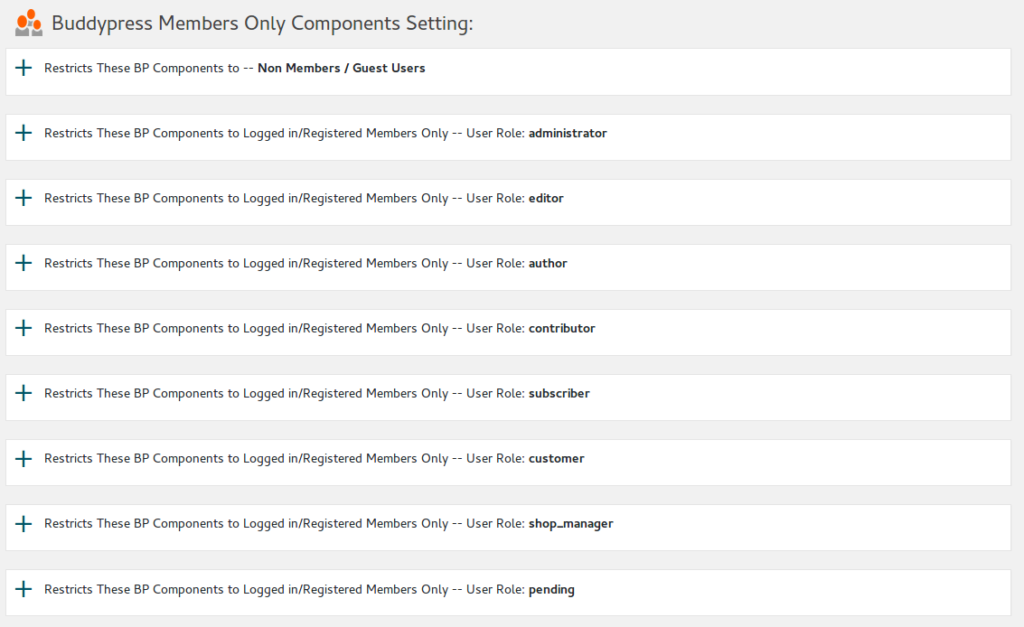
A: We support restricts BP standard components and customization components to users based on user roles, it looks like this:


You can setting which buddypress components opened for Non-Members / Guest users, and which buddypress components opened for logged in users based on user roles, for example:

1: You can setting allow Non-Members / Guest users only open buddypress members page, but they can not check buddypress members profile pages,

2: You can setting subscriber users can open buddypress members page and buddypress members profile pages, but they can not open buddypress messages pages.

3: You can setting paid members can open buddypress member pages and buddypress member profile pages, and they can not buddypress messages pages…

4: …. and so on

B: Changed professional logos on buddypress memebrs only setting panels, now it looks like this:

C: Use wp_enqueue_style to load css

D: Use wp_enqueue_script to load js

E: Minisize js and css file to speed up site speed.
F: Enhance security to stop run our php script directly
G: Disable list files in plugin folders directly to enhance site security

Please download and upgrade to newest version at your download page.

Our plugin is drive by user request, if you have any feature requests, it is super welcome to tell me at contact us,  thanks, have a blessings day with your family. 🙂

Best Regards,

Tomas

Tagged with: , , , ,

Buddypress Members Only Site upgraded

Hi Dears,

We have upgraded our system
1:We have upgraded our shop, and we customized our theme, now when users add product into the cart, in the sidebar, we designed more pretty and more clean style for cart button and checkout button.

2: We have upgrade our plugins and themes to the newest version.

3: We have nearly finished a new version of buddypress / wordpress members only pro plugin, based on user requests, in this version, you can protect your buddypress component based on user roles, for example, a free subscriber role users can view activity page, but only paid membership role users can view users Profile pages… and so on. 🙂

Thanks, have a great day with your family. 🙂

Best Regards,
Buddypress Members Only Support Team

Tagged with:

Buddypress Members Only 2.0.1 Released

Hi Dears,

We found a bug and we have fixed the bug in the new version 2.0.1, please log in your account and go to https://membersonly.top/my-account/downloads/ to download the new version. 🙂

Thanks, have a blessings day with your family. 🙂

Best Regards,
Tomas

Tagged with: ,

Buddypress Members Only 2.0 Released

Hi Dear Friends:

We have released Buddypress WordPress Members Only plugin 2.0, we found there are many theme or plugins have their own redirect functionality, and I have found at least one theme and one plugin did not follow wordpress standard to return correct data in login_redirect API, so this maybe caused redirect problems, we have re-develop our plugin to check API information, if the data did not be generated,  we will re-generate user data and still try to redirect to our users.

You can do a test for the new features, if you logged in https://membersonly.top, as a paid customer, before we updated new version,  you will  be redirect to https://membersonly.top/my-account/, this is redirect is generated by woocommerce, then you need click download link to open  https://membersonly.top/my-account/downloads/, after we update the plugin, now if you logged in, you will be redirected to https://membersonly.top/my-account/downloads/ automatically, so our users saved one step and this is more clear for new customers. Also if you test to logged in as a subscriber, now you will be redirected to https://membersonly.top/features/, when you logged out, you will be redirected to https://membersonly.top/features/ too, you can setting login and logout redirect for all user roles quickly.  🙂

We are developing a new version which have more amazing features,any new feature request is welcome. Thanks, have a good day with your family. ?Best Regards,

Tomas

Tagged with: , , , ,

Buddypress Members Only 1.9.8 Released

Hi Dear Friends:

We have finished a new version of Buddypress WordPress Members Only plugin, in this version, you can setting after login redirect URLs and after logout URLs based on roles. For example, you can setting users which have subscriber role redirect to their activity page after they logged in, and let users who have woocommerce customer role redirected to their shop account page,or redirect editors to their messages page… and so on.

This feature is very easy to use, please logged in your admin area, open BP Members Only menu, click redirect setting sub menu item, you can find we have listed all roles automatically, just select roles which you want to setting, select redirect method from 3 redirect method:

1: Default, this means do nothing and just follow  buddypress and wordpress default behaviour.

2: Referer, this means after logged in, user will be redirect to the same page before login

3: Redirect to Certain URL, you can enter any page URL in your domain, users which have related roles will be redirected to this URL after they logged in.

This feature works well on Buddypress, if you disable Buddypress, this module will works well on WordPress too.

Also we re-develop the plugin to support wordpress and bbpress better, when you disable buddypress, our plugin will still works well for wordpress users.

We are developing a new version which have more amazing features, for example, control access of each buddypress components based on user role… and so on.

Please log in your account and download the new version, just replace the old one with this new version. Any new feature request is welcome. Thanks, have a good day with your family. 🙂


Best Regards,

Tomas

Tagged with: , , , ,

Buddypress Members Only 1.8.8 Released

Hi Dears,

Buddypress WordPress Members Only 1.8.8 has been Released, in this version, we fixed a bug, before version 1.8.8, in “Opened Page URLs”, you can not delete all URLs at one time, in Buddypress Members Only 1.8.8, we have solved this problem, you can remove all opened page URLs in one time, if there are any bug or feature request, you are very welcome shoot us a message! 🙂

Best Regards,
Members Only Support Team

Tagged with: , , , ,

Demos of Restricts BP Standard Components to Logged in/Registered Members Only

You can choose which components will open to guest user, or which components will only opened to logged in users.

I have setting our BP members only plugin to allow buddypress groups component / page open to non members users, you can check our group at here.

Also as a non member users, you will find the activity component is not opened, but once you logged in, you will find you can open / post on the page.

It is very easy to use this functionality, In admin area,  in “BP Components” option panel, you will find we have listed all buddypress standard buddypress components in a checkbox list, you can choose which components will open to guest user, or which components will only opened to logged in users, just a little mouse clicks, you can checked any buddypress standard components to open to non member users, and disallow non member users to touch other buddypress standard component,  when non member users try to open any pages related with protected buddypress standard components, they will be redirected to redirect page which you setting in admin area, for example,  you can setting non member users be redirect to your register page or your members payment page.

For example, you can open Buddypress Members Component / pages to non member users, but if they want to click members profile pages, they will be redirect your register page or payment page, or you can hidden your Buddypress Activity pages, so all of your buddypress activities can only be opened after they register and logged in your site.

Or you can open Buddypress Forums Component / Pages to non member users, but when non member users try to open pages related with Buddypress Groups Component, they will be redirected to the redirect page which you setting in admin area.. and so on, infinite possibilities.

Tagged with: , ,

Members only version — Buddypress Members Only Pro Plugin 1.8.6 Released

This page a demo for members only page level protect functionality, if you are not logged in as a member, you will be redirected to our register page. If you logged in as a member, you will see this:

—————————————

Hi Dears,

We just released new version 1.8.6 of Buddypress Members Only Pro plugin,in this version, we support:

  • Restricts Your BuddyPress and WordPress to logged in/registered members only
  • Restricts your BP standard Components to Logged in/Registered members only, you can choose which components will open to guest user, or which components will only opened to logged in users
  • Restricts your BP customized Components to Logged in/Registered members only, you can setting as more as customized components to open to guest users.
  • Options to only protect your buddypress pages, so other section on your wordpress site will be open to the guest users.
  • Enable page level protect, when you edit a post, you can choose setting it as a members only page or not.
  • Supported https and websocket
  • If you disable buddypress, our plugins will detect it automatically and continue to protect your wordpress pages.
  • ……

In the current time, I am add more amazing functionality to help you build a more powerful and more easy-to-use bp social networking, for example in my To-Do list, a feature is multi membership levels, if you have more requirement, you are very welcome to request feature via contact us,  I hope I will publish the new version soon, thanks, enjoy. 🙂

Best Regards,
Tomas

—————————————

Buddypress Members Only Pro Plugin 1.8.6 Released

Hi Dears,

We just released new version 1.8.6 of Buddypress Members Only Pro plugin,in this version, we support:

  • Restricts Your BuddyPress and WordPress to logged in/registered members only
  • Restricts your BP standard Components to Logged in/Registered members only, you can choose which components will open to guest user, or which components will only opened to logged in users
  • Restricts your BP customized Components to Logged in/Registered members only, you can setting as more as customized components to open to guest users.
  • Options to only protect your buddypress pages, so other section on your wordpress site will be open to the guest users.
  • Enable page level protect, when you edit a post, you can choose setting it as a members only page or not.
  • Supported https and websocket
  • If you disable buddypress, our plugins will detect it automatically and continue to protect your wordpress pages.
  • ……

In the current time, I am add more amazing functionality to help you build a more powerful and more easy-to-use bp social networking, for example in my To-Do list, a feature is multi membership levels, if you have more requirement, you are very welcome to request feature via contact us,  I hope I will publish the new version soon, thanks, enjoy. 🙂

Best Regards,
Tomas

Tagged with: , , , ,
Top