Category: Document

Blog of Buddypress Wordpress bbPress Members Ony

How do I configure the plugin to make LearnDash Courses open to BuddyPress membership based on user roles?

Hi Dear BuddyPress Membership Users,

Hope this message find you are doing well and have happy days 🙂

We received an amazing users ticket about how to let buddypress membership plugin support learndash, we guess mabye many users have similar requirements, we are happy to reply this question publicly:

How do I configure the plugin to make LearnDash Courses open to BuddyPress membership based on user roles?

The question is:

I just purchased your buddypress membership plugin. I use BuddyPress for LearnDash. When the plugin is activated, it works well with BuddyPress, but all LearnDash Pages are not viewable on user accounts. How do I configure the plugin to make LearnDash Courses open to BuddyPress members?

We checked learndash plugin, it is a great LMS plugin, which can help webmaster to ” Easily create & sell courses, deliver quizzes, award certificates, manage users, download reports”, it is a premium plugin.

So the first solution do it by use our buddypress plugin component access control options

Please login wordpress admin area, then open “bp members only” menu item, click “bp components” sub menu item,you will open “buddypress members only components” settings panel, the URL should looke like https://yourdomain.com/wp-admin/admin.php?page=bpmembercomponentonly, the panel looks like this:

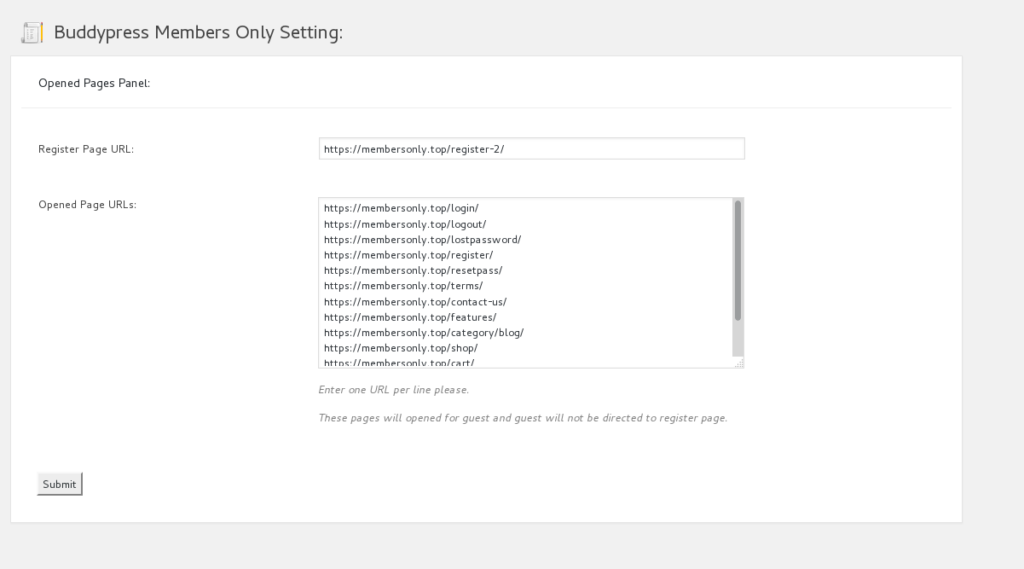
In buddypress membership only components panel, you will find you can open buddypress standard components based on user roles, also you will find you can open customized components too, please just enter your learndash buddypress plugins’ component name in “open customized components” text area, then all these customized components will open to learndash users automatically, you can settings access permission to open a  buddypress component or restrict a buddypress coomponent based on user roles.

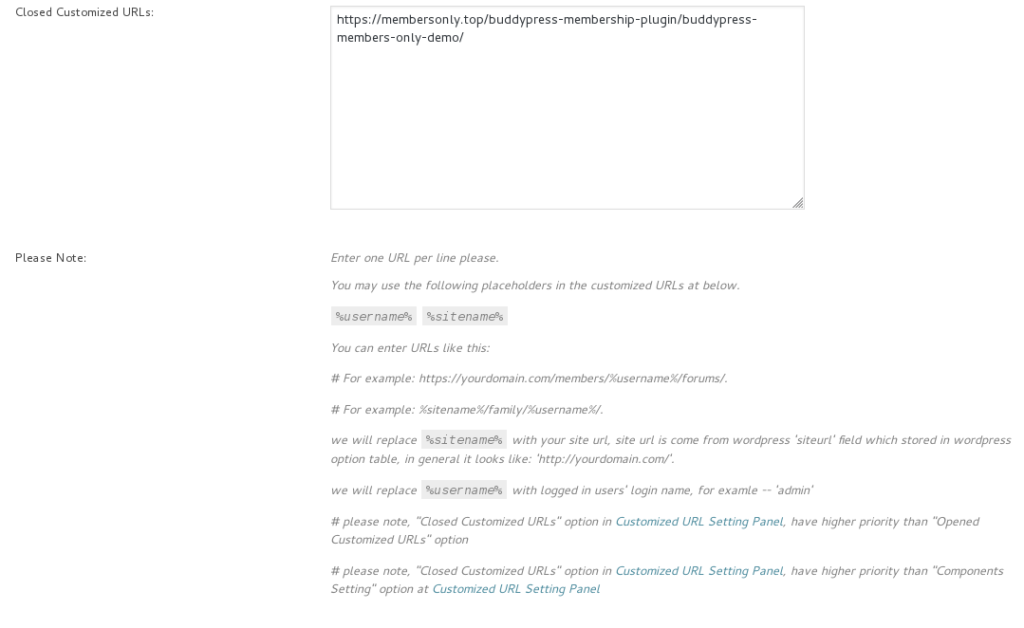
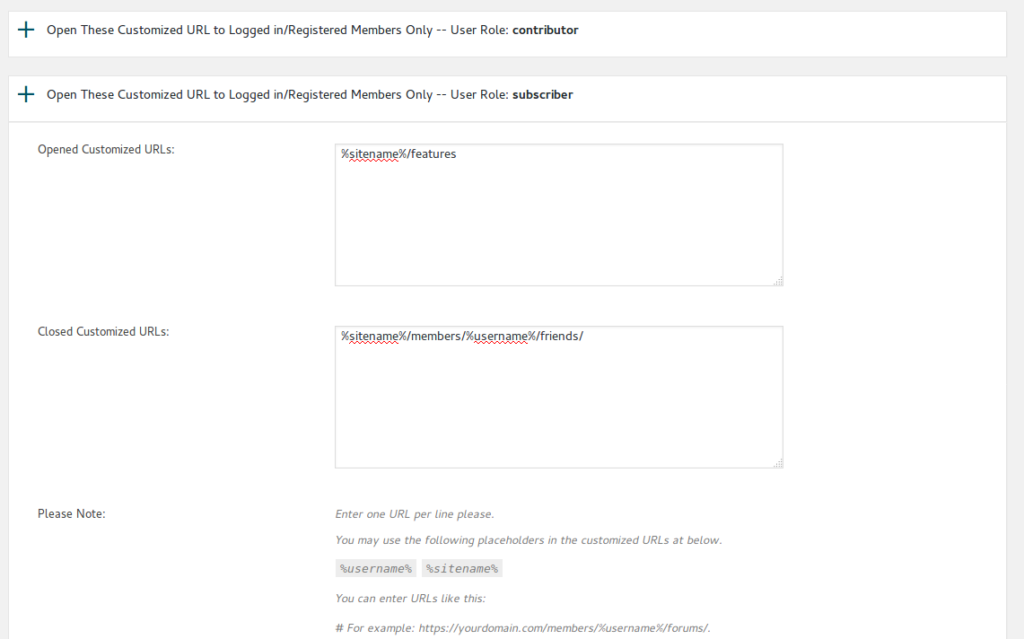
Of course, In some times,  if your 3rd plugins did not add a component name, when we have another solution, you can still enter URLs of any pages via buddypress membership “customized URL Restricts” panel, please just enter Urls in “Opened customized URLs” or “Closed Customized URLs” option based on users roles, it looks like this:
 

conclusion

Our buddypress membership plugin have a series of options / switches that restrict buddypress membership access permissions, if your buddypress plugin support buddypress component API, then all of this kind of 3rd plugin can works well with our buddypress membership plugin, else, you can use our buddypress URL access control list to restricts your pages which generated by 3rd plugins 🙂

please note, we are not promise support all plugins with our buddypress membership plugin automatically, that is impossible, if these solution do not support your plugin, you can still hire us to integrate your 3rd plugin with our buddypress membership plugin.

Thanks, have a blessings day with your family 🙂

Best Regards,
Buddypress Membership Plugin Support Team
Tagged with: , , , , , , ,

BuddyPress Blacklist Plugin Features

What is BuddyPress Blacklist Plugin?

BuddyPress Blacklist Plugin is a buddypress plugin which allow you build a blacklist to prevent spammers register as your users.

Why I need BuddyPress Blacklist Plugin?

One day when I try to reply users email ticket, I get an error notify which told me I over the limitation of SMTP, I checked all my settings and everything is works well, finally in wordpress users menu, I found I have about 10,000 users in a few days, and nearly all of these users is sapmmers  and all of them have same email domains. In web logs I find hugh register records, I tried black these IPs in .htaccess, it seems works, but a few days later, I found these spammers change their IP for each spam account, so I decide develop a plugin to block these spammers email domain, this is why I develop the buddypress blacklist plugin.

How BuddyPress Blacklist Plugin Working?

BuddyPress Blacklist Plugin will hook wordpress register API to scan each wordpress / buddypress standard new user registration progress, when we found there are any email address is listed in blacklist, we will prevent the registering on your site, and tell spammers: “Sorry: Your email address is not allowed in this site”. On my buddypress site,  it looks like this:


How to install buddypress blacklist plugin?

It is very simple:

#1 Please download buddypress blacklist plugin in https://membersonly.top.

#2 Please login your wordpress admin area and click “Plugins” menu item,then click “Add New” sub menu item

#3 In “Add Plugins” panel, click “upload plugin” button and upload the plugin zip file and activate the plugin

That’s all

How to use buddypress blacklist plugin?

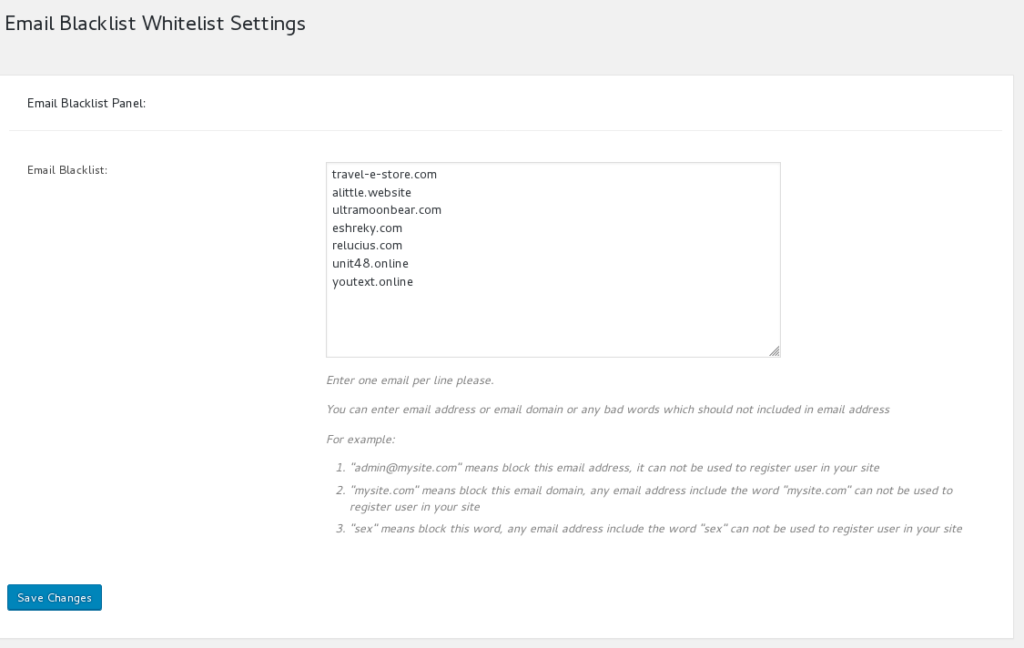
It is very easy to use buddypress blacklist plugin. After installed buddypress black plugin, you will find Blacklist-Whitelist menu item, please click Blacklist-Whitelist menu and then you will open Email Blacklist Settings panel, it looks like this:

In “Email Blacklist Settings” panel, you can build your email blacklist in “email blacklist” option  by this way:

#1 Enter one email per line

#2 You can enter email address or email domain or any bad words which should not included in email address
For example:

  • “admin@mysite.com” means block this email address, it can not be used to register user in your site
  • “mysite.com” means block this email domain, any email address include the word “mysite.com” can not be used to register user in your site
  • “sex” means block this word, any email address include the word “sex” can not be used to register user in your site

Then in frontend, when users try to registered as a members of your site, if any bad words or email address / email domains in blacklist be detected in user email address, they will get a error notify “Sorry: Your email address is not allowed in this site” and they can not register as your site members.

What we doing more for buddypress blacklist plugin now?

We are adding a few more features for buddypress blacklist plugin, for example, stop spammer publish in your buddypress activity…and so on, if you have any feature request, you are very welcome to tell us via contact us menu.

Just $5, you will stop spammers register as your member and stop them publish in your buddypress network!

Updated at 2019-05-21 by support: Features of BuddyPress Blacklist Plugin

Tagged with: ,

BuddyPress Members Only Plugin 3.6.8 Released

Hi Dears,

What’s New In BuddyPress Membership Plugin 3.6.8?

Since buddypress membership plugin 3.6.6,our plugin support restricts buddypress front component, then some amazing users requested when users logged in buddypress site, logged in users can be redirected to users front page too, also they hope after users logged out buddypress network, users can still have a chance to be redirected to their own users front page too. 🙂

This is why we released buddypress membership plugin 3.6.8 🙂

New Changes:

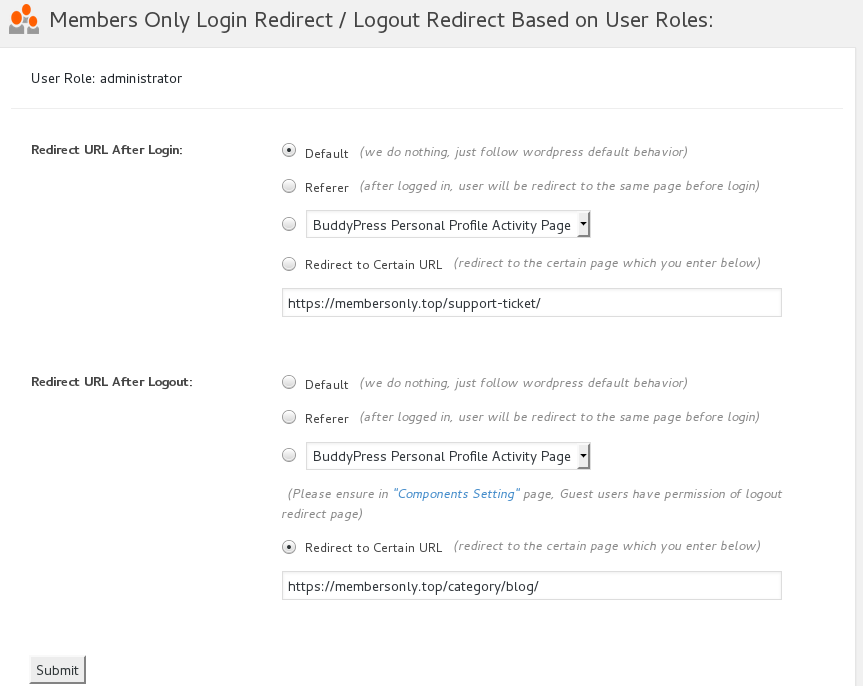
In buddypress members only plugin backend, in redirect settings panel,  “User logged in after redirection” option support redirect to user front page component, also  User logged out after redirection support redirect to user front page component.

Thanks for the great suggestion, also we are realize a few other amazing suggestions about restricts buddypress menu items, based on users roles, users can see different menu items, you will see it soon 🙂

Thanks, have a blessed day with your family 🙂

Best Regards

BuddyPress Membership Plugin Support Team

Tagged with: , , , ,

BuddyPress Membership Site Updated

Hi Dears,

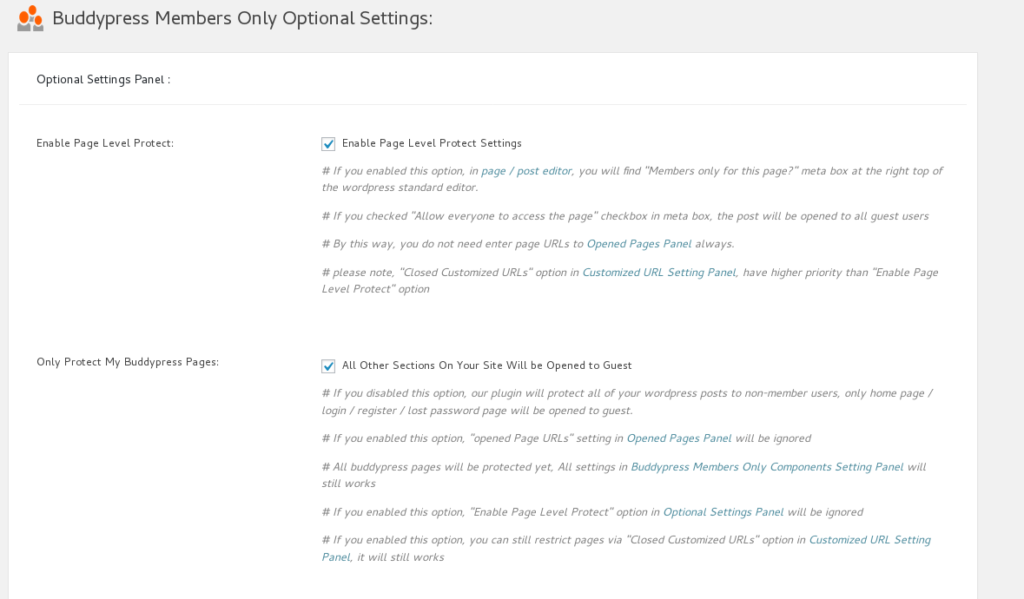
We have upgraded our buddypress membership site, we changed product images of buddypress membership plugin, and added more details for product of BuddyPress WooCmmerce Payment Gateway Plugin,and updated description of features of BuddyPress WooCmmerce Payment Gateway Plugin, also we upgraded our buddypress to the newest version and our buddypress membership plugins works well with the newest version of buddypress, and we have updated buddypress members only demo pages. 🙂

We are start adding new features for buddypress membership plugin, also we are developing a new buddypress plugin which help users protect their admin users more easier, you will see it sson 🙂

Thanks, have a blessed day with your family 🙂

Best Regards,

Buddypress Membership Plugin Support Team
Tagged with: ,

Buddypress Membership 3.6.6, support restricts buddypress front component

Hi Dears,

Based on users requested, we just released Buddypress Membership plugin 3.6.6, in this version we support restricts buddypress front component based on user role, In “Buddypress Members Only Components Setting” panel, you will find “Buddypress Front Component” option for each user role 🙂

Thanks, have a blessed day with your family 🙂

Best Regards,

Buddypress Memebrship Plugin Support Team


Tagged with: , , , ,

BuddyPress WooCommerce Payment Plugin 1.0.4 Released

Hi Dears,

We just released BuddyPress WooCommerce Payment Plugin 1.0.4, changes in this version:
#1 Added pretty icons
#2 Updated menu items in admin area

If you have any feature request, please don’t hesitate to tell us! 🙂

Thanks, have a blessed day with your family 🙂

Best Regards,
BP Membership Support Team

BuddyPress WooCommerce Payment Plugin Features

BuddyPress WooCommerce Payment Gateway Plugin

What is BuddyPress Membership WooCommerce Payment Gateway Plugin ?

BuddyPress WooCommerce Payment Gateway is a buddypress plugin to integrate WooCommerce Payment Gateway to help webmaster charge money from users of buddypress access.

For example, our plugin BP WooCommerce Payment integrated buddypress with woocommerce to allow you assign wordpress user roles to your woocommerce product, so when your buddypress users can pay for membership product to become your paid member who can get access of your advanced buddypress component or services.

How does BuddyPress Membership WooCommerce Payment Gateway PLugin Work?

Once activated BuddyPress WooCommerce Payment Gateway plugin, you will find menu item BuddyPress WooCommerce in admin area.

If you click “BuddyPress WooCommerce” menu item, you will open “BuddyPress WooCommerce Payment Gateway” panel.

#1 If you enabled option “Enable Membership Payment Gateway”, When you add / edit woocommerce products, you will find new tab “BP Membership” under “Product data”.

#2 If you click “BP Membership” tab in woocommerce product editor, You will find we have listed all user roles in “Membership Role” dropdown box, you can assign any user role to this product.

#3 Once user completed the order for this product, we will assign selected user role to paid customers automatically, this means you can charge membership level fee via woocommerce products.

#4 If you cancelled users order in woocommerce order manager, we will remove user membership role.

#5 If you refund users order in woocommerce order manager, we will remove user membership role too

#6 In Buddypress Members Only Pro Plugin, you can enable membership levels addon to add membership levels, and custom membership name.

#7 In Buddypress Members Only Pro Plugin, you can enable / disable buddypress component access for each user roles, for example user level1 can open members page, but level2 can do more things — open user profile pages, and level3 can post to buddypress activity… and so on.

#8 In WooCommerce Product editor, you can add membership levels which generated by “buddypress members only” plugin to “Membership role” dropdown box in “BP Membership” tab, then based on #7, you can charge membership levels fee for your buddypress component access

#9 We are adding more features for buddypress membership woocommerce payment gateway, for example, buddypress points, buddypress badge, buddypress gift… and so on, so users can fund money to their account in your buddypress site and pay for buddypress badge, buddypress gift… and so on, if you have any feature request, you are welcome to contact us

How to Install  BuddyPress WooCommerce Payment Gateway Plugin?

It is very easy to install BuddyPress WooCommerce Payment Gateway Plugin
1:Upload the BuddyPress WooCommerce Payment Gateway Plugin to your blog
2:Activate BuddyPress WooCommerce Payment Gateway Plugin
3:You will find menu item “BuddyPress WooCommerce” in admin area, click it you will open “BP WooCommerce Membership Panel”
4:Just follow our detailed guide in “BP WooCommerce Membership Panel”, you will finish all settings

Does this Plugin Must Work With Buddypress Members Only Plugin?

No, BuddyPress Membership WooCommerce Payment Gateway Plugin help you charge membership fee via woocommerce product, so if what you want is just find a method to charge money from user roles of your site, you can use this plugin. We are try to adding more membership payment features, for example order logs, membership suspended, membership expire notify… and so on, it works like a payment gateway to  focus on the functionality related with membership payment. Our Buddypress Members Only Pro plugin focus on buddypress restrictions, Buddypress Members Only Pro plugin will generate membership levels, and you can give different permission of each buddypress components based on these membership levels, if you want buddypress restrictions functionality, please check features of buddypress members only.

Change Log:
= Version 1.0.4 =
#1 Added pretty icons
#2 Updated menu items in admin area

= Version 1.0.0 =
First Version

Update Log :Author buddypress membership developer updated Features of BuddyPress Membership WooCommerce Payment Gateway Plugin at April 20, 2019

Tagged with: , , , , ,

New Update of Buddypress Membership PLugin Features Page

Hi Dears,

We have updated buddypress membership plugin features page, to add more details of new feature of our buddypress membership plugin, also based on user’s requested, we added screenshot of buddypress membership login and logout based on user roles, and we added new change log at the bottom of the buddypress membership plugin features page, you can check it at here. 🙂

Thanks, have a happy day with your family! 🙂

Best Regards,

Buddypress Membership Support Team

Tagged with: , , , , ,

Buddypress Membership Plugin 3.6.4 Released, Better SEO

Hi Dears,

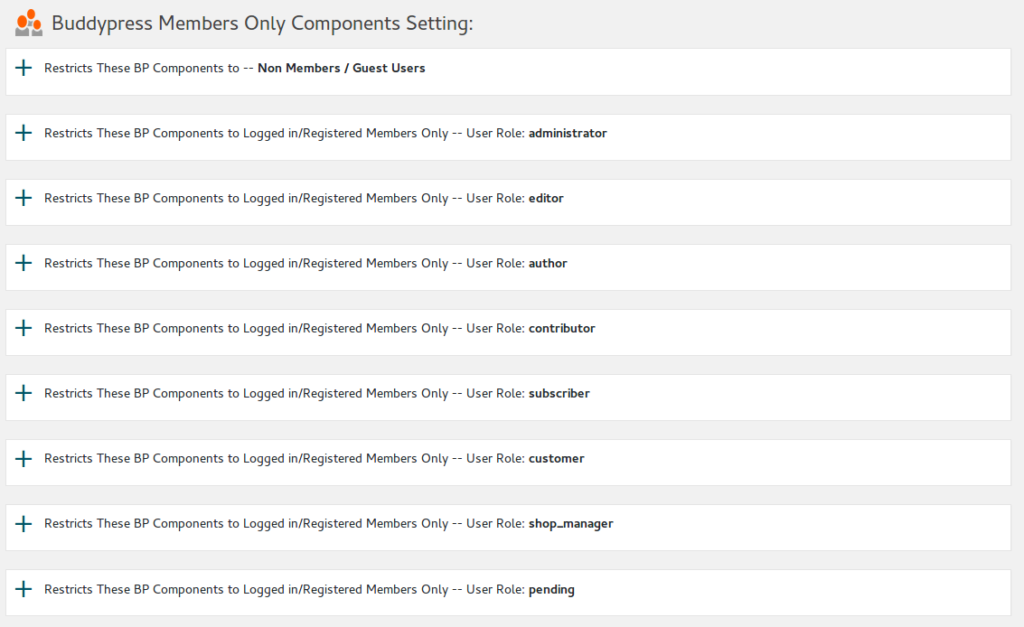
Based on an amazing user’s request, we have released a new version of buddypress membership plugin 3.6.4, in this version, we added a new option ” Use Permanent 301 Redirect Instead of Temporary 302 Redirect” in Buddypress Members Only Optional Settings
When users open a members only page, if the user have no permission to view the page, we will redirect users to your specified landing page — in general we use a 302 temporary redirect to do this. if you enabled this option, you can use 301 redirect instead of 302 redirect, generally speaking, a 301 permanent redirect is better for search engine optimization than a temporary redirect. You can find redirect settings in here
This will change redirect methods when:
1: Non-member and other member levels redirect to register rage URL or redirect URL

2: Restricts BP components to Non-member / guest, include:
Buddypress Activity Component
Buddypress Members Component
Buddypress Forums Component
Buddypress Friends Component
Buddypress Groups Component
Buddypress Messages Component
Buddypress Notifications Component
Buddypress Settings Component
Buddypress Profile Component
Buddypress Blogs Component
and other opened customized components you entered

3: Home page when you enabled “Restrict Home Page of the Site”

4: Non-member and other member levels redirect settings of “redirect after login” and “redirect after logout”, include:
Default
Referer
Redirect to Certain URL
redirect to buddypress component pages

5: Non-member and other member levels “Closed Customized URLs”

We are still add an amazing feature based on other amazing user’s request, you will see it soon 🙂

Thanks, have a great 2019 with your family! 🙂

Best Regards,

Buddypress Membership Plugin Support Team
Tagged with: , , , ,
Top