Category: Document

Blog of Buddypress Wordpress bbPress Members Ony

Build the Demo for Buddypress User Profile Field Visibility Control

Hi Dear Buddypress Membership Plugin Users,

A few days before, we reported that:  BuddyPress Membership Plugin 4.0.2 Released, Buddypress Profile Field Visibility Control by User Roles Addon Support Hide BuddyPress Profile Fields , today we received a user’s ticket which told us he want to see a demo of this feature, we changed our buddypress component settings to allow non-member user role to view the buddypress user profile pages, you can find my profile at my buddypress profile field demo page

Also we are happy to report you, based on another amazing user’s requests, we are developing a new version for buddypress activity visibility control 🙂
Thanks, have a blessed day with your family 🙂

Best Regards,

BuddyPress Membership Plugin Support Team

Tagged with: , ,

BuddyPress Membership Plugin 4.0.2 Released, Buddypress Profile Field Visibility Control by User Roles Addon Support Hide BuddyPress Profile Fields

Hi Dear Buddypress Membership Plugin Users,

Hope you are doing well and have happy days with your family 🙂  Based no an amazing users feature request, we just released BuddyPress Membership Plugin 4.0.2, in this version we added a new “Buddypress Profile Field Visibility Control by User Roles” addon to support hide BuddyPress profile fields:

BuddyPress Profile Field Visibility Control By User Roles

A few users told me they do not hope buddypress members profile filed be viewed by public users, for example, members’ name, age, sex, address… and so on. But as you know, in buddyrpess profile page,  everyone can view other guys profile fields, because in buddypress, all fields will be settings as “Every One” by defailt, of course,  profile owner can edit their profile fields one by one, but many user will ignored these settings because they are too busy to learn each options in buddypress settings panel, that’s why we created this one-click solution for buddypress community owners, it is very easy to hide profile fields based on user roles:

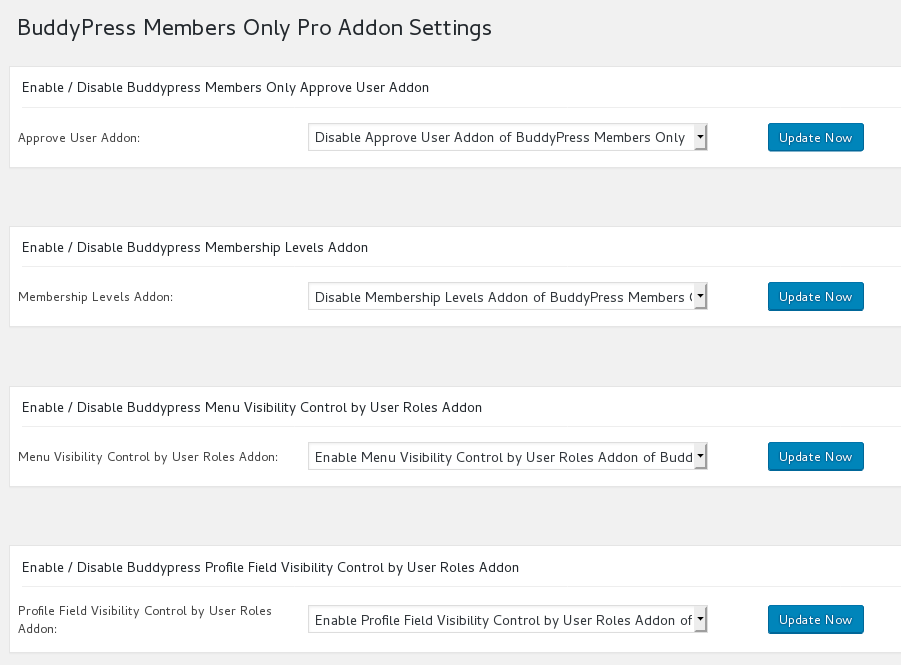
In back end, You will find the “Profile Field Visibility Control by User Roles Addon” Addon in buddypress members only “Addon” menu item, it looks like this:

buddypress mebership plugin addons

buddypress mebership plugin addons

If you enabled “buddypress Profile Field Visibility Control by User Roles” Addon, you will a new buddypress members only menu “Profile Field Visibility”

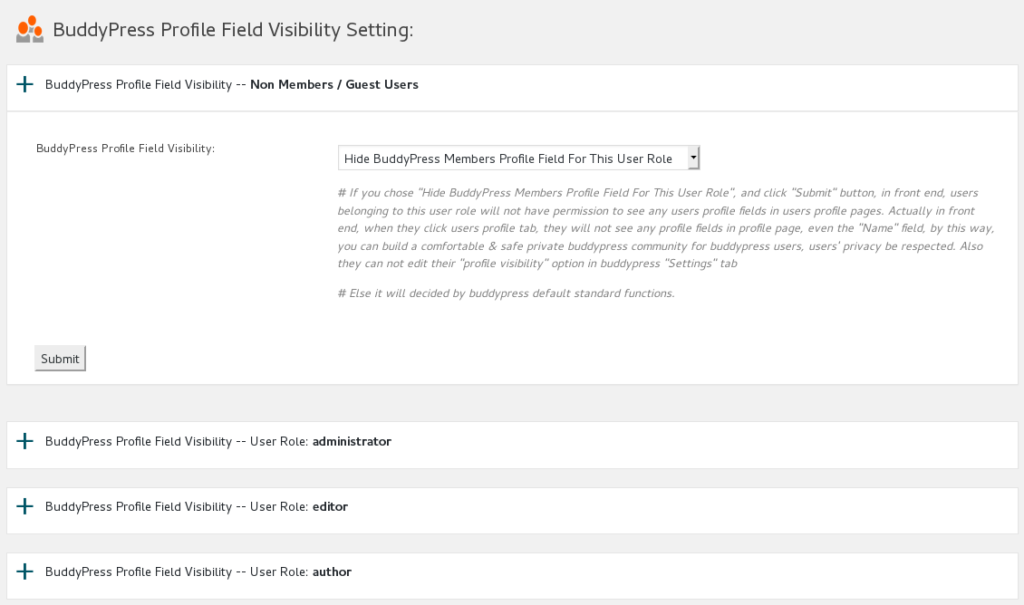
If you click the “Profile Field Visibility” menu item, you will open “BuddyPress Profile Field Visibility Setting” panel, it loks like this:

buddypress profile field visibility

buddypress profile field visibility

In the “BuddyPress Profile Field Visibility Setting” panel, you will find we have listed all users roles for you with a accordion effect,  please click any one user role item, you will find “BuddyPress Profile Field Visibility” option in expanded window, you can choose to “Hide BuddyPress Members Profile Field For This User Role” or “Enable BuddyPress Members Profile Field For This User Role”

If you chose “Hide BuddyPress Members Profile Field For This User Role”, in front end, users belonging to this user role will not have permission to open users’ profile pages.

Actually in front end, when they click users profile tab, they will not see any profile fields in profile page, even the “Name” field, by this way, you can build a comfortable & safe private buddypress community for buddypress users, users’ privacy be respected.

Also they can not edit their “profile visibility” option in buddypress “Settings” tab.

Else it will decided by buddypress default standard functions.

You can find a demo at  my buddypress profile field demo page

You can find full feature details at Features of BuddyPress Membership Plugin

Just $12, you will have a powerful Buddypress Members Pro plugin, Unlimited Download, Lifetime Upgrades, Ticket Support

We are adding new features for wordpress buddypress members only plugin, you will see it soon 🙂

Thanks, have a blessed weekend with your family 🙂

Best Regards,

BuddyPress Membership Plugin Support Team

Tagged with: , ,

BuddyPress Membership Plugin 3.9.4 Released, Support Temporarily Turn Off All Featrures Of BuddyPress Members Only

Hi Dear BuddyPress Memebrship Users,

A few days before, we received an amazing buddypress members only pro  user’s ticket, in which he said his developer is custom his site, and he hope our buddyPress membership plugin have an option to allow his developer to “Temporarily Turn Off All Featrures Of bbPress Members Only”, so his developer can test and debug on his site,  and do not need switch with different users roles, now we have realized his feature request in buddypress membership plugin 3.9.4,, if you check admin area of BuddyPress members only plugin, in “Optional Settings” panel, you will find new option ” Temporarily Turn Off All Featrures Of BuddyPress Members Only”, if you checked this option, all functionality of BuddyPress membersship plugin will be closed, until you unchecked this option, so if your developer want to debug your buddypress sites, this option will let it more easier ?

If you have any feature request, please don’t hesitate to tell us 🙂

Thanks, have a blessed weekend with your family 🙂

Best Regards,

BuddyPress Membership Support Team

Tagged with: ,

BuddyPress Menu Visibility By User Roles Demo

BuddyPress Menu Visibility Control by user roles, for example, in menu bar, support user role can find staff menu item, and customer can find download menu item… and so on, you can control menu visibility by user roles, each user roles can have their own menu items, so buddypress admin will not need make a long menu bar at the top of the buddypress site.

BuddyPress Menu Visibility Control by User Roles Demo

You can apply visibility controls to each menu items by user roles, for example, you can only allow customer user role to see download menu, subscriber & customer user role can see product menu… and so on, we make a few screenshots on our buddypress membership plugin site like screenshots below:

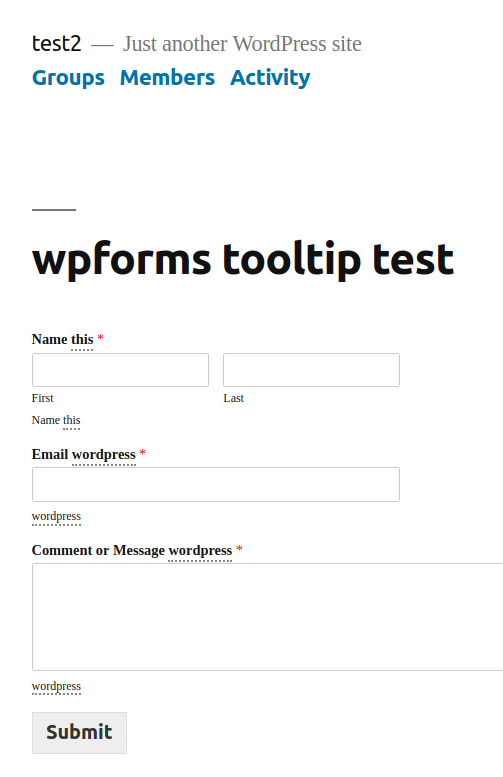
When users logged in as subscriber user role or customer user role, he will see the “My Account” menu item at the top bar, like this:

Subscriber or Customer User Role Menu Items

Subscriber or Customer User Role Menu Items

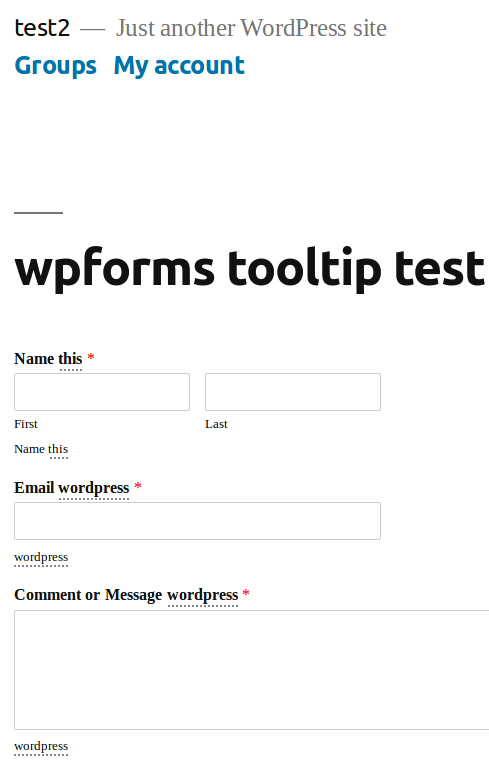
When guest non-member users role view our buddypress membership plugin site, in the top bar, he will not see the “My Account” menu item:

Guest User Role Menu Items

Guest User Role Menu Items

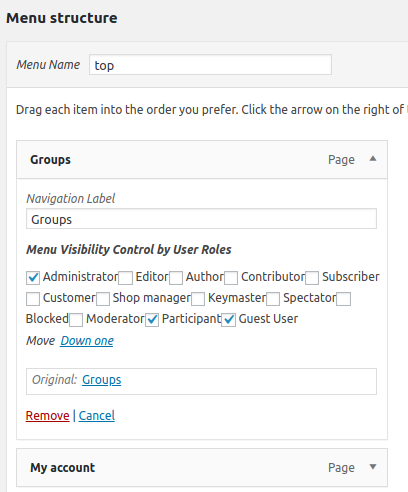
In front end, different user roles will have different menu item, based on your settings in back end, back end looks like this:

menu visibility in appearance menus panel

menu visibility in appearance menus panel

More “Buddypress Menu Visibility Control by User Roles” Features

You will find the “Menu Visibility Control by User Roles” Addon in buddypress members only addon menu item.

If you enabled “Menu Visibility Control by User Roles” Addon, you will a new buddypress members only menu “Menu Visibility Control”

In “Menu Visibility Control” panel, please checked “Yes, I will enable menu Visibility control by user roles” option and click submit and read our detailed description

If you checked this option, We will add a menu Visibility list option for each menu items at wordpress standard menus setting panel.

Then in “Menu structure” panel, if you click any menu item, you will find “Menu Visibility Control by User Roles” option, and we have listed all user roles in here

Please note, once you activated Menu Visibility Control addon, by default, all menu item in frontend will be hidden, you need setting “Menu Visibility Control by User Roles” option for each menu item

Tagged with: , ,

BuddyPress Membership Plugin 3.9.2 Released

Hi Dear BuddyPress Membership Plugin Users,

We just released BuddyPress Membership Plugin 3.9.2, in this version, we fixed function name conflict with bbpress membership plugin, so when users can activate buddypress membership plugin and bbpress membership plugin at the same time 🙂

Also we have updated detailed description of buddypress members only plugin to add new changes in recent versions, you can find them at:

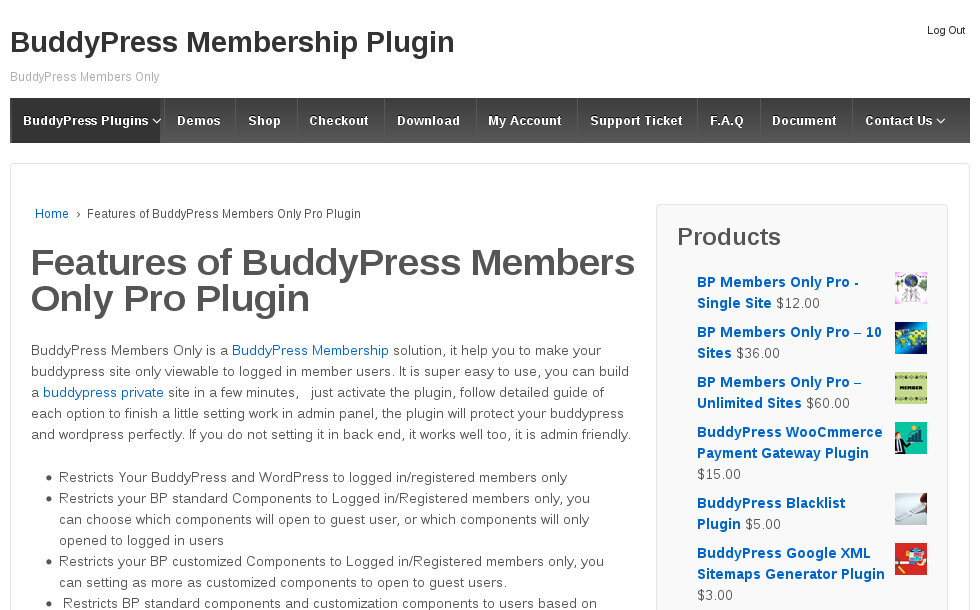
Features of BuddyPress Members Only Pro Plugin

BP Members Only Pro – Single Site

BP Members Only Pro – 10 Sites

BP Members Only Pro – Unlimited Sites

Thanks, have a blessed weekend with your family 🙂

Best Regards,

BuddyPress Membership Plugin Support Team
Tagged with: , ,

Updated BuddyPress Membership Plugin Features Page and Description of 3 Products

Hi Dear BuddyPress Membership Plugin User,

We have reported since Buddypress Membership Plugin 3.9.0,  we developed a new “BuddyPress Menu Visibility Control by User Roles” Addon .

A few users submitted a few feature requests, in which they hope hide their buddypress menus to guest users, and another users said he hope different user roles will find different menus in the same menu bar, because their have a few kinds of user type, for example, they hope support can find staff menu item and customer can find download menu item… and so on, based on their user roles, they will see related menu items, so buddypress admin will not need make a long menu bar at the top of the buddypress site

Today we have added detailed description to BuddyPress Membership Plugin feature page, and we have added details to 3 BuddyPress Membership Plugin product page.

We are developing a new buddypress members only version based on users feature requests, you will see it soon 🙂

Thanks, have a blessed day with your family 🙂

Best Regards,

BuddyPress Membership Plugin Support Team
Tagged with: , , , ,

Buddypress Membership Plugin 3.9.0, Added new “BuddyPress Menu Visibility Control by User Roles” Addon

Hi Dears,

Based on feature requests from dear buddypress membership users, we have developed a new buddypress members only 3.9.0 version, in this version:

Added “BuddyPress Menu Visibility Control by User Roles” Addon

A few users submitted a few feature requests, in which they hope hide their buddypress menus to guest users, and another users said he hope different user roles will find different menus in the same menu bar, because their have a few kinds of user type, for example, they hope support can find staff menu item and customer can find download menu item… and so on, based on their user roles, they will see related menu items, so buddypress admin will not need make a long menu bar at the top of the buddypress site 🙂

Based on these amazing feature requests, we are happy to report you that we have realize it in buddypress members only 3.9.0, if you upgrade to buddypress membership plugin 3.9.0:

You will find the “Menu Visibility Control by User Roles” Addon in buddypress members only addon menu item.

If you enabled “Menu Visibility Control by User Roles” Addon, you will a new buddypress members only menu “Menu Visibility Control”

In “Menu Visibility Control” panel, please checked “Yes, I will enable menu Visibility control by user roles” option and click submit and read our detailed description

If you checked this option, We will add a menu Visibility list option for each menu items at wordpress standard menus setting panel.

Then in “Menu structure” panel, if you click any menu item, you will find “Menu Visibility Control by User Roles” option, and we have listed all user roles in here

You can apply visibility controls to each menu items by user roles, for example, you can only allow customer user role to see download menu, subscriber & customer user role can see product menu… and so on, we make a few screenshots on our test sites:

You can find in screenshot #1, guest non-member users role can only see a few menus

guest non-member users role can only see a few menus

guest non-member users role can only see a few menus

And in screenshot #2, subscriber user role can see more menus

subscriber user role can see more menus

subscriber user role can see more menus

In front end, different user roles will have different menu item, based on your settings in back end, back end looks like this:

menu visibility in appearance menus panel

menu visibility in appearance menus panel


Please note, once you activated Menu Visibility Control addon, by default, all menu item in frontend will be hidden, you need setting “Menu Visibility Control by User Roles” option for each menu item

If you have any more amazing buddypress feature requests, please don’t hesitate to tell us 🙂

Thanks, have a blessed day with your family 🙂

Best Regards,

BuddyPress Memebership Support Team


Tagged with: , , , , ,

BuddyPress Sitemap Plugin 1.0.4 Released

Hi Dear BuddyPress Sitemap Users,

Last week we released a new buddypress plugin BuddyPress Google XML Sitemaps Generator Plugin, based on users’ feedback, we have released BuddyPress Sitemap Plugin new version  1.0.4:

New Changes in BuddyPress Sitemap 1.0.4

Added GPLv3 License

Added copyright

Fixed a file warning

Support WordPress 5.2.2

If you have any feature requests about buddypress plugins, it is very welcome contact us to realize your features.

Best Regards,

Buddypress Membership Plugin Support


Tagged with: , ,

BuddyPress Google XML Sitemaps Generator Plugin Features

What is BuddyPress Google XML Sitemaps Generator Plugin and how Increase Buddypress SEO?

A buddypress user told us he can not find a BuddyPress Sitemap plugin, he have a large buddypress social networking site, a lot of users registered in his buddypress site everyday and post many activity in his site, he want a buddypress sitemap file which can be updated once a buddypress activity  be published or once a comment be posted in any buddypress activity,  to improve buddypress SEO and help google find his members and user-generated content more easier,  now the answer is here, BuddyPress Google XML Sitemaps Generator plugin will generate google xml sitemap for your buddypress community site,  include all buddypress members URL and all buddypress activities, and all comments URL on buddypress activities.

How BuddyPress Google XML Sitemaps Generator Plugin Works?

Our buddypress sitemap plugin will generate google xml sitemap for you automatically, once buddypress users create new buddypress activity, or once buddypress users commented any buddypress activity, or once buddypress users update / delete their buddypress activity or buddypress comment in your buddypress site, we will generate a google xml site map for you automatically.

Where can I find BuddyPress Google XML Sitemap File?

BuddyPress Google XML Sitemaps Generator will generate “sitemap.xml” in your site root folder, google can find these sitemap quickly.

How to Manage BuddyPress Google XML Sitemaps Generator Plugin?

BuddyPress Google XML Sitemaps Generator will help you to improve your buddypress SEO automatically, what you need to do is just install and activate it, no anything more need you do to manually.

How to Install BuddyPress Google XML Sitemaps Generator Plugin?

1. Download the plugin from https://membersonly.top/

2. Unzip the plugin BuddyPress Google XML Sitemaps Generator and upload the plugin folder “buddypress-sitemap” to your site wp-content/plugins folder

3. Activate the plugin “BuddyPress Sitemap”

4. Try to update any one of your wordpress post or update any buddypress activity or comment in your buddypress activities, you will find “sitemap.xml” in your site root folder

That’s all

License and Terms of BuddyPress Google XML Sitemaps Generator Plugin?

Site License:

For Single Site

# Terms:

Before purchase our product, please read terms first.

GPLv3 or later
License URI: http://www.gnu.org/licenses/gpl-3.0.txt

Just $3, you will own BuddyPress Google XML Sitemaps Generator plugin for single site license

Purchase Now


Changelog of BuddyPress Google XML Sitemaps Generator Plugin:

= 1.0.2 =
first version of BuddyPress Google XML Sitemaps Generator plugin

Tagged with: , , , , , ,

BuddyPress Membership Plugin 3.7.2 Released

Hi Dears,

We have released buddyrpess membership only plugin 3.7.2, buddypress new version added a few new buddypress components, in this version, our buddyrpess members only plugin support restrict buddypress register component based on user role and support buddypress activate component based on user role 🙂

Thanks, have a blessed day with your family 🙂

Best Regards,

BuddyPress Membership Plugin Support Team
 

Tagged with: , , , ,
Top