Category: Document

Blog of Buddypress Wordpress bbPress Members Ony

BuddyPress Membership Plugin 4.4.4, Added How to Use BuddyPress Membership Plugin Knowledge Base

Hi Dear BuddyPress Membership Plugin Users,

We just released buddypress membership plugin 4.4.4, in this version, based on users’ suggestion of buddypress membership plugin, we added How to Use BuddyPress Membership Plugin Knowledge Base menu item in back end.

Please:

1: Download buddyrpess membership plugin from your “my account” page in buddypress membership plugin site.

2: Login wordpress admin area

3: Deactivate old buddypress membership plugin in your wordpress PLUGIN panel

4: Delete old buddypress membership plugin

5: Upload the plugin zip file

6: Activate the new buddypress membership plugin

7: In “How To Use BuddyPress Members Only” panel, you will find how to use buddypress memebrship plugin knowledge base:

How to Install BuddyPress Members Only

What is the Function of BuddyPress Members Only

How BuddyPress Members Only Works?

BuddyPress Members Only Plugin Settings

How to Get Support From Our Official Site: membersonly.top

It looks like this:
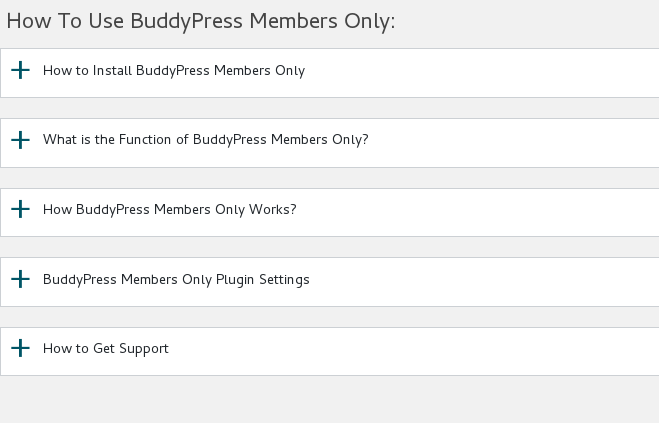
buddypress membership plugin knowledge base

buddypress membership plugin knowledge base

Thanks for the give us the rare suggestions of buddypress membership plugin, if you have any more feature request about our buddypress plugin, please don’t hesitate to tell us, we are happy to realize it for you πŸ™‚

Thanks, have a blessed day with your family πŸ™‚

Best Regards,

BuddyPress Membership Plugin Support Team

Tagged with: , ,

BuddyPress: How to only Allow Specific BuddyPress User Roles to Access BuddyPress User Profiles?

Hi Dear BuddyPress Memebrship Users,

We received a user’s ticket, in which he asked us a question: How can I just allow these user roles to access buddypress profile only: “administrator”,Β  “customer”, I believe there are more users have similar question, I’d like reply in here publicly:

How can I just allow these user roles to access buddypress profile only: “administrator”,Β  “customer”?

Actually it is very simple in our buddypress membership plugin, you can allow / disallow different user rolesΒ  to access buddypress profile just via a few clicks,would you please:
#1 Login wordpress admin area

#2 Click “BP Members Only” Menu

#3 Click “BP Components” Sub Menu

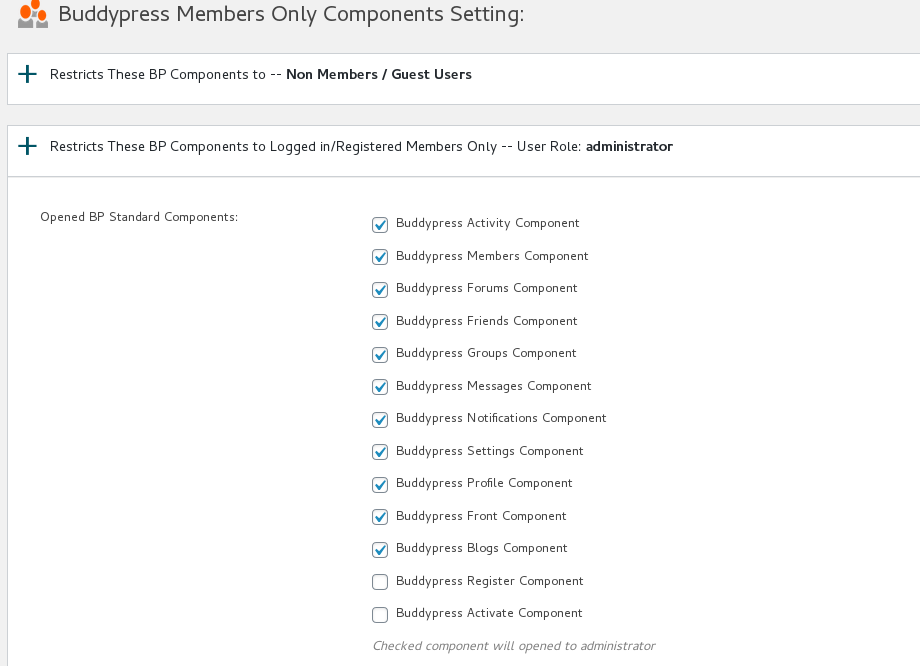
#4 You will open “BuddyPress Members Only Components Settings” Panel, in here, you will find we have listed all users roles for you, you can just enable / disable buddypress profile component for any user roles in here πŸ™‚

#5 Checked these user roles that you allow them to open buddypress user profile component,

#6 Click “Submit” button

It looks like this:

buddypress allow specific user role access buddypress user profile

buddypress allow specific user role access buddypress user profile

That’s all, in front end, only those selected users can open buddypress user profile pages, when other user roles or guest users try to open your buddypress user profile page, they will be redirected to register page or any pages you specific in the buddypress memebrship plugin. πŸ™‚

Thanks, have a blessed day with your family πŸ™‚

Best Regards,
BuddyPress Membership Plugin Support Team
BuddyPress Membership Plugin 4.3.4 Released

Hi BuddyPress Membership Users,

Hope this message find you are doing well and have happy days with your family πŸ™‚

We have released BuddyPress Membership plugin 4.3.4, in this version, we re-developed our buddypress members only pro plugin to avoid naming conflicts of functions.php, please remember to upgrade your buddypress membership plugin to latest version πŸ™‚

Thanks, have a blessed day with your family πŸ™‚

Best Regards,

BuddyPress Membership Support

Tagged with: , ,

BuddyPress Membership Plugin 4.3.2, Support Restricts Custom Post Types based on User Roles

Hi Dear BuddyPress Membership Plugin Users,

Based on buddypress memebrship plugin user suggestions, we have developed buddypress members only 4.3.2, changes in this version:

BuddyPress Membership Plugin Support Restricts Custom Post Types based on User Roles

A buddypress membership plugin user told us, he want to have ability yo restricts custom post types, and he hope he can one click to bulk open custom post types for some user roles, in buddypress membership 4.3.2, we realized this feature πŸ™‚

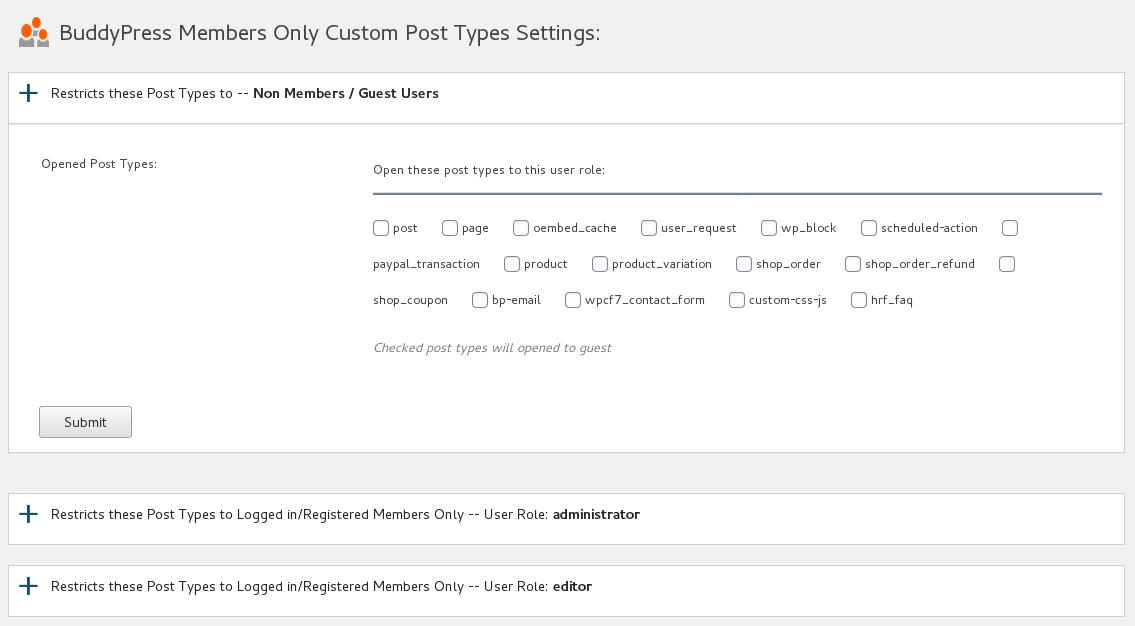
If you upgraded to buddypress membership plugin 4.3.2, in wordpress back end, you will find a new menu item “Post Types”, if you click the “Post Types” menu,Β  you will open “BuddyPress Members Only Custom Post Types Settings” panel,it looks like this:

BuddyPress Members Only Custom Post Types Settings

BuddyPress Members Only Custom Post Types Settings

You can see in the “BuddyPress Members Only Custom Post Types Settings” panel, we have have listed all user roles for you, if you click any user roles tab, you will open restricts Post Types option box for that user role, in which we have listed all custom post type in your wordpress site for you, you can just select custom post types and click submit button, in front end, selected specific custom post types will open / hideΒ  for specific user role.

Thanks for this amazing suggestions, it is a great help for help users restricts custom post types for specific user roles quickly, if you have any more amazing feature request of buddypress membership plugin, please don’t hesitate to tell us, we are happy to realize it for you πŸ™‚

Thanks, have a blessed day with your family πŸ™‚

Best Regards,

BuddyPress Membership Plugin Support

Tagged with: , ,

Buddypress Membership Plugin 4.2.6, You can Custom / Hide WordPress Login Link

Hi Dear Buddypress Membership Plugin Users,

Hope this message find you are doing well πŸ™‚

Based on user’s feature request, we have added a new feature in the new buddypress membership plugin 4.2.6, in this version, we added new option “Custom / Hide WordPress Login Link” in “Buddypress Members Only Setting” panel πŸ™‚

Why / When you need custom wordpress login link? A few users reported they get a lot of spam users, and every day they need use a lot of time to remove these fake buddypress users, so they hope change wordpress login link for their private buddypressΒ  network, for stop spam bot. πŸ™‚

By default, wordpress login link is https://membersonly.top/wp-login.php, but you can custom it like this: https://membersonly.top/signin, orΒ  https://membersonly.top/nospam…., and so on πŸ™‚

If you do not want to custom wordpress login link, just delete your value in this filed πŸ™‚

Thanks for the amazing buddypress feature request, if you have any more suggestion or question, please don’t hesitate to tell us πŸ™‚

We are develop a new buddypress members only plugin, based on another user’s feature request, you will see it soon πŸ™‚

Thanks, have a blessed day with your family πŸ™‚

BuddyPress Membership Plugin Support Team
Tagged with: ,

BuddyPress Search Plugin Features(Free!)

buddypress search plugin

Buddypress Search is a fast and light AngularJS members search plugin, when typing members name, show user list instantly in drop-down list, no need refresh member page

== Description ==

BP Search is a fast and light buddypress member search plugin to help users search buddypress members more faster, users do not need click submit button to refresh the BP members page.
When users type buddypress members name, we will show related members instantly in a drop-down member list, the plugin drived by AngularJS.

Why I develop this BuddyPress Search plugin?

I designed a few large buddypress sites, some of them have complex functionality in buddypress member page, for example distance, online status, user videos, matching and sorting… and so on.

This means when users search buddypress members in “Search Members” search box in members page — yourdomain.com/members, after click the “Search” button in “Search Members” search box,
We need refresh the members page and users need waiting a few seconds and all functionliaty in members page will it wastes server resources.

So I re-developed the buddypress member search box to offer a fast search result.

When users search members, once he typed one character, we start to show related members with user links instantly in a drop-down box, this running fast and users do not need to refresh the member page.

Of course, users still can click search submit button to the get member lists in a search result page, if they want. All of your buddypress search functionality did not be changed, I just inject new functionality into buddypress default members search box via AngularJS.

More amazing features are being developed and any feature request is welcome.

== Installation ==

1:Upload the BuddyPress Search plugin to your blog
2:Activate it
3: Check members search function in your members search box, for example http://yourdomain.com/members
1, 2, 3: You’re done!

== Changelog ==
= Version 1.1 =
Support newest version of buddypress plugin

= Version 1.0 =
* Spell out that the license is GPLv3
* Finished the first version
* General code clean up

Tagged with: , ,

Buddypress Membership Plugin 4.1.6, Opt to remove pages of specific buddypress components from search engine to protect users’ privacy

Hi Dear Buddypress Membership Plugin Users,

Hope this message find you are doing well and have happy days with your family! πŸ™‚

We received a user’s ticket, in which he said he is running a medical support social networking, he said he found his users photo and buddypress activity is indexed in search engine, his users want to remove these very private personal information from search engine, he hope buddypress membership plugin can remove buddypress activity pages and buddypress group pages and buddypress members pages from search engine.

We are very happy to report you, based on an amazing user’s feature request, we released Buddypress Membership Plugin 4.1.6, changes in this version:

Opt to remove pages of specific buddypress components from search engine to protect users’ privacy

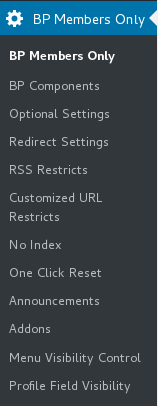
In back end, you will find the menu item “No Index”,it looks like this:

buddypress membership plugin 4.1.6 menu items

buddypress membership plugin 4.1.6 menu items

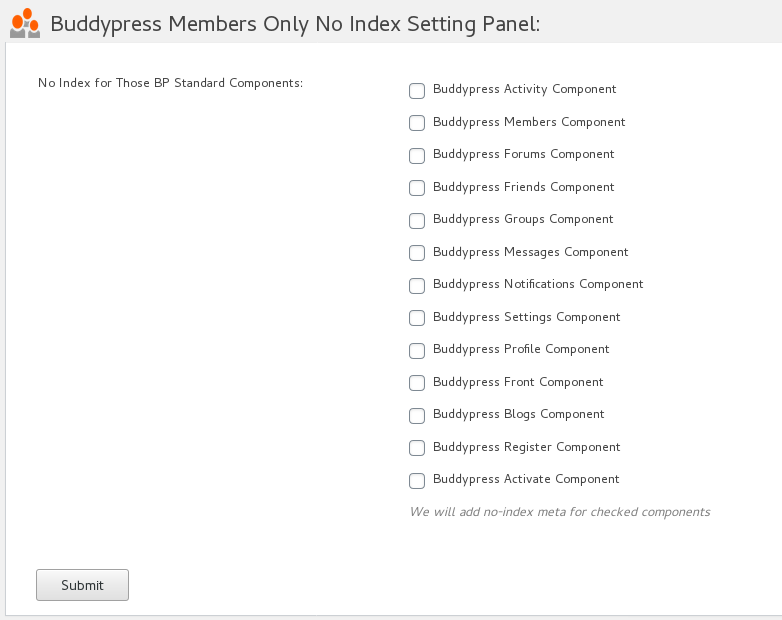
if you click “No Index” menu item, you will open Buddypress Members Only No Index Setting Panel, it looks like this:

buddypress memebrship plugin no index setitng panel

buddypress memebrship plugin no index setitng panel

In Buddypress Members Only No Index Setting Panel, you can select to remove any content of specific buddypress standard components from search engine. It is very easy, right? πŸ™‚

Please check full features of buddypress membership plugin, if you have any feature request about buddypress memebrship plugin, please don’t hesitate to tell us πŸ™‚

Thanks, have a blessed day with your family πŸ™‚

BuddyPress Membership Plugin Support Team

 

Tagged with: ,

BuddyPress Google XML Sitemaps Generator Plugin 1.1.0 Released

Hi There,

Dear BuddyPress google XML sitemaps generator plugin users, we are happy to report you that we auditing source codes of BuddyPress google XML sitemaps generator plugin, and we are following wordpress security to enhance security of buddypress google xml sitemap generator plugin πŸ™‚

BuddyPress google XML sitemaps generator plugin is written for search engines like google, bing… and so on, it will help search engines index your buddypress activity, comments… and so on more faster and more easier, so it is helpful to help search engines improve your buddypress site’s SEO rank πŸ™‚

BuddyPress google XML sitemaps generator plugin will hold all works on backend automatically, once user publish an buddypress activity or comments on your site, BuddyPress google XML sitemaps generator plugin will add it into buddypress XML sitemap automatically, you do not need to do anything. πŸ™‚

It is is very easy to use BuddyPress google XML sitemaps generator plugin, actually what you need to do is just uploade and activate BuddyPress google XML sitemaps generator plugin, then all works done automatically πŸ™‚

Good news? Yes, a better user is, first 100 users will get a bounce quote — $3.00, timed πŸ™‚

If you have any feature request or question about BuddyPress google XML sitemaps generator plugin, please don’t hesitate to tell us! πŸ™‚

Thanks, have a blessed day with your family πŸ™‚

BuddyPress google XML sitemaps generator plugin Support Team

Tagged with: , ,

BuddyPress Membership Plugin 4.1.2 Released

Hi Dear BuddyPress Membership Plugin Users,

In BuddyPress Membership Plugin 4.0.2, we reported that buddypress members only plugin support buddypress profile field visibility control by user roles via buddypress profile filed visibility addon, yesterday we get a report which find a bug on buddypress user profile field tab, we just released buddypress membership plugin 4.1.2 to fix it, no any work need to do in back end of buddypress membership plugin, just update it and all things will works well πŸ™‚

We are developing a new version of buddypress memebrs ship plugin, in which buddypress webmaster can remove some of their buddypress components from google indexes for protect buddypress users’ provicy, you will see it soon πŸ™‚

Thanks, have a blessed weekend with your family πŸ™‚

Buddyrpess Members Plugin Support Team

Tagged with: ,
Top