We Just Released BuddyPress Membership Plugin 2.8.5
Dear
BuddyPress Membership Plugin users, hope this message find you are doing well and have happy weekend with your family, based on user’s feature request, we just released buddyPress membership plugin 2.8.5 — a new shortcode to restrict content in wordPress post 🙂
Changes in 2.8.5, New Shortcode to Restrict Content of WordPress Post
We get a message from a user of buddypress membership pro plugin, he said he love our buddypress membership plugin, he used our buddypress membership plugin to build a dating site, he have restricted buddypress acitvity and buddypress members page to non-member users, and have have restricted a few important menu and functionality to guest users, just open these paid functions to paid members only, now he start to write some wordpress posts, and he hope, buddypress membership plugin can support restrict some important content in the wordpress post to guest users too, so only paid wordpress members can view a few important section in his wordpress pages, he do not want guest user or search engines open these important talk records to public users, based on his feature request, we have released buddypress membership plugin 4.7.0, then our developer think this is helpful function to help users of buddypress members only free plugin too, so we added this function into buddypress members only 2.8.5. 🙂
If you want a specific piece of content in a wordpress post to be available only to registered users, while hiding this short content from non-registered users, you can use the shortcode [Sorry, this is restricted content, please
log in first If the user have logged in your buddypress site, he will see the real content “hi, we are private content”, else he will see the content “Sorry, this is restricted content, please log in first” — with the login link, you can set up the log in link in buddypress membership plugin settings panel, if you did not entered login link in buddypress membership plugin settings panel, buddypress membership plugin will use the wordpress default login link 🙂
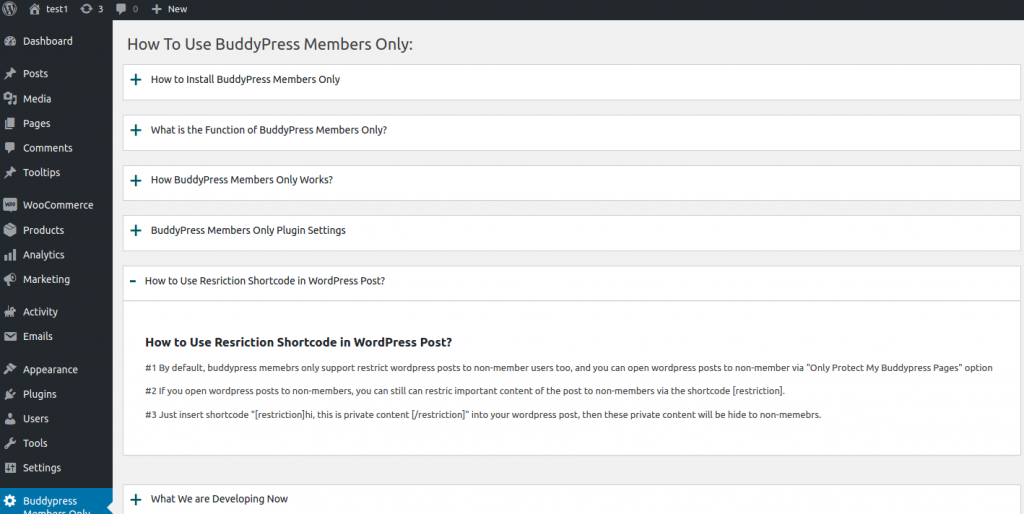
Also we added a new buddypress members only FAQ in Knowledge menu, to help users understand how to use this shortcode [restriction], it looks like this:

how to use restriction shortcode
If you have any more suggestion, please don’t hesitate to tell us, we are very happy to build a better and better buddyrpess plugin for you 🙂
Thanks, have a happy weekend with your family 🙂
BuddyPress Membership Plugin Support Team



Leave a Reply
You must be logged in to post a comment.