
Hi Dear BuddyPress Memebrship Users,
We received a user’s ticket, in which he asked us a question: How can I just allow these user roles to access buddypress profile only: “administrator”, “customer”, I believe there are more users have similar question, I’d like reply in here publicly:
How can I just allow these user roles to access buddypress profile only: “administrator”, “customer”?
Actually it is very simple in our buddypress membership plugin, you can allow / disallow different user roles to access buddypress profile just via a few clicks,would you please:
#1 Login wordpress admin area
#2 Click “BP Members Only” Menu
#3 Click “BP Components” Sub Menu
#4 You will open “BuddyPress Members Only Components Settings” Panel, in here, you will find we have listed all users roles for you, you can just enable / disable buddypress profile component for any user roles in here 🙂
#5 Checked these user roles that you allow them to open buddypress user profile component,
#6 Click “Submit” button
It looks like this:
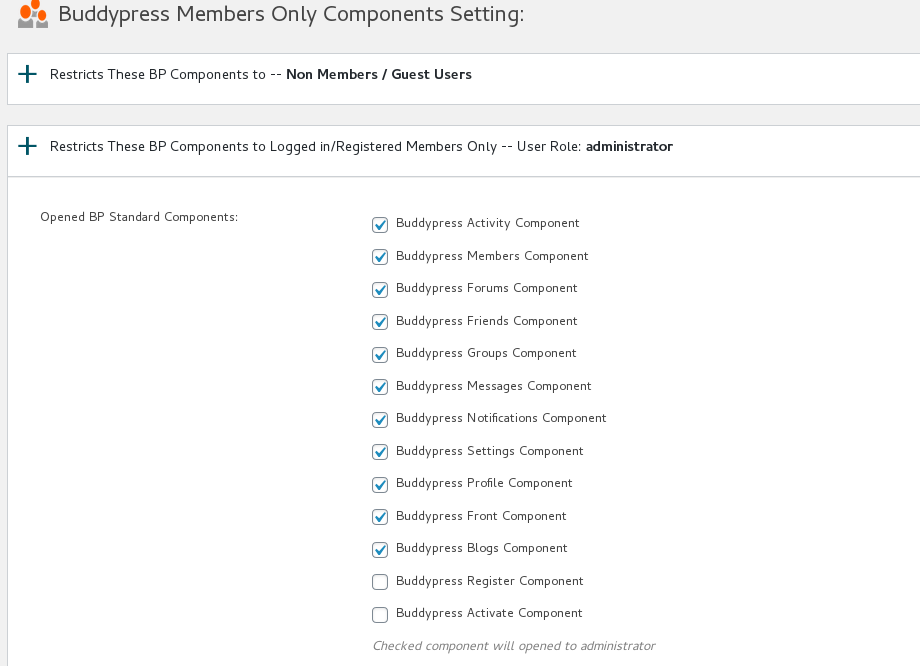
buddypress allow specific user role access buddypress user profile
That’s all, in front end, only those selected users can open buddypress user profile pages, when other user roles or guest users try to open your buddypress user profile page, they will be redirected to register page or any pages you specific in the buddypress memebrship plugin. 🙂
Thanks, have a blessed day with your family 🙂
Best Regards,
BuddyPress Membership Plugin Support Team


Leave a Reply
You must be logged in to post a comment.