
Hi dear BuddyPress membership users. hope this message find you are doing well and have happy days with your family 🙂 We got an amazing buddypress members only plugin user’s ticket in which he said:
Hi, I’m using version 4.9.0 and I just want to hide my homepage and all Buddypress pages from guest users only but for some strange reason your plugin is hiding all buddypress pages fromm login users.
Whenever I click on a user’s profile photo or try to view a Buddypress page I get redirected to the page I set as my Redirect Page.
We checked the front end of his site and we believe this is a settings problem, we’d like write a detailed document for the amazing buddypress members pro user. 🙂
How to hide my homepage and all Buddypress pages from guest users only but open all buddypress pages from login users?
1: login your account in buddypress members only site
2: download the latest version of buddypress memebrship plugin
3: login your buddypress site as admin
4: in wordpress dashboard, please click BP Members Only menu, then you will open “Buddypress Members Only Setting” panel, it looks like this:
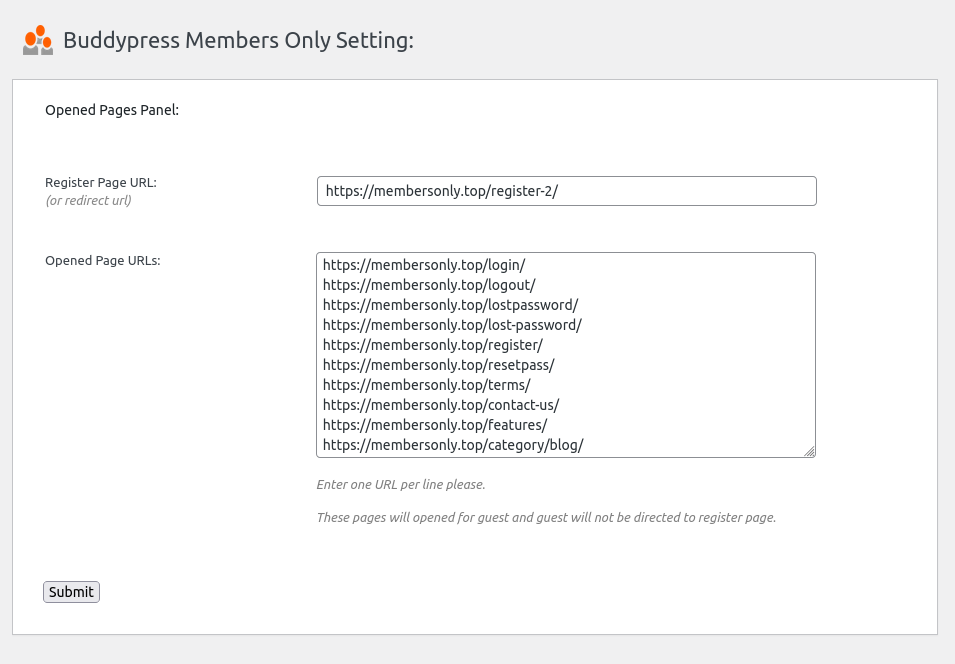
Buddypress Members Only Setting panel in buddypress 4.8.8
As you can see, you can enter the landing page / redirect page / register page for guest user in register page URL input box, When a user attempts to access a page for which they do not have permission, they will be automatically redirected to this landing page.
5: On wordpress dashboard, please click bp members only menu, then click optional settings sub menu item, you will open “Buddypress Members Only Optional Settings” panel, it looks like this:
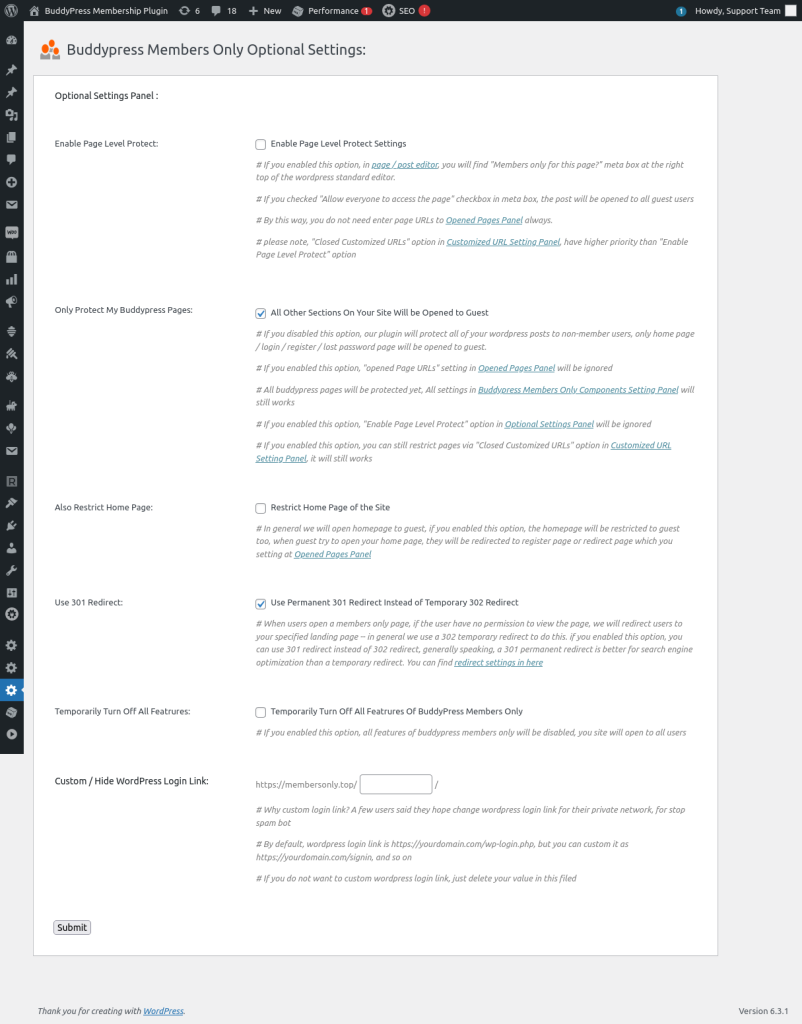
Buddypress Members Only Optional Settings panel in 4.8.8
Please go to “Only Protect My Buddypress Pages”, and checked the option “All Other Sections On Your Site Will be Opened to Guest”, please note:
a If you enabled this option, all buddypress pages will be protected yet, all settings in Buddypress Members Only Components Setting Panel will still works.
b If you enabled this option,wordpress posts / pages will be opened to guest users.
c If you enabled this option, “opened Page URLs” setting in Opened Pages Panel will be ignored.
d If you enabled this option, “Enable Page Level Protect” option in Optional Settings Panel will be ignored
e If you enabled this option, you can still restrict pages via “Closed Customized URLs” option in Customized URL Setting Panel, it will still works
f If you disabled this option, our plugin will protect all of your wordpress posts to non-member users, only home page / login / register / lost password page will be opened to guest.
In your case, please enable this option to open all wordpress posts to your guest users
6: In “Buddypress Members Only Optional Settings” panel, please go to “Restrict Home Page” and checked “Restrict Home Page of the Site ” option,
By default, we will open the wordpress home page to guest users, but if you enabled this option, the homepage will be restricted to guest users too, when guest try to open your home page, they will be redirected to register page or redirect page which you setting at Opened Pages Panel
7: On wordpress dashboard, please click bp members only menu, then click “BP Components” sub menu item, you will open ”
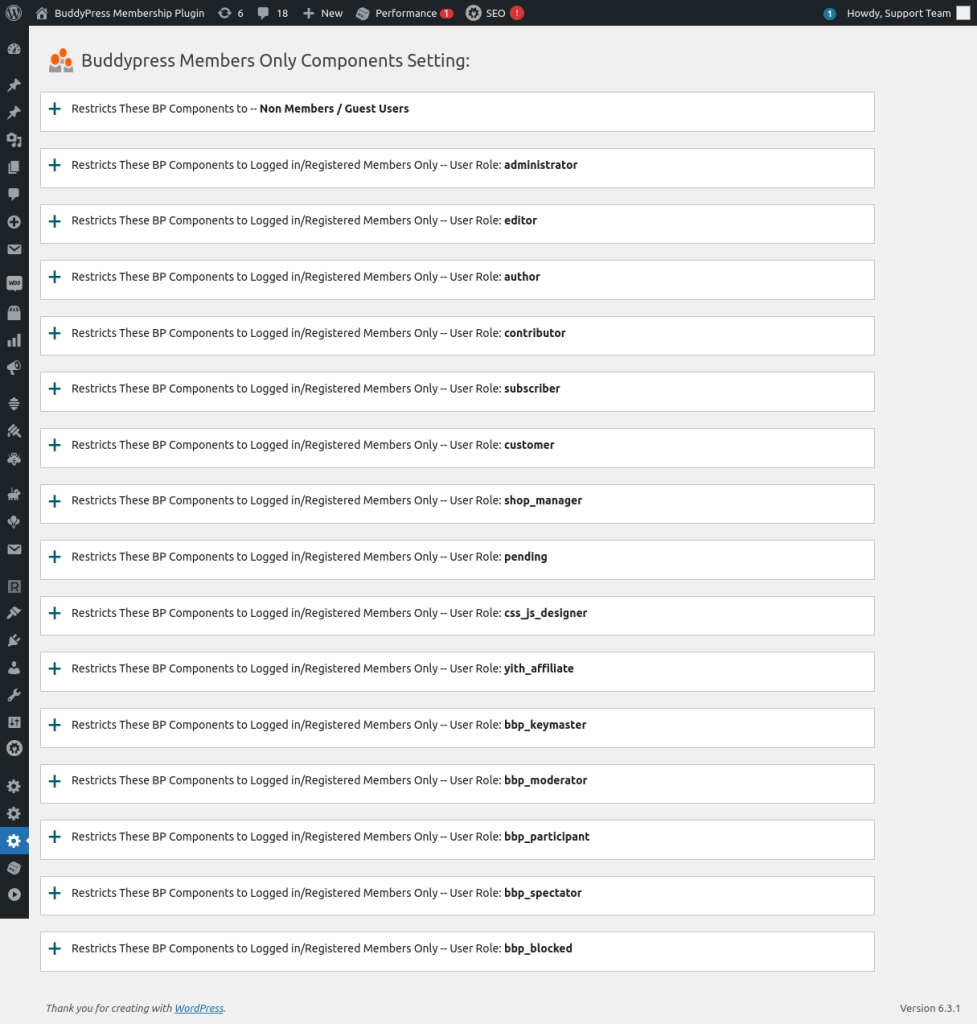
Buddypress Members Only Components Setting panel in bp members only 4.8.8
As you can see, we listed all user roles of your buddypress site in here, what you need is just click tabs of user roles to open buddypress standard components for specific user roles, for example, please click “subscriber” tab, it will looks like this:
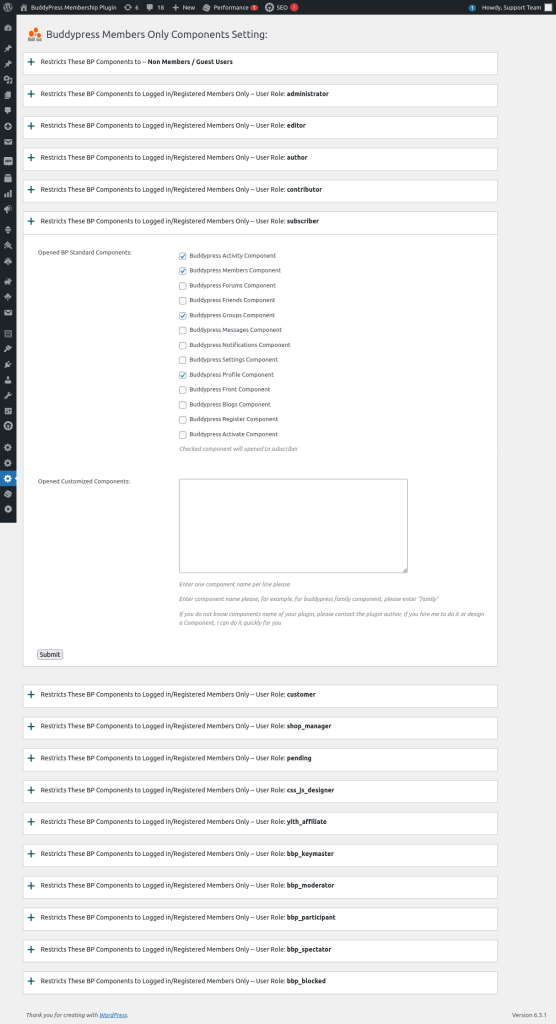
open buddypress compents for specific user roles.png
as you can see, we have listed all buddypress standard components in here, checked component will opened to subscriber , what you need is just click to open specific buddypress standard components for the user role “subscriber”, please remember to click “submit” button to save the changes.
Also if you installed 3rd buddypress plugins which offer customized components, you can enter name of these 3rd customized components, they will opened to the user role “subscriber” too.
By this way, you can open other buddypress components to other user roles.
For newbie of buddypress members only user, you can try to open all buddypress components to all user roles, but restricts it to guest user.
Sometimes, these settings cannot works well, it is because in buddypress site, buddypress plugin looks HTTP link and HTTPS links as two different sites, in this case, you need install a plugin like REALLY SIMPLE SSL plugin to force HTTP links to HTTPS links 🙂
We are still creating the video for the document, once finish it we will insert the video in here so you can learn it easier 🙂
Thanks,have a blessed day with your family 🙂
Best Regards,
Buddypress memebrship plugin support


Leave a Reply
You must be logged in to post a comment.